Table of Contents
This guide explains Facetime, why it matters, how it works, and how to evaluate or use it in practical situations.

1. What is Facetime?
FaceTime is a calling app between Apple devices like iPhone / iPad and Mac computers. Facetime was first announced at the same time as the iPhone 4 with front camera and Facetime application can use the front camera to make video calls. Today, the application of calling and messaging via the Internet called OTT (Over The Top) is developing flourish such as Google Hangout, Messenger, Zalo. but FaceTime still has a large number of users because when making calls via FaceTime will display the contacts in the iPhone's contacts and the person called can easily recognize you. The biggest downside of FaceTime is that it only applies on Apple devices and not on Android phones.
2. How to make Facetime calls on iPhone
To make Facetime calls on iPhone, we must turn on Facetime on iPhones first. How to do the following.
Step 1: Go to Settings => FaceTime => Set FaceTime switch to On
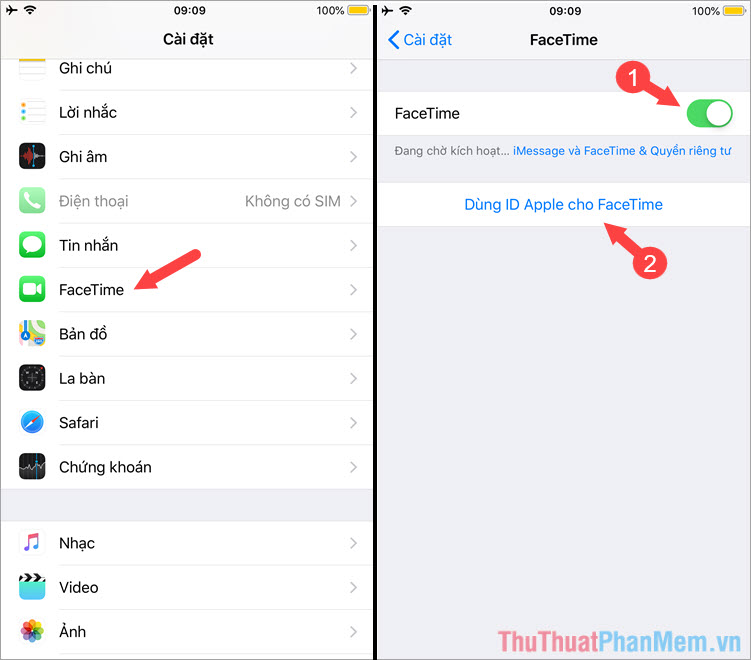
Step 2: Log in to your Apple ID account.

Step 3: Open your phone => Contacts and try to open any contacts that have Facetime enabled as shown below. You click on the video icon to make a FaceTime call and click on the headset icon to make an audio FaceTime call.
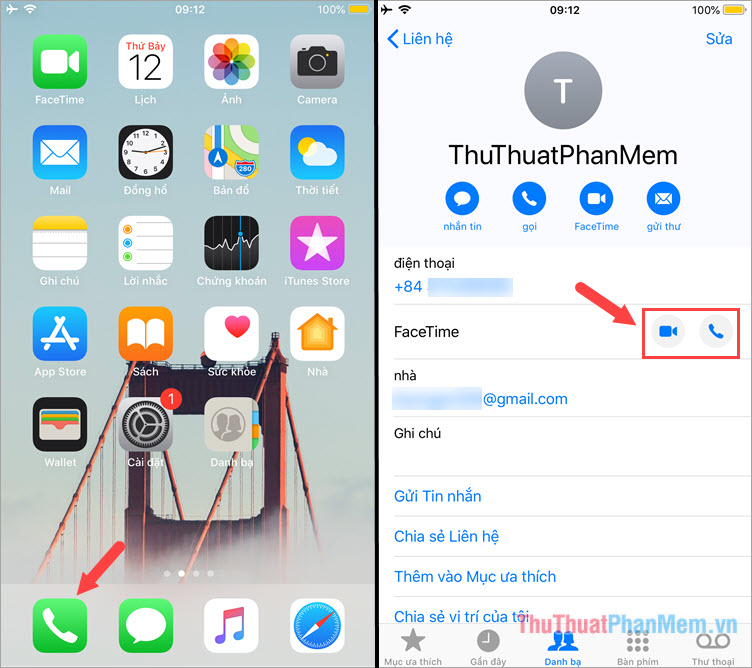
Dial-up interface for calling FaceTime

Audio FaceTime call (left) and video FaceTime (right)
Through this article, you understand what FaceTime is and how to make FaceTime calls on iPhone. You should use FaceTime regularly when contacting with friends to help the conversation be comfortable without having to worry about call charges. Good luck!
FAQ
What should I know about Facetime?
Focus on the key features, requirements, limitations, and practical use cases explained in this guide.
How do I get the best results with Facetime?
Follow the recommended steps, use current software or information, confirm compatibility, and review settings before major changes.
Are there any risks or limitations?
Potential limitations depend on compatibility, data quality, cost, privacy, support, and how the product or method is used.
Related Articles
 How to Call Groups on Facetime Iphone, Ipad and Mac3 minutes read
 How to Record Facetime Calls on Mac, iPhone and iPad6 minutes read
 Facetime on iPhone 7 and iPhone 7 Plus Does Not Work, This Is How4 minutes read
 How to Filter Spam Calls on FaceTime: Step-by-Step Guide3 minutes read
 How to Use Animoji and Memoji in FaceTime on iPhone4 minutes read
 Iphone: How to Make Phone Calls with Yosemite2 minutes read
Reader Comments 0
Sign in with email or Google to join the discussion.