Table of Contents
Context rot is the informal name for a model becoming less reliable as its input grows longer or more cluttered. The prompt may still fit inside the advertised context window, yet the model can overlook a requirement, confuse similar details, follow an outdated instruction, or fail to combine information correctly.
The remedy is not a fixed rule such as “start over after 15 messages.” Keep the context relevant, structured, and testable; externalize important state; and begin a clean session when the accumulated history is no longer helping.
Context window and context rot are different
A model’s context window is the maximum set of tokens it can process for one response. Depending on the product, that input can include your messages, earlier conversation, uploaded text, system instructions, tool descriptions, retrieved passages, and tool results. The application may also summarize or omit older material.
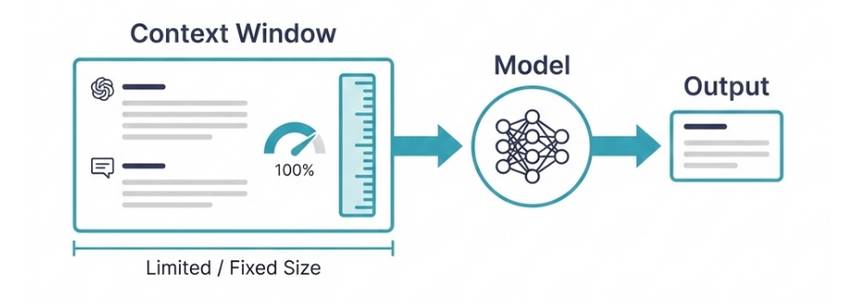
Reaching the hard token limit is a capacity problem: something must be removed, summarized, or rejected. Context rot is a quality problem that can appear before that limit. A model may accept all the text without using every part of it equally well.
Advertised context sizes change frequently and are not directly comparable across products. A large number tells you how much input the system can accept, not how accurately it will reason over every possible long document or conversation.
What research shows
The 2023 paper Lost in the Middle: How Language Models Use Long Contexts tested multi-document question answering and key-value retrieval. The authors found that model performance often depended on where the relevant information appeared, with information in the middle of a long input frequently used less reliably than information near the beginning or end.
A 2025 Chroma technical report on context rot evaluated 18 models on several controlled tasks. It found increasingly unreliable performance as input length grew and showed that semantic similarity, distractors, and the structure of the surrounding text could change the result.
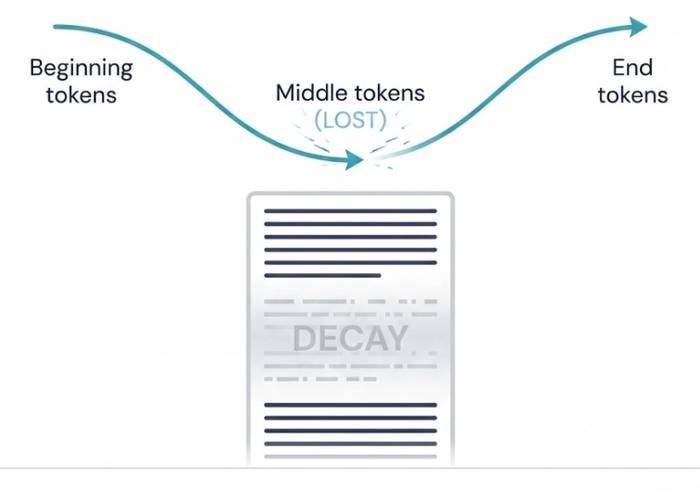
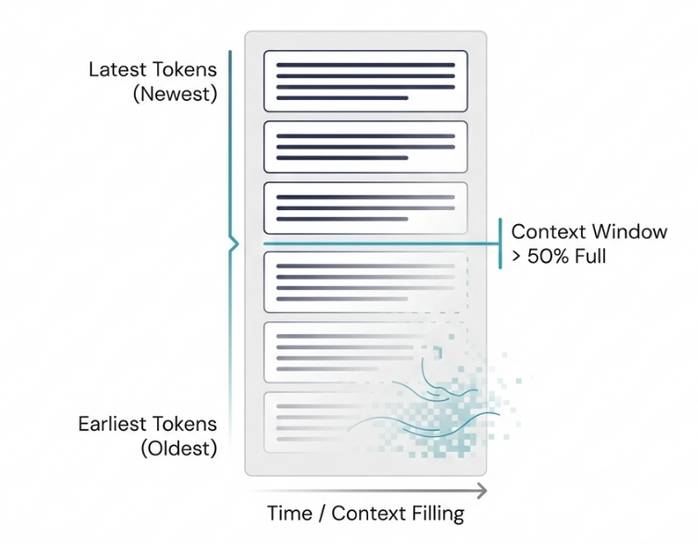
These studies do not establish a universal 50% threshold or prove that information literally disappears. Performance varies by model, task, prompt, content, and evaluation. Simple retrieval, multi-step reasoning, summarization, and agent monitoring stress context in different ways.
Why a long chat becomes harder to use
- Competing instructions: an early rule conflicts with a later correction, and the model chooses the wrong one.
- Relevant distractors: several similar names, versions, errors, or documents make the right detail harder to distinguish.
- Stale state: the conversation contains plans and files that were later changed.
- Buried constraints: an important requirement appears once in the middle of a long transcript.
- Unstructured tool output: large logs, search results, or file dumps consume attention without identifying what matters.
- Task switching: unrelated questions accumulate in one session and leave ambiguous references such as “it,” “that file,” or “the last version.”
More context can still help when every part is relevant and the task requires it. The goal is not to make every prompt short; it is to maximize useful signal and reduce ambiguity.
Signs that context is hurting the answer
- The model violates a constraint it followed earlier.
- It answers an older version of the question or edits the wrong file.
- It repeats a discarded plan or resurrects an obsolete fact.
- It contradicts itself about names, numbers, or decisions.
- It produces a generic summary despite detailed source material.
- Adding one more document makes the answer less accurate.
- A fresh chat with a compact brief performs better.
These symptoms can also come from an ambiguous prompt, weak source material, or model limitations. To diagnose the cause, run a controlled comparison: ask the same question with the full context and with only the necessary evidence.
How to reduce context rot in chat
Use one conversation for one coherent task
Start a new chat when you change topics or goals. A new session is also useful after a long troubleshooting branch that is no longer relevant to the next decision.
Put a current brief near the request
When a project spans many turns, periodically provide a compact state block:
Goal:
Current state:
Decisions already made:
Constraints that must not change:
Sources of truth:
Open question:
Required output:
Do not rely on an automatically generated summary for important commitments. Read it, correct omissions, and carry exact values or requirements forward.
Remove noise before adding documents
Delete duplicate passages, navigation text, irrelevant columns, repeated logs, and obsolete drafts. For research, retrieve a small set of relevant primary sources instead of pasting every result. Tools in this AI research comparison can help locate sources, but the final context still needs curation.
Label sources and instructions clearly
Use headings, filenames, dates, and delimiters. State which document is authoritative when sources conflict. Distinguish quoted source material from instructions so text inside a document is not mistaken for a command.
Repeat critical constraints at the decision point
Place the few non-negotiable requirements immediately before the requested output. This is not keyword repetition; it is a deliberate reminder. Ask the model to check each constraint before finalizing.
Request evidence, not confidence
For each important conclusion, ask for the supporting filename, section, quotation, calculation, or test result. Verify that the cited evidence actually supports the claim. A fluent answer without traceable support is not reliable merely because the context was large.
Context management for coding agents
Coding agents accumulate source files, command output, diffs, issue text, tool instructions, and earlier failed attempts. Use the repository—not the chat transcript—as the durable source of truth.
- Record requirements and acceptance tests in a short project file.
- Keep decisions in version-controlled documentation.
- Ask the agent to inspect only the relevant modules before broadening the search.
- Limit command output with focused tests and filters.
- Commit or review a clean diff at meaningful checkpoints.
- Start a fresh task with the current brief after a major milestone.
- Use separate agents only for bounded subtasks with explicit inputs and outputs.
For the wider workflow, see how AI coding tools support planning, editing, testing, and review.
Context management in web chat
Many chat interfaces do not show exactly which prior messages, memories, or uploaded passages are included in a particular response. Long chats may be summarized automatically, and the model can still miss details even when the product accepts the conversation.

When quality drifts, ask for a concise project handoff, verify it, and open a new chat with that handoff plus only the necessary files. Keep the old conversation for reference rather than copying its entire transcript into the new one.
A practical long-context test
- Select five to ten questions whose answers are known and spread across the source material.
- Run them against the short, relevant context and record the answers.
- Add realistic distractors or the full document set and rerun the same questions.
- Check exact facts, citations, instruction compliance, and multi-step reasoning.
- Change the position of key evidence to see whether results remain stable.
- Use the smallest context strategy that reliably passes the test.
This evaluation is more informative than assuming that a model will use every token because the prompt fits. A context window is capacity; careful context design is what makes that capacity useful.
Related Articles
 The Context Menu of Windows 11 Will Have a New Eye-catching4 minutes read
 Windows 11: Complete Guide: Microsoft Is Committed to Improving the3 minutes read
 How to Delete Options in the Windows Context Menu11 minutes read
 This Small Application Helps Bring the Context Menu3 minutes read
 How to Add Items to the ''create New'' Context Menu in Windows 106 minutes read
 Context Management in Claude Code9 minutes read
Reader Comments 0
Sign in with email or Google to join the discussion.