Table of Contents
ChatGPT can help you build a product shortlist, compare trade-offs, and refine a shopping search. Start with your budget, location, and intended use, then check the linked listings before buying. Do not assume every product can be purchased inside ChatGPT: checkout options depend on the merchant, product, and features available to your account.
1. Describe what you need
A useful shopping request includes the product category, spending limit, currency, country, and features that matter most. Separate requirements from preferences so an attractive but unsuitable product does not dominate the shortlist.
For example:
I need noise-canceling headphones for flights, available in the US, with a budget of $200 before tax. Prioritize comfort and noise cancellation. Compare three options, link to current listings, and flag anything you cannot verify.
Other useful constraints include laptop weight, required ports, speaker water-resistance needs, delivery timing, and whether refurbished products are acceptable. These examples are shopping criteria, not claims that a particular product is available at a particular price.
2. Ask for a comparison you can check
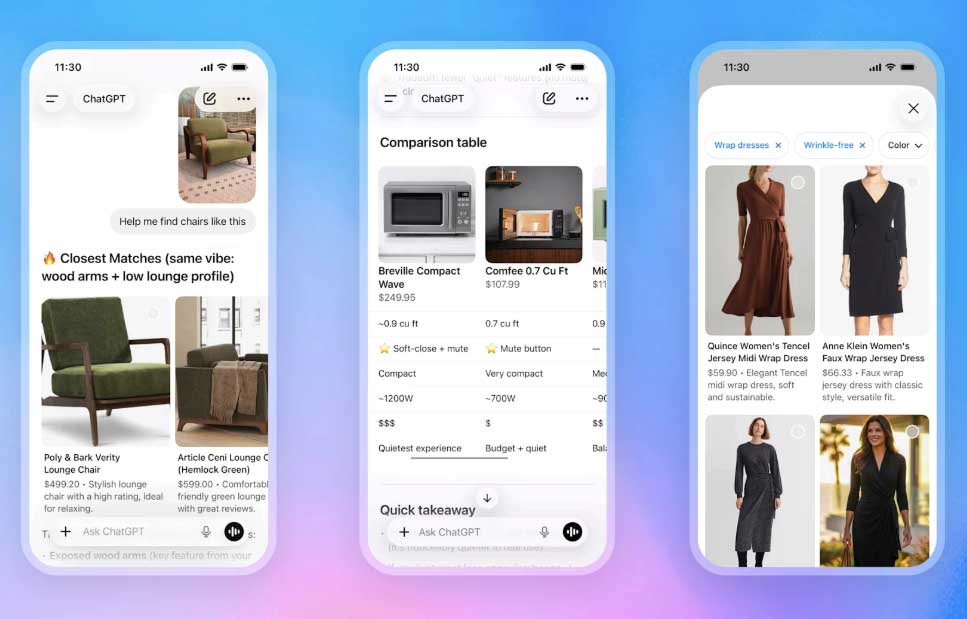
Ask for a table that compares the exact model or variant, listed price, seller, relevant specifications, and the main compromise. Product names alone can hide differences in storage, size, accessories, or generation.
Compare these three models for my use case. Separate manufacturer specifications from review opinions. Include source links and mark missing information as unknown rather than estimating it.
For headphones, battery figures should indicate whether noise cancellation is enabled when the source specifies it. For laptops, compare the actual processor, memory, and storage configuration in each offer. An unsupported specification should not decide the purchase.
3. Narrow the shortlist with follow-up questions
Stay in the same conversation so your requirements remain clear. Ask questions that expose a trade-off:
- Which option best meets my must-have requirements, and which requirement does each alternative miss?
- Is the cheaper listing for the same model and condition?
- What would I give up by choosing the least expensive option?
- Which claims need to be checked on the manufacturer's website?
If the answer drifts toward more expensive products, restate the budget and ask for options that actually fit. “Best” should refer to your needs, not an unexplained overall ranking.
4. Verify the offer before checkout
Open the product listing or review the checkout details presented to you. Confirm the seller, exact item, stock status, shipping destination, taxes, delivery fees, estimated arrival, and return terms. A price shown in a comparison may have changed or may exclude costs that appear later.
If your interface offers an eligible in-app checkout, inspect the order details before confirming. Otherwise, follow the merchant's purchase link. The presence of a product card does not by itself establish that checkout is available inside the chat.
Behind these integrations, the Agentic Commerce Protocol provides infrastructure for merchants to share structured product data. Shoppers do not need to configure that protocol to ask product questions.
5. Compare deals by total cost
Ask for offers on an exact model rather than only “the best deal.” Compare the final payable amount and conditions, including coupons, membership requirements, refurbished status, and return shipping. If a price cannot be checked, treat it as unconfirmed.
Compare current offers for this exact model. Show item price, known shipping charges, condition, seller, and any discount requirements. Do not call an offer the lowest price unless the comparison supports that claim.
Use the conversation to organize evidence and reduce the shortlist. Make the buying decision from verified product and merchant information, especially when the recommendation depends on a specific specification or delivery date.
Related Articles
 Perplexity vs ChatGPT: Which AI Assistant Is Better?11 minutes read
 Instructions for Creating Online Business Shops on Zalo7 minutes read
 OpenAI Enables ChatGPT to Chat Directly with Apps: Complete Guide4 minutes read
 Compare ChatGPT 4o and ChatGPT 47 minutes read
 What Is Claude Pro? How Does Claude Pro Compare to Chatgpt Plus?6 minutes read
 Light Shop Review: Pros and Cons of the Film7 minutes read
Reader Comments 0
Sign in with email or Google to join the discussion.