Table of Contents
gpt-oss is OpenAI's family of open-weight reasoning models. The two models introduced in the original release, gpt-oss-120b and gpt-oss-20b, can be downloaded and run on your own infrastructure. They are text models, not the ChatGPT app, and downloading them does not provide ChatGPT's interface or connected services.
What does open-weight mean?
The model weights are available under the Apache 2.0 license. This lets developers run and adapt the models subject to the license's terms. “Open-weight” is the more precise description: access to weights does not mean the complete training dataset and every step of the training process are available.
Downloading weights also differs from paying for a hosted service. Local use still requires compatible hardware, storage, electricity, and software; a hosting provider may charge for inference.
gpt-oss-120b vs. gpt-oss-20b
| Specification | gpt-oss-120b | gpt-oss-20b |
|---|---|---|
| Total parameters | 117 billion | 21 billion |
| Active parameters per token | 5.1 billion | 3.6 billion |
| Total experts | 128 | 32 |
| Context length | 128k tokens | 128k tokens |
| Published memory target for the quantized release | 80 GB | 16 GB |
Both use a mixture-of-experts architecture. Only part of the model is active for each token; the active parameters are a subset of the total, not additional or “remaining” parameters.
The memory figures are deployment targets, not promises that every computer with that amount of RAM will run the model comfortably. Runtime compatibility, available memory, context length, and other applications matter. Check the requirements of the specific model package and inference software.
What can the models do?
They support text-based reasoning, coding, and tool calling, with low, medium, and high reasoning-effort settings. Tool support means an application can connect them to tools; it does not give a downloaded model automatic internet access or a built-in code execution environment. Neither model directly accepts images or audio.
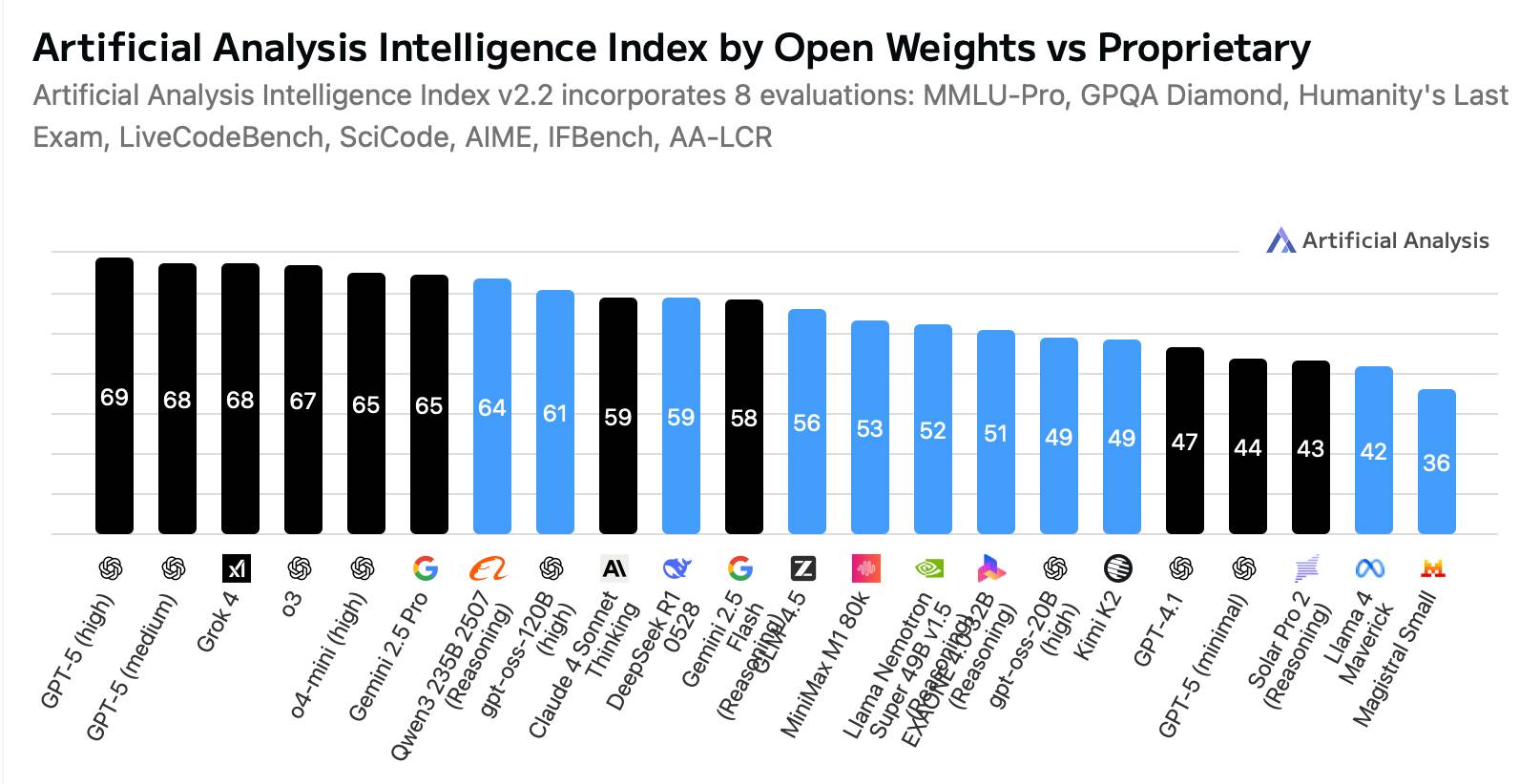
OpenAI's release evaluation compared gpt-oss-120b with o4-mini and gpt-oss-20b with o3-mini on selected benchmarks. Those comparisons are useful background, but do not establish a permanent ranking or guarantee results on your work. See the official release and evaluation details.
Evaluate a model using representative tasks: factual questions you can verify, coding tasks with tests, and documents similar to those your application will process. Compare answer quality and response time on the same inputs. A larger model is not automatically the best choice if it exceeds your hardware budget or latency requirements.
How to get started
- Choose local or hosted use. Local deployment gives you control over the runtime. Hosted inference avoids maintaining the model hardware, but involves a provider's costs and data-handling terms.
- Check compatibility before downloading. Confirm that your chosen runtime supports the model and its packaged format. The Ollama and LM Studio comparison explains two common approaches to local model management.
- Start with a small test. Load the model, ask a short question, and check memory use and speed before increasing context length or adding tools.
- Validate your intended workflow. Test coding output with your project's checks and verify factual answers against sources. You can also compare other local coding models on the same tasks.
Fine-tuning is an option for specialized workflows, but it is a separate project with its own data and hardware requirements. First establish whether prompting and a suitable runtime already meet your needs.
Reader Comments 0
Sign in with email or Google to join the discussion.