Table of Contents
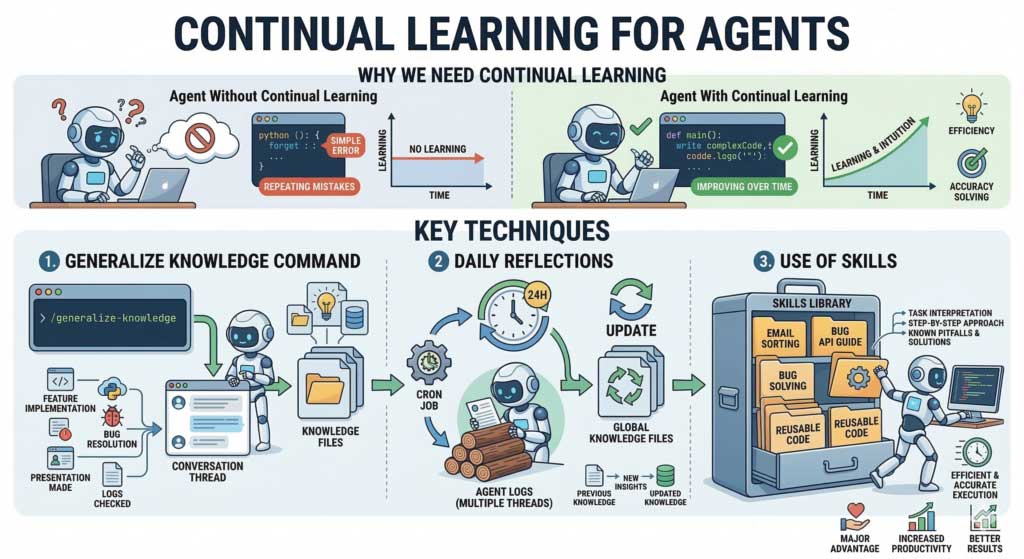
To help Claude Code avoid repeating a mistake, record the verified lesson in the right project instructions or reusable workflow, then test it in a later task. This improves the context available to the agent; it does not retrain the underlying model or guarantee that the error will never recur.
Turn a fixed mistake into a specific rule
A useful lesson states the condition, the correct action, and how to check it. “Be more careful” is too vague. “Run the migration check after changing database models” is actionable when it matches the project's actual process.
Before saving a lesson, verify the cause. A one-time workaround may not belong in permanent instructions, and an untested explanation can spread the same mistake into future sessions.
Use project memory deliberately
Claude Code documents CLAUDE.md for project instructions and also provides auto-memory features. Consult Anthropic's memory documentation for current loading behavior and scope.
Use the correct filename and capitalization for the intended mechanism. Do not assume that a lowercase claude.md or an AGENTS.md file is loaded automatically in every tool. If your project shares guidance across agents, explicitly verify how each tool reads it.
Keep durable rules concise. Link to detailed documentation instead of copying an entire conversation into a file that every task will read.
Summarize a completed task
The original article suggests /generalize-knowledge. Treat this as a custom command name, not a built-in Claude Code command. It will work only if you have created or installed a corresponding command or skill.
You can make the request in ordinary language instead:
Review this completed task and propose only reusable lessons supported by the result. For each lesson, state the mistake, verified cause, correct procedure, and relevant check. Compare with existing project instructions and flag conflicts. Do not save secrets, temporary logs, or unverified assumptions.
Review the proposed changes before keeping them. A short entry might say:
When changing an API response:
- Update the response schema and the affected callers together.
- Run the project's documented API contract checks.
- Verify that error responses still follow the shared format.
Adapt that example to your repository. Do not invent a test command or require a check that the project does not actually provide.
Use a skill for a repeatable procedure
General project instructions describe persistent constraints. A skill can hold a task-specific procedure, such as reviewing a database migration or integrating a particular API. Anthropic's skills documentation explains the supported structure and invocation options.
A useful procedure includes when to use it, required inputs, the sequence of checks, and the expected deliverable. Keep permissions explicit: an instruction to prepare a release should not silently become permission to deploy it.
For the broader mechanics, see how skill support works in an agent. Test the skill on a representative task and inspect whether it actually prevents the original failure.
Review recurring errors without collecting everything
A periodic review can identify mistakes across tasks, but it requires a deliberately configured process. Claude Code does not automatically analyze every day's logs simply because you have written a memory file.
Use approved, relevant records and exclude credentials or unrelated personal information. Group repeated failures by cause, remove obsolete advice, and keep only lessons that change a future action. Daily review is unnecessary if there is too little new evidence to justify it.
Measure whether the change helps
- Choose a similar task where the original mistake could recur.
- Confirm the relevant instruction or skill is available in that session.
- Observe whether the agent follows it without additional correction.
- Run the real project checks and inspect the result.
- Revise or remove the lesson if it is ambiguous, outdated, or ineffective.
Persistent context works best alongside a normal development review process. The Claude Code in VS Code guide describes reviewing changes across files. Instructions help direct work; tests and inspection establish whether the work is correct.
Related Articles
 How to Work More Effectively With Claude Code12 minutes read
 What Is the Claude Code: Clear Explanation7 minutes read
 How to Improve Claude Code Performance Using Automated Testing6 minutes read
 Learn About Claude Code Routines16 minutes read
 How to Use Claude Code Safely: a Guide to Risk Management12 minutes read
 When Should You Not Use Claude Code?10 minutes read
Reader Comments 0
Sign in with email or Google to join the discussion.