Table of Contents
In its default state, Claude Code can handle programming requests quite well: receiving prompts, generating code, and producing relatively accurate results. However, the actual performance of this tool can be significantly improved by optimizing the workflow—especially in the testing phase.
According to the practical experience of many experts, the most effective factor is not the prompt or the model, but testing , especially automated testing. When the agent is able to self-check and evaluate its own results, the output quality will improve significantly, and the number of iterations between the user and the AI will be considerably reduced.
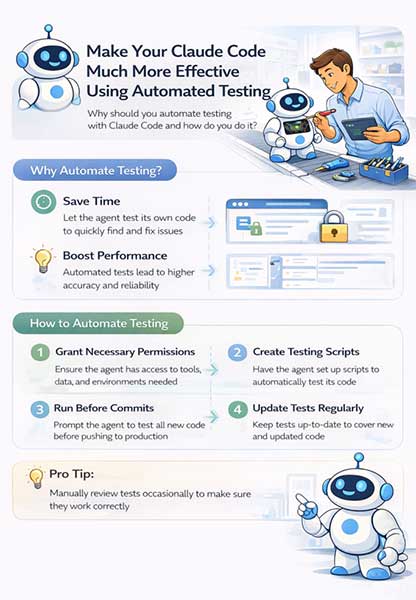
Why is automated testing important?
The development of coding agents has changed the 'bottleneck' in programming. Previously, writing code was the most time-consuming part. But now, with AI able to generate code quickly, the bottleneck has shifted to checking whether that code works as intended.
In reality, most of a programmer's time is no longer spent writing code, but primarily testing different solutions, then verifying the results and ensuring the system works correctly. When testing is automated, this entire process is significantly shortened. The agent not only writes the code but also verifies it itself, reducing the number of iterations and saving considerable time.
How to implement automated testing for Claude Code
For a coding agent to perform self-testing, the first thing to ensure is access permissions . Grant only the minimum permissions needed for the test, and use isolated test data and environments where possible.
In some cases, Some integration tests may require access to browsers, APIs, or cloud services. Use test accounts, scoped credentials, and non-production resources. Once sufficient permissions are granted, the next step is to instruct the agent to set up the testing system themselves.
Instead of simply requiring users to write code, they can prompt the agent to generate it:
- unit test
- test script
- or integration test
Integration testing is particularly effective in agent environments because it simulates the entire workflow of the system through APIs or pipelines.
An important point is to explicitly state: the agent must not stop until the entire test has successfully run. This helps avoid the model 'half-heartedly' performing the test—a fairly common problem without specific constraints.
Integrate testing into the development workflow
Automated testing is only truly effective when integrated into the development process. Tests should be configured to run before code is committed or merged. This can be done via pre-commit hooks or run when new updates are received on pull requests.
Additionally, integration with CI/CD systems like GitHub Actions helps automate the entire process without the need for manual execution.
However, in practice, many people still prefer running tests directly on their personal computers for faster feedback and easier control. One often overlooked factor is maintaining test code . When the code changes, tests need to be updated accordingly. Otherwise, the testing system will become outdated and ineffective. While this may require extra effort initially, it helps reduce bugs and avoid running unnecessary tests in the long run.
How to do manual testing more effectively
Not everything can be automated. In many cases, testing still requires human involvement, especially when:
- The task is too complex.
- Request sensitive access
- This relates to UI or user experience issues, or simply the inability to fully trust AI.
In these situations, instead of trying to automate at all costs, a more effective approach is to optimize testing manually .
One of the most effective techniques is visual testing . Instead of memorizing a list of tasks to test, the agent can be asked to create an HTML report listing all the functions to be tested, along with checkboxes to mark completion.
In addition, the agent can also provide direct links to the pages that need testing, as well as specific instructions on how to test each function. This helps users avoid having to manually remember each step, and simply follow the available instructions.
Alternatively, another optimal approach is to continue 'hiring' the agent to support testing. For example, when data is needed for testing, instead of searching for it themselves, users can request the agent to retrieve and prepare the data in advance.
Testing is no longer a secondary step in programming, but has become a crucial factor in determining efficiency when working with AI. Claude Code can write code quickly, but only when combined with a good testing system does it truly become a powerful tool.
The difference lies not in which model you use, but in how you design your workflow — where automated testing plays a central role.
Related Articles
 Claude Code in VS Code: How to Use AI for Efficient Multi-File Programming9 minutes read
 How to use the /goal command in Claude Code for fully11 minutes read
 What Is the Claude Code: Clear Explanation7 minutes read
 Claude Code Learns from Mistakes7 minutes read
 How to Optimize Claude Code for More Efficient One-shot Code Implementation7 minutes read
 When Should You Not Use Claude Code?10 minutes read
Reader Comments 0
Sign in with email or Google to join the discussion.