Table of Contents
Claude Code is more likely to produce a useful first implementation when it can inspect the repository, understand the acceptance criteria, run the project’s real checks, and see clear boundaries. The goal should not be “one shot at any cost.” A correct, reviewable change with evidence is more valuable than a large patch that merely looks complete.
Use the following workflow to reduce avoidable revisions while keeping a human responsible for architecture, security, and the final merge.
1. Start with a verifiable task
A request such as “add billing” leaves important decisions unstated. Define the user-visible behavior, affected area, constraints, and proof of completion.
Implement password-reset request handling.

Behavior:
- Add POST /api/password-reset/request.
- Accept a validated email address.
- Return the same public response whether or not the account exists.
- Rate-limit repeated requests using the project's existing limiter.
- Queue the existing reset-email job only for eligible accounts.
- Do not log reset tokens or reveal account existence.

Constraints:
- Follow existing auth and API error patterns.
- Do not add a dependency or change the database schema.
- Preserve unrelated behavior.

Acceptance:
- Add tests for an existing account, unknown account, invalid email, and rate limit.
- Run the focused tests, formatter, type checker, and relevant security checks.
- Report changed files, commands run, results, and any unverified assumption.
This gives the agent a boundary and a testable definition of done. If a product decision is genuinely missing, ask Claude to identify it before editing.
2. Let Claude inspect before proposing changes
Ask it to find the relevant entry points, existing patterns, tests, and configuration. Do not paste an isolated function if behavior depends on middleware, schemas, or call sites.
Before editing, inspect the repository for:
- the current password-reset flow;
- auth route and validation conventions;
- rate-limiter usage;
- email job interfaces;
- tests for similar privacy-sensitive endpoints.

Summarize the current flow with file and symbol references. List uncertainties and
the smallest set of files likely to change.
Review the summary. A wrong repository map is an early warning that the implementation will drift.
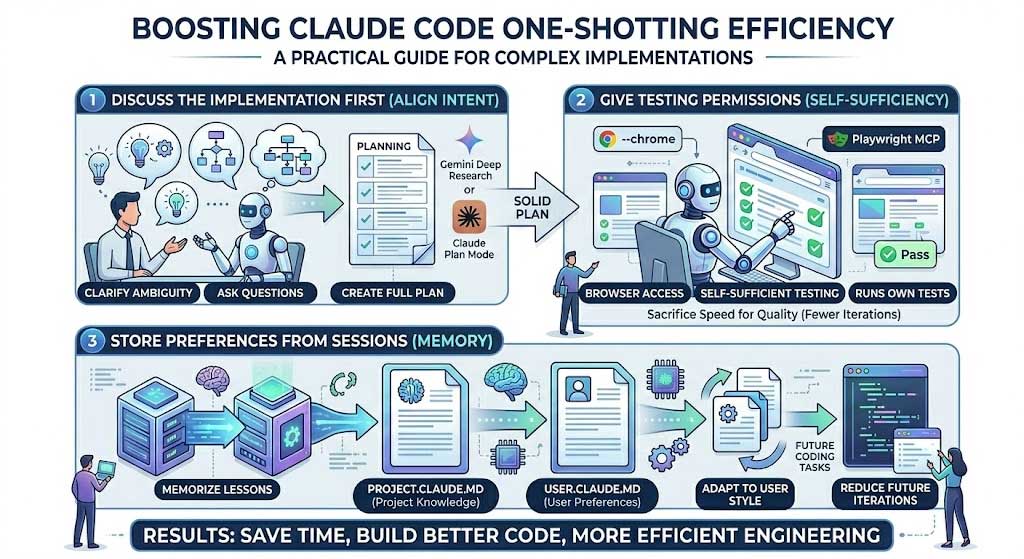
3. Use plan mode for consequential or cross-file work
Claude Code’s plan mode allows repository reading and plan creation without editing files. It is useful for migrations, security-sensitive work, unfamiliar code, and changes that span several components.
claude --permission-mode planYou can also switch modes during a session. Ask the plan to include:
- files and symbols to change;
- behavior preserved;
- data flow and failure handling;
- tests to add or update;
- migration and rollback concerns;
- unresolved choices that require a person.
The official Claude Code common-workflows guide explains plan mode and other supported workflows.
4. Keep project rules in CLAUDE.md
A project CLAUDE.md is appropriate for durable facts that should apply across sessions:
# Project guidance

## Commands
- Unit tests: npm test -- --runInBand
- Focused test: npm test -- path/to/test
- Type check: npm run typecheck
- Format check: npm run format:check

## Architecture
- HTTP handlers validate and delegate; business logic stays in services.
- Database access goes through repositories.
- Public errors must not expose internal exception text.

## Change rules
- Do not add dependencies without approval.
- Do not edit generated files directly.
- Preserve existing API compatibility unless the task says otherwise.
- Add or update tests for behavior changes.
Keep it concise and accurate. Do not turn it into a diary of every previous session. Move lengthy repeatable procedures into a skill or project document and keep volatile task details in the current request.
Claude’s memory documentation notes that CLAUDE.md shapes behavior but is not a hard enforcement layer. Use permission settings, sandboxing, branch protection, and CI for controls that must be enforced.
5. Give the agent executable feedback
Claude can correct more issues before handing back the change if it can run the same checks a developer would run. Provide the exact commands and define which failures are in scope.
- focused unit and integration tests;
- formatter and lint checks;
- static typing;
- build or package step;
- schema validation;
- security and dependency scans already used by the project;
- a narrow end-to-end check for the changed behavior.
A useful instruction is:
After implementing, run the smallest relevant checks first. Fix failures caused by
your changes. Then run the broader project checks listed in CLAUDE.md. Do not change
unrelated tests just to make the suite pass. If a command cannot run, report the
exact command, error, and what remains unverified.
6. Add browser verification only when the task needs it
For a user-interface change, source-level tests may not catch clipping, focus order, responsive layout, or a broken interaction. Claude Code can use supported browser tools or the desktop Browser pane to inspect a running app.
Define a narrow scenario:
Start the documented development server. In the browser:
1. Open the password-reset page at desktop and narrow mobile widths.
2. Submit invalid, unknown, and valid-looking addresses.
3. Confirm the public message is identical where required.
4. Check keyboard focus, visible labels, loading state, and error announcements.
5. Capture screenshots of the final states.
Do not submit real customer data or access external accounts.
Browser access increases capability and risk. Use a test environment, scoped credentials, and the least permissive mode that can complete the check. Review state-changing actions.
7. Break large changes into verified checkpoints
A single uninterrupted implementation becomes fragile when it combines a schema migration, backend service, UI, and deployment change. Use checkpoints that each leave the repository coherent:
- establish the tests or contract;
- implement core logic;
- connect integration points;
- add user interface behavior;
- run end-to-end verification;
- update documentation.
This is not unnecessary iteration. It prevents an early misunderstanding from spreading across the entire patch.
8. Control permissions and external access
Do not solve friction by granting unlimited access. Claude Code has permission controls for file edits, shell commands, and other tools. Configure them for the repository and organization.
- Use read-only access during discovery.
- Allow only the commands needed for build and test.
- Keep secrets out of prompts, logs, and test fixtures.
- Use non-production accounts for browser or API testing.
- Require approval for publishing, deleting, deploying, or modifying external systems.
- Do not use permission bypass options merely to avoid prompts.
Review the current Claude Code permission documentation before standardizing a team configuration.
9. Ask for a structured handoff
At the end of the task, request evidence rather than a confidence statement:
Before finishing:
- review the final diff for scope creep and accidental changes;
- list every changed file and why;
- list the exact verification commands and results;
- identify untested paths and assumptions;
- call out security, compatibility, data-migration, or rollout concerns;
- do not claim success for a check that did not run.
This makes review faster and exposes gaps while the session still has context.
10. Review the diff yourself
Human review remains necessary. Check:
- Does the implementation match the requested behavior?
- Did it reuse existing patterns rather than create a parallel architecture?
- Are authentication, authorization, validation, and privacy handled?
- Could logs, errors, or telemetry expose secrets or personal data?
- Are tests meaningful, or do they only assert the implementation’s own assumptions?
- Did unrelated code, configuration, or generated files change?
- Can the change be deployed and rolled back safely?
Run important commands independently when the risk warrants it, and use normal code review and CI before merging.
Common causes of weak first passes
| Problem | Better approach |
|---|---|
| Vague feature request | Specify behavior, constraints, and acceptance tests |
| Too little context | Let Claude inspect related code, tests, and conventions |
| Too much irrelevant context | Point to the relevant area and keep durable rules concise |
| No executable checks | Provide exact test, lint, type, and build commands |
| Unbounded tool access | Use scoped permissions and test systems |
| Large one-step change | Use coherent, verified checkpoints |
| Trusting the final summary | Inspect the diff and verification evidence |
A compact implementation prompt
Inspect the repository and implement [FEATURE].

User-visible behavior:
[LIST]

Constraints:
[LIST]

Relevant starting points:
[FILES OR SYMBOLS, IF KNOWN]

Acceptance tests:
[LIST]

Verification commands:
[LIST]

First summarize the existing implementation and any blocking ambiguity. For a
cross-file or risky change, propose a plan before editing. Keep the patch minimal,
follow CLAUDE.md, run the relevant checks, and finish with changed files, command
results, assumptions, and remaining risks.
Better first-pass performance comes from making the task observable and giving the agent a tight feedback loop. Precise requirements, repository-aware planning, real tests, scoped permissions, and disciplined review matter more than trying to force every feature into a literal one-shot interaction.
Related Articles
 How to Work More Effectively With Claude Code12 minutes read
 What Is the Claude Code: Clear Explanation7 minutes read
 Claude Code in VS Code: How to Use AI for Efficient Multi-File Programming9 minutes read
 When Should You Not Use Claude Code?10 minutes read
 7 Ways to Reduce Token Costs When Using Claude Code8 minutes read
 Things You Need to Know About Claude Code5 minutes read
Reader Comments 0
Sign in with email or Google to join the discussion.