Table of Contents
Claude can help you turn a small idea into code and explain how that code works. For a beginner, the most useful approach is to ask questions, build one feature at a time and verify the result yourself. Generated code can contain mistakes even when its explanation sounds confident.
You do not need a special “intensive coding mode” to begin. If Claude displays a Code suggestion or project categories, they can help start a conversation. They are not proof that a different model has been activated or that the output is secure.
1. Start with a small, visible project
Choose something you can test without accounts, payments or sensitive data. A simple personal page, unit converter or checklist is easier to understand than a full social network.
For a first browser project, ask for plain HTML, CSS and JavaScript unless you have a reason to use a framework. HTML defines the page structure, CSS controls its appearance and JavaScript adds behavior. Learning those roles will help you understand later changes.
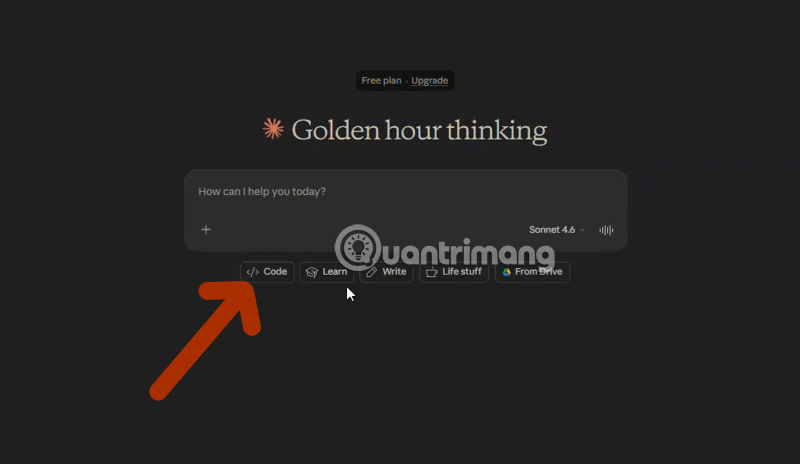
Try this opening request:
I am new to programming. Help me build a small checklist in one HTML file using HTML, CSS and JavaScript. It should let me add an item, mark it complete and remove it. Use sample data and no external services. Before writing code, ask up to three questions that affect the design. Explain unfamiliar terms briefly.
2. Let questions clarify the requirements
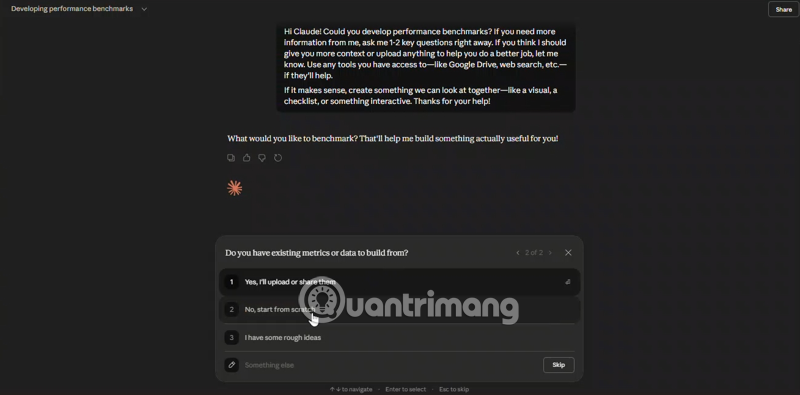
Guided prompting means using a back-and-forth conversation to define the task. It is an approach you can request directly, not a feature you must find under a particular product label.
Useful questions concern behavior: should items survive a reload, what happens when the input is empty, and should completed items remain visible? Color preferences matter too, but they do not replace decisions about what the tool does.
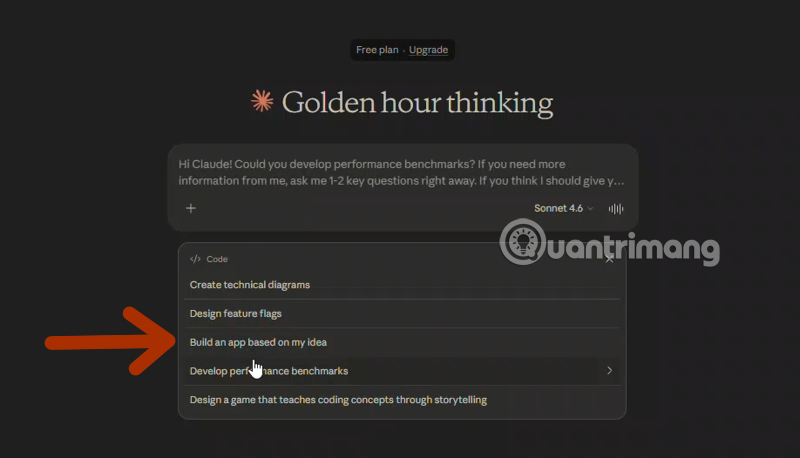
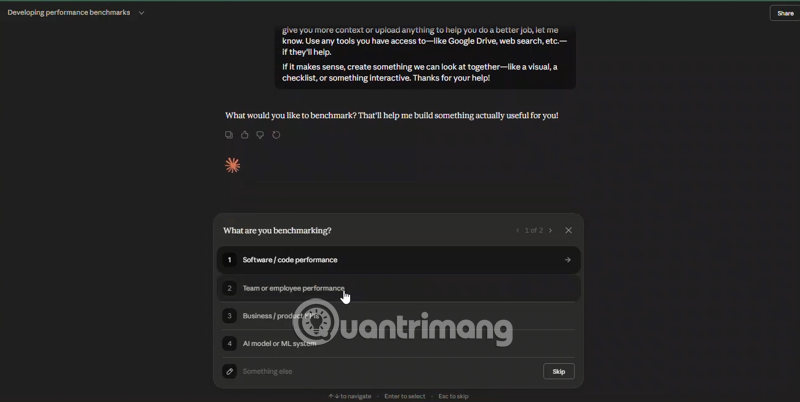
When you do not know how to choose, ask for a recommendation with a short explanation. For example: “I do not know whether I need React. Recommend the simplest approach for this one-page learning project.”
3. Request complete code and run instructions
Ask Claude to state which files to create, what software is required and how to start the result. For a single HTML file, ask for the entire file rather than disconnected fragments. For a multi-file project, require file names and a clear folder structure.
Build the agreed first version. Explain how to save and open it. Then describe which part handles the form, which part updates the list and which part stores data, if storage is included. List three checks I can perform to confirm it works. Do not claim to have run checks unless you actually ran them.
Claude's artifacts feature supports content such as single-page HTML and interactive React components. A supported preview can make experimentation easier, but it does not prove that the project will work in every browser or deployment environment.
If you save code locally, use a separate learning folder and sample files. Read commands before running them. Ask for an explanation of any installation, deletion or permission-changing step you do not understand.
4. Test behavior before adding features
For the checklist example, try these checks:
- Add a normal item and confirm it appears once.
- Submit an empty value and confirm the behavior is sensible.
- Mark an item complete, then remove the intended item.
- Reload the page and check whether persistence matches the agreed requirement.
- Use a narrow browser window and keyboard navigation to find layout or usability problems.
Compare the observed result with the requirement. Do not accept “it should work” as a substitute for trying it. If you later add local browser storage, understand that it is not a cloud account, a shared database or a backup system.
5. Debug with a reproducible description
When something fails, provide the exact error and the steps that produced it. Remove passwords, API keys and personal information before sharing logs or screenshots.
When I add a second checklist item and click Remove on the first item, both items disappear. I expected only the first to be removed. Here is the relevant code and browser-console error. Explain the likely cause, make the smallest correction and tell me how to verify that the bug is fixed.
Ask Claude to explain the changed function, not just an unstable line number. If a proposed fix introduces another failure, return to the last working version and report both behaviors.
Use the assistant to build understanding
After a feature works, ask yourself what input it receives, how it changes the data and what output it produces. Try a small modification independently, then ask Claude to review your reasoning.
Request comments for non-obvious logic rather than a comment on every line. Ask for examples of variables, functions, conditions and events drawn from your actual project. Prompting is useful, but programming also involves debugging, data modeling, testing and understanding the tools you run.
When to move beyond the chat window
For larger projects, a code editor and version control make changes easier to inspect and recover. Claude Code in VS Code offers a different workflow from ordinary Claude chat, with access determined by its environment and permissions.
Connectors and MCP servers are optional integrations, not prerequisites for learning. Review what they can read or change before connecting a repository or file system. Compare AI coding tools when you have a concrete need, and seek experienced review before using generated code for real authentication, payments or confidential data.
Related Articles
 Tips for Using Project in Claude Effectively to Create a Personal AI Space8 minutes read
 How to Plan Your Study Program with Claude6 minutes read
 How to Use Claude to Code and Debug Code6 minutes read
 Guide to Connecting MCP GitHub Local Dev21 minutes read
 How to Effectively Utilize Claude Cowork for Your Daily Work11 minutes read
 Prompt Classic AI: the Best AI for Work6 minutes read
Reader Comments 0
Sign in with email or Google to join the discussion.