Article on the subject of "obsidian"
-

Obsidian - A powerful personal knowledge and note-taking application.
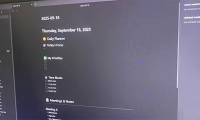
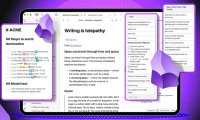
obsidian is both a markdown editor and a powerful personal knowledge management application.
-
How to connect an Obsidian repository to NotebookLM
you can imagine that these two applications combined would form a formidable pair. they are truly effective, and this is the setup that will help you achieve success.
-
How to connect a local AI model to Obsidian using MCP
mcp stands for model context protocol. it is a common protocol for connecting ai models to external tools, but what makes it groundbreaking is its ability to integrate well with obsidian and lm studio.
-
How to use local LLM to sort chaotic Obsidian inventory
using an ai-powered note tagger and an auto-move note plugin, you can easily reorganize your notes whenever your archive gets messy.
-
How to use the Pane Relief plugin to get a dual pane layout in Obsidian
after countless hours of frustration and testing several plugins, many people have settled on pane relief. this plugin not only solves the double pane problem, but completely changes the way users work with multiple notes.
-
Why install the new Baseline custom Obsidian theme?
the new theme - baseline - has a different feel and many people decide to stick with it for the long term.
-
Why ditch your planner for the Obsidian plugin with integrated Daily Notes?
obsidian was instantly impressive when they first tried it, but what they didn't expect was that daily notes - a planner inside a note-taking app - was more effective than any other planner they'd ever used.
-
Why switch from Obsidian to Joplin?
the constant maintenance felt like a part-time job. this realization prompted them to explore alternatives, which led them to joplin, and they have never regretted the switch.
-
Why should you stop switching note-taking apps to Obsidian?
most note-taking apps force their way of working on you. obsidian, on the other hand, adapts to how you work—whether it's simple or complex, it's up to you. your notes remain as plain text files.
-
How to Keep Your Notes in Perfect Sync Everywhere Without Spending a Dime
after switching to obsidian, many people discovered that their sync service would add $60 to their subscription budget, so they found a completely free way to sync notes across all their devices.
-
How to create a simple shortcut for Obsidian on your phone
obsidian is a second brain for many people - but until recently, jotting down quick ideas on a mobile phone was quite difficult.
-
This minimal setup will make Obsidian your favorite writing tool
writing means constantly facing creative block. the more you write, the more you know the feeling. obsidian is a great choice for all of these, and with a few tweaks, it can actually make you want to write more.
-
12 Apps Windows 11 Users Should Install on Their New PC
here are 11 apps you should have on microsoft's new operating system. these apps improve on existing features or add what windows 11 lacks (and they work just as well on windows 10).
-
7 Reasons to Switch from Notion to Obsidian
after much deliberation, some people have switched to obsidian and are very happy with this new option.
-
4 Smart Ways to Link Notes in Obsidian Automatically
obsidian is a powerful note-taking tool, and one of its best features is note linking. however, note linking needs to be done manually, which makes note-taking less enjoyable.
-
6 Reasons Obsidian is Used for In-Depth Research Projects
research projects can get messy quickly, so having the right tool is essential—one that seamlessly connects your thoughts and ideas while still being easy to use.
-
7 Best Obsidian Plugins for Mobile
in addition to tweaking the interface and making obsidian run more efficiently, they'll give you a richer set of note-taking tools.
-
Is Obsidian note-taking app worth your time?
obsidian is a feature-rich note-taking tool, but is it worth the time spent getting used to and customizing?
-
How to write mathematical notation in Obsidian
need to write math equations in obsidian? here's how to write math notation easily and efficiently in obsidian.
-
What is Obsidian Note-Taking? Obsidian User Manual
bored of traditional note-taking apps? so learn how to use the obsidian note-taking app to increase work efficiency!
-
What is Obsidian Note-Taking? Obsidian User Manual
bored of traditional note-taking apps? so learn how to use the obsidian note-taking app to increase work efficiency!
-
How to use Obsidian with local AI to visualize things.
recently, some people have overcome this by combining their obsidian account with a local ai image generator.
-
7 Best Obsidian Plugins for Mobile
in addition to tweaking the interface and making obsidian run more efficiently, they'll give you a richer set of note-taking tools.
-
How to combine Claude Code with Obsidian CLI
if you've been using obsidian for note-taking for over a year, your archives are probably a mess. try giving the problem to claude code, combine it with a few obsidian cli commands, and watch it accomplish what you haven't been able to do in years, in about 90 minutes.
-
How to connect a local AI model to Obsidian using MCP
mcp stands for model context protocol. it is a common protocol for connecting ai models to external tools, but what makes it groundbreaking is its ability to integrate well with obsidian and lm studio.
-
How to create a simple shortcut for Obsidian on your phone
obsidian is a second brain for many people - but until recently, jotting down quick ideas on a mobile phone was quite difficult.
-
How to connect an Obsidian repository to NotebookLM
you can imagine that these two applications combined would form a formidable pair. they are truly effective, and this is the setup that will help you achieve success.
-
Why should you stop switching note-taking apps to Obsidian?
most note-taking apps force their way of working on you. obsidian, on the other hand, adapts to how you work—whether it's simple or complex, it's up to you. your notes remain as plain text files.
-
Obsidian - A powerful personal knowledge and note-taking application.
obsidian is both a markdown editor and a powerful personal knowledge management application.
-
7 Reasons to Switch from Notion to Obsidian
after much deliberation, some people have switched to obsidian and are very happy with this new option.
-
How to write mathematical notation in Obsidian
need to write math equations in obsidian? here's how to write math notation easily and efficiently in obsidian.
-
How to Keep Your Notes in Perfect Sync Everywhere Without Spending a Dime
after switching to obsidian, many people discovered that their sync service would add $60 to their subscription budget, so they found a completely free way to sync notes across all their devices.
-
How to use local LLM to sort chaotic Obsidian inventory
using an ai-powered note tagger and an auto-move note plugin, you can easily reorganize your notes whenever your archive gets messy.
-
Why install the new Baseline custom Obsidian theme?
the new theme - baseline - has a different feel and many people decide to stick with it for the long term.
-
Why switch from Obsidian to Joplin?
the constant maintenance felt like a part-time job. this realization prompted them to explore alternatives, which led them to joplin, and they have never regretted the switch.
-
6 Reasons Obsidian is Used for In-Depth Research Projects
research projects can get messy quickly, so having the right tool is essential—one that seamlessly connects your thoughts and ideas while still being easy to use.
-
This minimal setup will make Obsidian your favorite writing tool
writing means constantly facing creative block. the more you write, the more you know the feeling. obsidian is a great choice for all of these, and with a few tweaks, it can actually make you want to write more.
-
4 Smart Ways to Link Notes in Obsidian Automatically
obsidian is a powerful note-taking tool, and one of its best features is note linking. however, note linking needs to be done manually, which makes note-taking less enjoyable.
-
Is Obsidian note-taking app worth your time?
obsidian is a feature-rich note-taking tool, but is it worth the time spent getting used to and customizing?
-
Why ditch your planner for the Obsidian plugin with integrated Daily Notes?
obsidian was instantly impressive when they first tried it, but what they didn't expect was that daily notes - a planner inside a note-taking app - was more effective than any other planner they'd ever used.
 Home
Home Tech info
 Technology
 Science
 Life
Life Application
 Electric
 Program
 Mobile
 System