Table of Contents
HDDScan can read SMART data and run surface tests on supported storage devices. It can help confirm slow or unreadable areas, but it does not repair physical damage. If the drive contains important files and is clicking, disconnecting, or producing read errors, copy or image the data before running a full scan.

Download and prepare HDDScan
- Get the utility from the official HDDScan site. Avoid repackaged installers.
- Close applications using the target disk and connect a laptop to power.
- Open HDDScan and carefully identify the drive by model and capacity. Selecting the wrong device can lead to misleading results—or data loss if a destructive command is chosen.
HDDScan support varies by controller, USB enclosure, and storage protocol. Some adapters do not pass SMART information or test commands through to the drive.
Read SMART information first
Open the SMART report and look for warnings, not just a single “health” percentage. On an HDD, reallocated, pending, or uncorrectable sector counts deserve attention, especially when they increase between checks. The meaning and raw-value format can vary by manufacturer.
A failing SMART result is a reason to back up and replace the drive. A passing result does not guarantee that every sector is readable.
Run a non-destructive surface test
- Select the intended drive.
- Open the test menu and choose a non-destructive Verify or Read test. Do not choose Erase on a drive whose data you need.
- Start the task, open its details, and monitor the response-time map and error log.
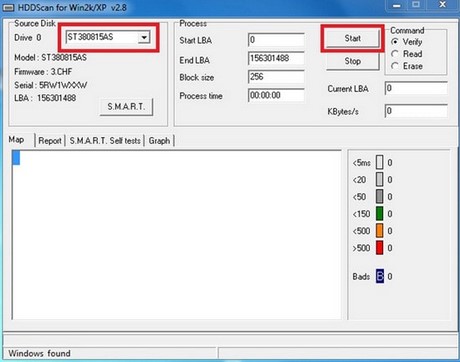
The screenshots show an older HDDScan interface; current controls may differ. Consult the documentation included with your version before starting any write-based test.
Interpret the results
- Read errors or bad blocks: back up immediately and verify with the drive manufacturer's diagnostic. Plan to replace the disk.
- Many very slow blocks: check cables, power, controller logs, and drive health; repeat only after the data is safe.
- No errors: the tested surface was readable during that run, but intermittent faults, controller problems, and file-system corruption may still exist.
Fragmentation does not create physical bad sectors, and defragmentation will not repair them. A scan also cannot restore lost files or make a mechanically failing drive reliable.
What to do after an error
Preserve the data first. Then run the storage manufacturer's short diagnostic and check Windows logs for disk or controller errors. Replace the drive if warnings recur, sector counts increase, or the manufacturer's test fails.
TipsMake also explains how to check drive health in Windows and how to recognize bad-sector symptoms. Avoid zero-filling or formatting a failing disk unless the data is expendable and your goal is specifically to erase it.
Related Articles
 How to Check Bad Hard Drive, Check Bad Hard Drive by HDDScan3 minutes read
 Know About Bad Sectors on Your Hard Drive8 minutes read
 3 Best Software to Check the Hard Drive for the Best Bad3 minutes read
 Dti Surface Scanner: Quickly Detect Bad Sectors for Hard Drives3 minutes read
 5 Ways to Check Bad Sectors on Hard Drives and Prevent Them7 minutes read
 8 Effective Ways to Check Your Hard Drive to Periodically Check18 minutes read
Reader Comments 0
Sign in with email or Google to join the discussion.