Table of Contents
MHDD can scan an older hard drive for slow or unreadable sectors, but it cannot repair physical damage to a platter or flash cell. Options described as “remap,” “erase delays,” or “regenerate” may force the drive to reallocate a sector, overwrite data, or hide the symptom temporarily. If a disk contains important data, copy or image that data first and plan to replace the drive when errors are confirmed.
Do not start with a repair scan. Repeated full-surface tests, partition changes, and write-based “fixes” can make recovery harder on a failing disk. If the drive clicks, disconnects, disappears, becomes extremely slow, or contains the only copy of valuable files, power it down and consult a qualified data-recovery service.
MHDD and Hiren's BootCD are legacy tools
MHDD 4.6 appeared in older DOS-based Hiren's BootCD releases. The current Hiren's BootCD PE is a different Windows-based environment, so these menu paths may not exist in a modern download. The Hiren's BootCD old-version catalog documents which legacy releases included MHDD.

These old utilities may not recognize NVMe SSDs, USB-attached drives, RAID volumes, or storage controllers operating in unsupported modes. Do not change SATA controller mode in firmware merely to make MHDD detect a disk unless you understand the boot and encryption consequences. A current manufacturer diagnostic is usually the better first choice.
What a bad-sector report means
A sector can be unreadable because the storage medium has deteriorated, the drive cannot correct the recorded data, or communication with the device is unstable. Modern drives maintain spare sectors and may remap a failing location internally. Rising counts of pending, uncorrectable, or reallocated sectors are warning signs; they are not proof that software has restored the hardware to reliable condition.
SMART is useful evidence, but a simple “Good” status does not guarantee that a drive is healthy. Combine SMART attributes with symptoms, the manufacturer's diagnostic result, system logs, and whether the error count is changing. TipsMake's guides to checking drive health in Windows and viewing SMART data with CrystalDiskInfo provide safer first checks.
Before running any surface scan
- Back up readable data. Copy the most valuable files first. A normal file copy is suitable for a stable drive; a failing disk may require a recovery-oriented imaging tool or professional service.
- Record SMART information. Note the drive model, serial number, overall status, and raw values for reallocated, pending, and uncorrectable sectors.
- Check the connection. For an external drive, try a known-good cable and power supply. Interface errors can resemble disk-surface problems.
- Use the manufacturer's current diagnostic. Run a short, read-only test before considering a long scan. The drive diagnostic tools overview includes common options.
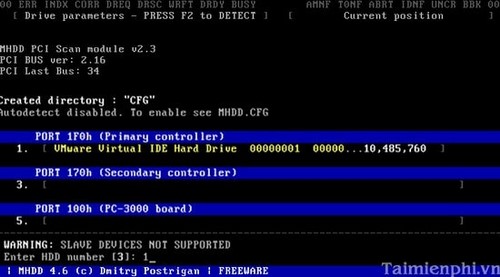
- Work on the correct disk. Disconnect unrelated drives where practical and verify the model and capacity. MHDD identifies physical devices, not familiar Windows drive letters.
Navigate to MHDD in an old Hiren's BootCD release
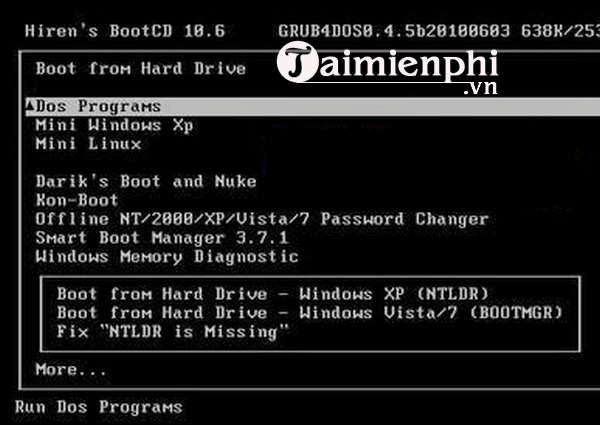
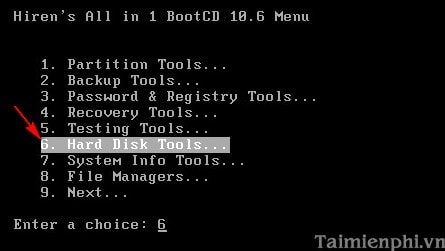
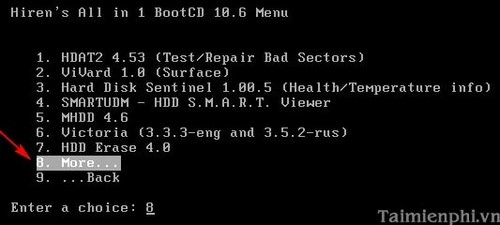
The following screenshots are retained to identify the legacy interface; they are not instructions to download an unofficial or modified copy. Use only media whose source and integrity you can verify.
-
Boot the legacy media and open DOS Programs.
-
Open Hard Disk Tools. Depending on the release, MHDD may appear on a later More page.
-
When MHDD lists devices, match the model and capacity to the drive you intend to inspect. Stop if the identity is ambiguous.
Use read-only settings
Open MHDD's scan settings and verify that every write-affecting option—including Remap, Erase, and Erase Delays—is disabled. Limit the first scan rather than immediately reading the entire disk. Watch for slow blocks, timeouts, and UNC errors, and stop if the drive begins disconnecting or making abnormal mechanical sounds.
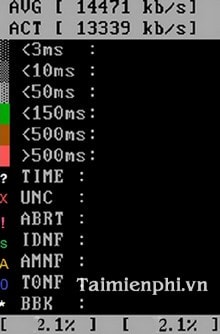
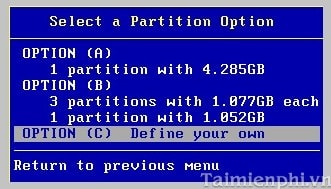
The colored response-time blocks show how quickly sectors answered during that test. A red X or UNC error indicates an unreadable request, while many very slow blocks can signal a deteriorating drive or another hardware problem. The percentages are diagnostic observations, not a safe formula for deciding where to create partitions.
Do not “cut out” the damaged area with partitions
The old procedure used Ontrack Disk Manager to create partitions around the reported region, then deleted a logical partition that contained the errors.
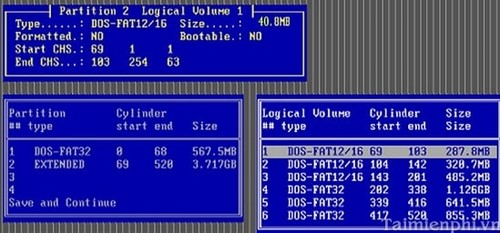
This does not repair the disk. It only avoids addresses that were known to fail at the time of the scan, and it can destroy the current partition table and data. Additional sectors may fail elsewhere later. Do not use this partitioning method on a disk you want to trust or on a disk that still contains recoverable data.
What to do after errors are found
- Preserve or complete the backup before running more tests.
- Replace the drive if a manufacturer test fails, SMART reports a critical condition, unreadable sectors recur, or error counts rise.
- Restore the data to a healthy replacement and verify the restored files.
- Do not sell or reuse a failing drive for backups, even if a format temporarily clears warnings.
- If the drive is under warranty, save the diagnostic code and follow the manufacturer's replacement procedure.
A scan can help confirm that a drive is unreliable; it cannot make damaged storage trustworthy again. The safest response to real bad sectors is to recover the data and retire the affected device.
Related Articles
 Know About Bad Sectors on Your Hard Drive8 minutes read
 Check and Detect Bad Sectors on Your Hard Drive Using Hddscan3 minutes read
 Hard Drive Bad Sectors - Signs and Solutions3 minutes read
 3 Best Software to Check the Hard Drive for the Best Bad3 minutes read
 Dti Surface Scanner: Quickly Detect Bad Sectors for Hard Drives3 minutes read
 How to Implement Clean Boot on Windows 10/8/74 minutes read
Reader Comments 0
Sign in with email or Google to join the discussion.