Table of Contents
Set the default quality for purchased or downloadable Apple video in the Apple TV app's Playback settings. On current Windows and Mac versions, the highest download option is up to 1080p; 4K may be available for streaming, but not as a 4K offline download.
This is a computer setting. It controls downloads in the Apple TV app or legacy iTunes on the PC or Mac; it does not change the iPhone's video-recording quality or automatically copy a different version to the phone.

Set download quality in the Apple TV app on Windows
- Open the Apple TV app.
- Select the Sidebar Actions button at the top of the sidebar.
- Choose Settings, then select Playback.
- Open Video download quality and choose the option that fits your connection and storage.
- High Quality (Up to 1080p): downloads the highest available quality up to 1080p and uses more time and disk space.
- Most Compatible HD (1080p): favors an HD format broadly compatible with the computer display.
- Fast Downloads: uses a smaller file for a quicker download.
- Most Compatible SD (480p): reduces quality and storage use for older displays or limited space.
You can also enable multichannel audio when it is available. That option increases download size and is useful only when the playback equipment can benefit from it.
Set download quality in the Apple TV app on Mac
- Open the Apple TV app.
- Choose TV > Settings from the menu bar.
- Select Playback.
- Under Download Options, select High Quality, Fast Downloads, Most Compatible HD, or Most Compatible SD.
The exact title and maximum available resolution depend on the item, region, account rights, app version, hardware, and display. Choosing 1080p cannot add detail to a title offered only in SD or 720p.
Legacy iTunes steps on Windows
Apple now provides the Apple TV app for video on current Windows systems, but some older PCs still use iTunes. The screenshots below show a historical iTunes interface and may not match a current installation.
Open iTunes, then choose Edit > Preferences. Some older layouts used a menu button and a Store tab; newer iTunes documentation places size and quality choices in the Downloads preferences.
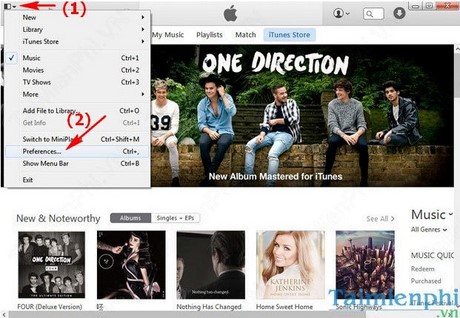
Open the Downloads or Store pane shown by your version. Choose the preferred HD download quality, apply the setting, and download a test item to confirm the result.
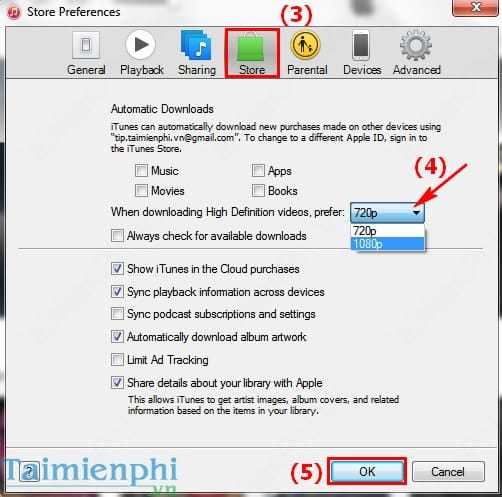
If iTunes offers a general HD choice and the title is available in 1080p, it downloads the 1080p version. The old screen-resolution figures sometimes quoted with this setting were playback requirements for legacy hardware, not the dimensions of the video itself.
Which quality should you use?
| Situation | Recommended option |
|---|---|
| Large display, enough storage, fast connection | High Quality (Up to 1080p) |
| Playback compatibility matters most | Most Compatible HD |
| Slow connection or urgent download | Fast Downloads |
| Very limited storage or older display | Most Compatible SD |
Changing the preference normally affects future downloads, not files already stored on the computer. Delete and download an eligible item again if you need a different local copy, while checking rental or download restrictions first.
If the HD option is missing
- Update the Apple TV app or iTunes and restart it.
- Confirm that the movie or episode is actually offered in HD.
- Check the available disk space and the account used for the purchase.
- Try the Most Compatible HD option if High Quality playback fails.
- Remember that catalog features vary by country or region.
Readers still maintaining an older media library can use this iTunes beginner guide. For viewing rather than downloading, compare the limitations in this overview of streaming services with 4K content.
Related Articles
 How to Convert Videos from Computer to iPhone with Itunes5 minutes read
 How to Reinstall Itunes5 minutes read
 Click: How to Update Itunes2 minutes read
 How to Download Itunes4 minutes read
 How to Transfer Purchases from an Iphone to Itunes5 minutes read
 Error Cannot Connect to Itunes Store, This Is a Fix17 minutes read
Reader Comments 0
Sign in with email or Google to join the discussion.