Table of Contents
The sections below explain mini projector for iPhone and iPad in a clear and practical way. Review the key details, examples, and considerations before applying the information.
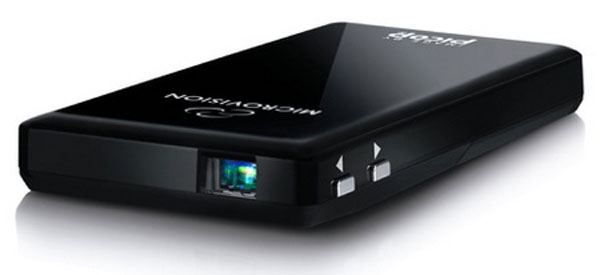 MicroVision ShowWX + HDMI mini projector. (Photo: MicroVision).
How Mini Projector for iPhone and iPad Works
ShowWX + HDMI is the latest projector from the manufacturer MicroVision. This is a mobile projector model that supports the projection of images with a maximum resolution of 848 x 480 pixels, broadcast from SD sources of 480p to higher such as HD 720p and Full HD 1080p.
MicroVision's model has a 15 lumens illuminator, an HDMI port and especially a separate port designed to allow direct connection to Apple handheld devices for live image projection.
In addition, ShowWX + HDMI is also sold with a special adapter, allowing connecting the projector to a computer via a traditional VGA line. Users can also use the HDMI interface to connect the projector to Android tablet or mobile models with built-in microUSB port.
 MicroVision products are compatible with many different handsets, including Apple products. (Photo: MicroVision).
This mini-projector model has a Lithium-ion rechargeable battery that allows continuous demonstration for two hours.
According to Electronistra , MicroVision products are allowed by the company to order directly on their home page with a list price of $ 369.
FAQ
What is the main benefit of mini projector for iPhone and iPad?
The main benefit is a clearer understanding of the topic and a practical way to apply the information covered in this guide.
What should I check before using mini projector for iPhone and iPad?
Confirm compatibility, review the required settings, protect important data, and use the latest supported version whenever possible.
What should I do if the result is different?
Repeat the steps carefully, verify permissions and version differences, and consult the product's official support documentation for changes not shown in the article.
Related Articles
 Top 5 Best Mini Projectors 20189 minutes read
 How to Open Genuine iPad Air in Vietnam3 minutes read
 Fujitsu Laptop and Projector4 minutes read
 Review iPhone 12 Mini: Battery Life up to 7 Hours15 minutes read
 iPad Mini 4 Is More Expensive Than $70 but Not as Strong as the New iPad5 minutes read
 5 Popular Wireless Projectors to Connect to Laptops, Phones5 minutes read
Reader Comments 0
Sign in with email or Google to join the discussion.