Table of Contents
Explore 20 support apps for Android in 2011 and learn what each option does well. The article focuses on practical details that can help you make a more informed decision.
. com - Android Market market may not be "crowded" like the iPhone App Store, but still enough to meet the needs of users, continuous development and innovation.In the following article, we will introduce you to the list of the 20 most useful applications for Android operating system based on the opinions shared and contributed by users community.
1. Google Voice
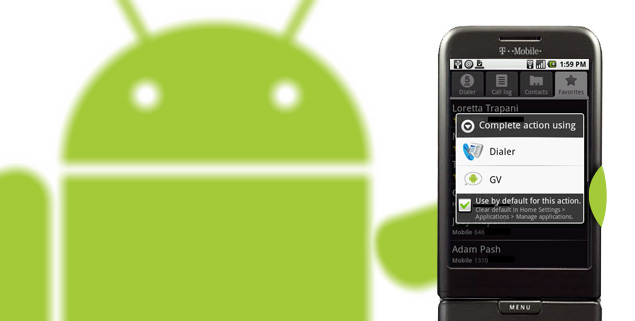
The number of people using Google Voice Support services is growing more and more, with the utility system quite diverse, Google Voice Provides users with a fixed phone number, which can be done Calls to many different places or devices support. Besides being able to access all voicemail and text mailboxes from the Internet. the app further integrates into the system, which can make outgoing calls look like Google Voice Numbers, so users can keep their real phone numbers confidential.
>>> Some references about Google Voice
Video reference
2. Advanced Task Killer
One of the most practical needs in managing and monitoring mobile operating systems is to ensure performance and life of storage batteries. Advanced Task Killer - ATK Is one of the few applications that meets this requirement, with just a few simple steps, users can easily turn off many different applications, either manually or pre-set..
Video reference
3. Dropbox
Dropbox Is a Cloud-based utility service, capable of automatically combining, syncing files and folders between multiple computers using various operating systems: Windows, Mac, or Linux . Dropbox Version for Android Can also integrate with many other supporting applications (eg Documents To Go ) to access and open document files. The program allows users to use PDF files, images, popular text file formats with the drag and drop operation respectively on the phone.
Video reference
4. Evernote
Once you get used to using the virtual keyboard on smartphones, this becomes one of the great and indispensable editing tools, Evernote Is the choice not to be missed in this case. With the same operation as Dropbox In storing data, the synchronization process will be carried out immediately when you finish editing.
Video reference
5. Taskos
Among many applications that support To - do (create user reminder information), the Taskos Proved to be superior because of its simple interface, easy to use and user friendly interface. One of the biggest advantages of this program is the ability to identify information through the voice of users, Simply speak loudly and clearly the work to be done, the program will immediately show Display specific information accordingly.
Video reference
6. DroidAnalytics
For some reason, Google has Not officially provided any applications for Google Analytics Services on the mobile platform (either Android or IPhone ), but instead you can refer to and use DroidAnalytics. Another very useful option is mAnalytics Pro.
Video reference
7. Documents To Go
The free version of Documents To Go Provides users with applications that read Word and Excel files, but if they want to create, edit or 'embed' PowerPoint-style documents, they must upgrade to the full version. - Full For $ 15 . Besides, QuickOffice is also a choice not to be missed.
Video reference
8. Google Docs
If you often have to work with Google Docs (including uploading Microsoft Office Files to Google Services), this is the necessary program. This is really an effective solution and fully inherits the necessary features of the text management programs, except for one point is to always open the file through the browser, not like regular software.
Video reference
9. Tripit
Among the applications that support users in monitoring and managing travel, Tripit is the best choice for you. With the same mechanism of operation as backend systems, users simply forward confirmation information via email about flights, hotels, hired cars. and Tripit Will automatically sort and arrange they are as appropriate as possible. Or If you use Gmail , you can use the plug-in support to automatically collect the necessary information from email, then apply to Tripit .
Video reference
10. Places
If you need to find a utility that helps you find the nearest store or service to your current location, Places is a better choice. From fast food stores, cafes, taxi catches, petrol stations. Places Calculates very accurately based on information from Google Local, Besides, the program also integrates completely stable with Google Maps.
Video reference
11. Astro File Manager
One of the interesting things about Android Is that we can grant access to the system at low level. Astro Is one of such applications, supporting users in transferring system files, in accordance with technical-related tests.
Video reference
12. Speed Test
If you are a person who often has to move to work, the process of checking network speed is most essential. Among many services and software support, Speedtest. net Is a service that always receives the most attention and appreciation of users community.
13. Amazon Kindle
Since the app is officially announced, the number of Amazon Kindle users has quickly increased. The program is extremely simple, easy to use, many utilities and suitable for many users.
Video reference
14. Google+
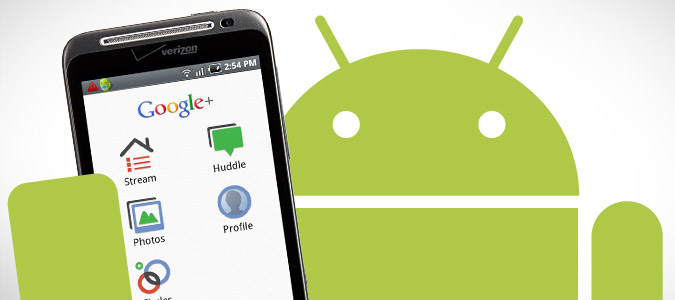
Immediately from the first day of 'appearing' (July 2011), Google+ or Google Plus has attracted many interest from the technology community as well as users community. Also from this point, the number of support applications for the Android Platform has also increased significantly and is constantly being changed, developing more new features.
Video reference
15. Air TED
TED Conferences - (Technology, Entertainment and Design) Have been held regularly since 1984 with the Ideas Worth Spreading Guideline. With this TED Air App, users can enjoy the most daring ideas from world-famous participants, such as Bill Clinton, Bill Gates, Jamie Oliver and Brian Cox. You may disagree with some people, but if you pay close attention to the topics they mention, you will immediately feel the appeal and appeal of such seminars.
Video reference
16. Google Goggles
Maybe many people will be quite surprised at this application's 'ahead of time' feature, Goggles Can search based on images. Users can take photos of objects, the program will try to describe in detail and detail about the object. Although still limited in some ways, the idea of this program is very attractive and will definitely become a new trend of technology in the future. Another highlight of Goggles Is taking photos with text information in another language, then recompiling it to suit users.
Video reference
17. Photoshop Express
Surely in most users, everyone knows about Photoshop - Adobe 's professional graphics processing program. And the Mobile Version of this software on the mobile platform is enough to meet the needs of users, with basic operations such as changing the ratio, size, brightness, contrast.
Video reference
18. Audible
With this application, users can connect directly to the Audible Storage library and download the ebook extremely quickly and simply. Besides, the program also provides additional utilities to support optimized audiobook files set up, create notes and bookmarks information.
19. Shazam
When needed to impress your friends about your music knowledge, use Shazam . Simply press the button with the icon Shazam , then keep it for about 10 - 15 seconds, the program will display all the information collected related to that song as the name of the artist and author., album.
Video reference
20. Google Finance
This extremely useful application is often 'forgotten' by users, the program will connect directly to the Google Finance Account, where you can organize and classify companies, witnesses contract deals. to monitor the situation, change prices in the market, or create Portfolios - demand groups. The program is always updated in real time, so you do not have to worry about having Google Finance Beside:
Video reference
Good luck!
FAQ
How were the 20 support apps for Android in 2011 options selected?
The options are compared by usefulness, ease of use, core features, and their fit for the situations described in the article.
Which option is best for beginners?
Choose the option with the simplest setup, clear documentation, and the features you actually need. A more advanced option is not always the better starting point.
What should I check before choosing?
Check compatibility, current availability, pricing or licensing, privacy requirements, and whether the product still receives updates and support.
Related Articles
 Best AI Apps for Android7 minutes read
 The Best Android Apps9 minutes read
 Why Are Android Tablet Apps So Bad: Key Facts7 minutes read
 The 11 Best Android Apps to Install on Chromebooks8 minutes read
 10 Open Source Android Apps You Can't Live Without8 minutes read
 Series of Fake Android Apps You Should Remove from Your Device Immediately6 minutes read
Reader Comments 0
Sign in with email or Google to join the discussion.