Table of Contents
Krita AI Diffusion and Adobe Firefly can both assist with image generation and editing, but they are designed around different priorities. Adobe emphasizes a managed, integrated experience across its creative products. Krita AI Diffusion gives users more choice over models and controls, with the tradeoff of a more technical setup and greater responsibility for the workflow.
Neither option makes the other obsolete. The right choice depends on the applications you already use, available hardware, desired level of control, budget, and how the images will be published.
What is the Krita AI Diffusion plugin?
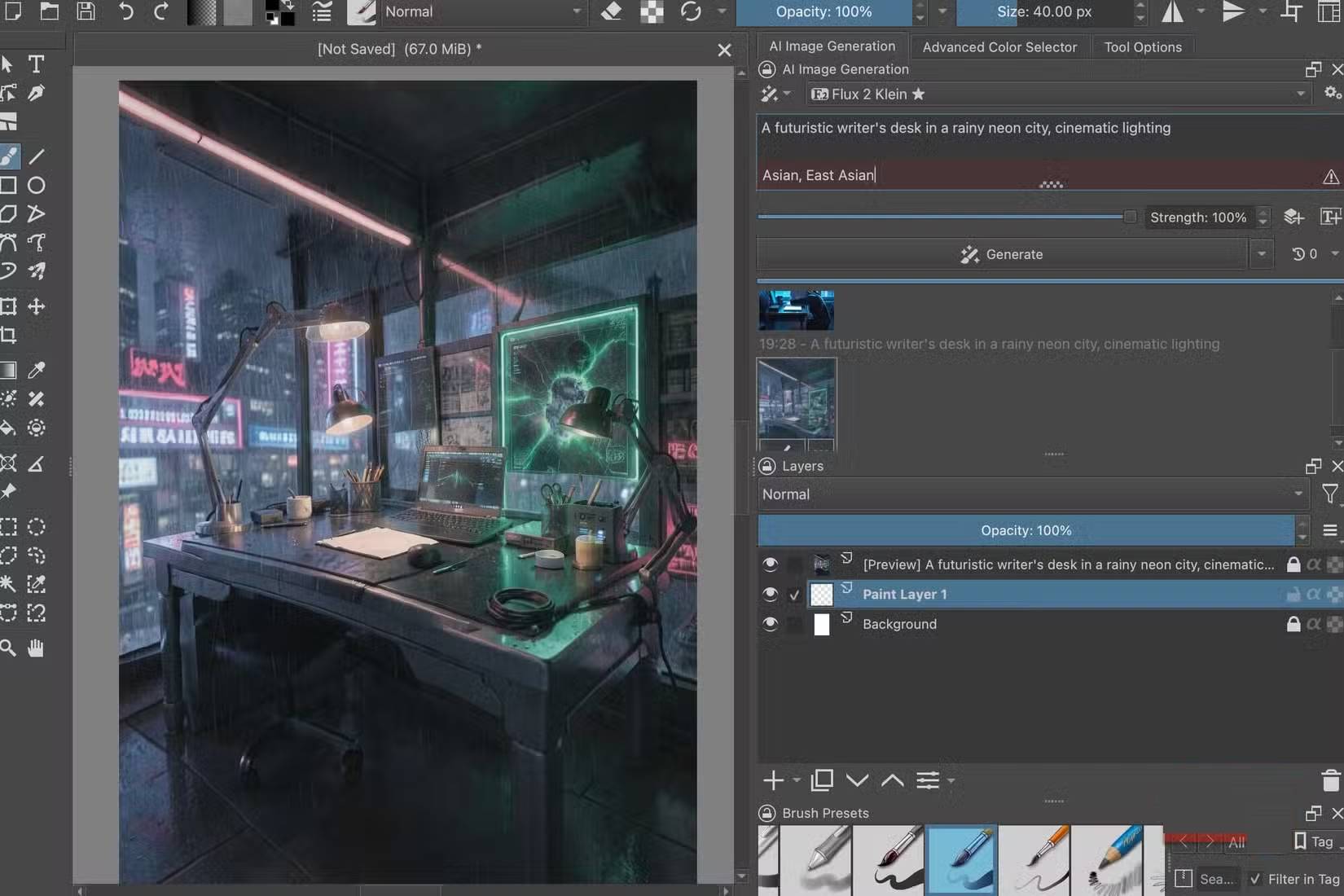
Krita is a free, open-source painting application. Its AI features are not built into the core application: Krita AI Diffusion is a separate community-developed plugin that connects Krita's canvas and selection tools to a supported image-generation backend.
Depending on the current plugin version and configuration, generation may run on local hardware or through a compatible remote service. Local processing offers more control over the environment but requires enough memory and suitable computing hardware for the selected model. A hosted option reduces local hardware demands but may introduce usage charges, account requirements, and different data-handling terms.
Installation is more involved than opening a web generator. Users generally need a compatible Krita version, the correct plugin release, and a working backend. Because steps and supported models can change, follow the documentation supplied with the exact plugin version rather than relying on old file paths or screenshots.
Krita AI Diffusion and Firefly compared
| Consideration | Krita AI Diffusion | Adobe Firefly workflow |
|---|---|---|
| Core approach | Third-party plugin connected to a selectable backend | Managed Adobe service integrated with supported Adobe products |
| Setup | May require plugin installation, model/backend configuration, and troubleshooting | Usually simpler for users already signed in to compatible Adobe apps |
| Control | Choice of supported models, parameters, and conditioning workflows | Curated controls and product-specific generative features |
| Local use | Possible with a compatible local setup and sufficient hardware | Primarily service-based processing |
| Cost | Plugin may be free, but hardware or hosted generation can still cost money | Depends on the current Adobe product, plan, and usage allowance |
| Maintenance | User manages compatibility across Krita, plugin, backend, and models | Adobe manages the model service and product integration |
Editing control and canvas integration

The strongest reason to consider Krita AI Diffusion is not simply that it can generate an image from text. The plugin works within an editor where the user can paint masks, select regions, combine layers, refine a composition, and repeat only the part that needs improvement.
Supported conditioning tools may use edges, depth, poses, or other guides to influence composition. Availability and behavior depend on the chosen backend, model, and plugin version. These controls can be valuable when a rough sketch or existing layout matters more than receiving a completely new interpretation from a prompt.
Adobe's generative editing tools are generally designed for a smoother guided workflow inside supported applications. For someone already using Photoshop or another compatible Adobe product every day, selecting an area and generating alternatives may involve fewer setup and maintenance decisions.
Image quality cannot be judged from one identical prompt alone. Different systems interpret prompts, masks, model settings, aspect ratios, and reference images differently. A useful test should reflect the actual work: object removal, background extension, concept sketches, article illustrations, product-safe compositions, or repeated style constraints.
Costs are broader than the subscription price
Krita and the plugin can be obtained without buying a traditional creative-software subscription, but generation is not necessarily free. Local use consumes hardware resources and may justify an upgraded GPU. Hosted backends can charge for compute or credits. Time spent installing, updating, downloading models, and resolving compatibility issues is also part of the cost.
Adobe pricing and generative-use allowances can change by product and plan. Users who already pay for an Adobe workflow may value the integration more than someone considering a subscription solely for AI image generation.
Privacy, licensing, and commercial use
Local generation may keep source images and prompts on the user's machine, but only if every relevant component actually runs locally. A cloud backend sends data to another service. Review the current privacy and retention terms before submitting client work, unpublished designs, or personal images.
Commercial suitability is not determined only by the application's name. Check the license and terms for the editor, plugin, model, checkpoint, additional model components, cloud service, source material, and intended use. Do not assume that a downloadable model grants unrestricted rights or that every output is free of third-party rights.
Adobe has described commercial considerations for Firefly in its own product materials, but users should rely on the current terms for their specific plan and jurisdiction. For either tool, organizations may need provenance records and a review process before publication.
Choose Krita AI Diffusion when
- You already paint or edit in Krita and want generation inside a layer-based workflow.
- You want to choose among supported models and use more technical composition controls.
- You are comfortable installing and maintaining a plugin and backend.
- Local processing is important and you have suitable hardware.
- You prefer to refine AI output manually rather than rely on a mostly guided workflow.
Choose Adobe Firefly when
- You already depend on compatible Adobe applications and want close integration.
- Fast setup and a managed service matter more than model-level choice.
- Your team needs a standardized interface that is easier to support.
- The current Adobe plan and terms fit your volume and publishing requirements.
- You do not want to operate a local image-generation backend.
Test both with a real project
- Choose several representative tasks rather than a single showcase prompt.
- Record total time from source image to publishable result, including corrections.
- Compare mask accuracy, composition control, consistency, and manual cleanup.
- Check hardware or service cost at your expected volume.
- Review privacy, licensing, and approval requirements before using production assets.
Krita AI Diffusion is a capable option for users who value flexibility and hands-on control. Firefly is a stronger fit for users who prioritize a managed, integrated experience. The practical winner is the tool that produces acceptable work reliably within your technical, legal, and budget constraints.
Related Articles
 This Feature Makes Adobe's New AI App a Must-try Tool5 minutes read
 Learn About Krita - Free Alternative to GIMP: What Is Krita8 minutes read
 Use Visual Intensity in Adobe Firefly for More Detailed Images: Step-by-Step Guide7 minutes read
 Which Is Better Krita or GIMP: Complete Overview9 minutes read
 minutes read
 Use Structure Reference and Style Reference in Adobe Firefly: Step-by-Step Guide9 minutes read
Reader Comments 0
Sign in with email or Google to join the discussion.