Table of Contents
Learn how to customize plugins in claude cowork with practical instructions, useful tips, and troubleshooting guidance for common issues.
In Cowork, plugins provide Claude with expertise in your field—sales methodologies, financial frameworks, legal review guides, marketing orangepaign structures. Each plugin combines skills, connectors, and sub-agents into a package that you can customize for your team.
Anthropic's built-in plugins help you maintain structure and serve as a starting point. Without customization, Claude will ask setup questions before using plugins to understand your needs. Customization integrates those answers, so every skill starts from your context instead of having to ask from scratch.
Claude Cowork allows for customization through chat. Claude will ask about your work and update the plugin accordingly.
- How to build a plugin from scratch in Claude Cowork
What You Can Customize in the Plugin
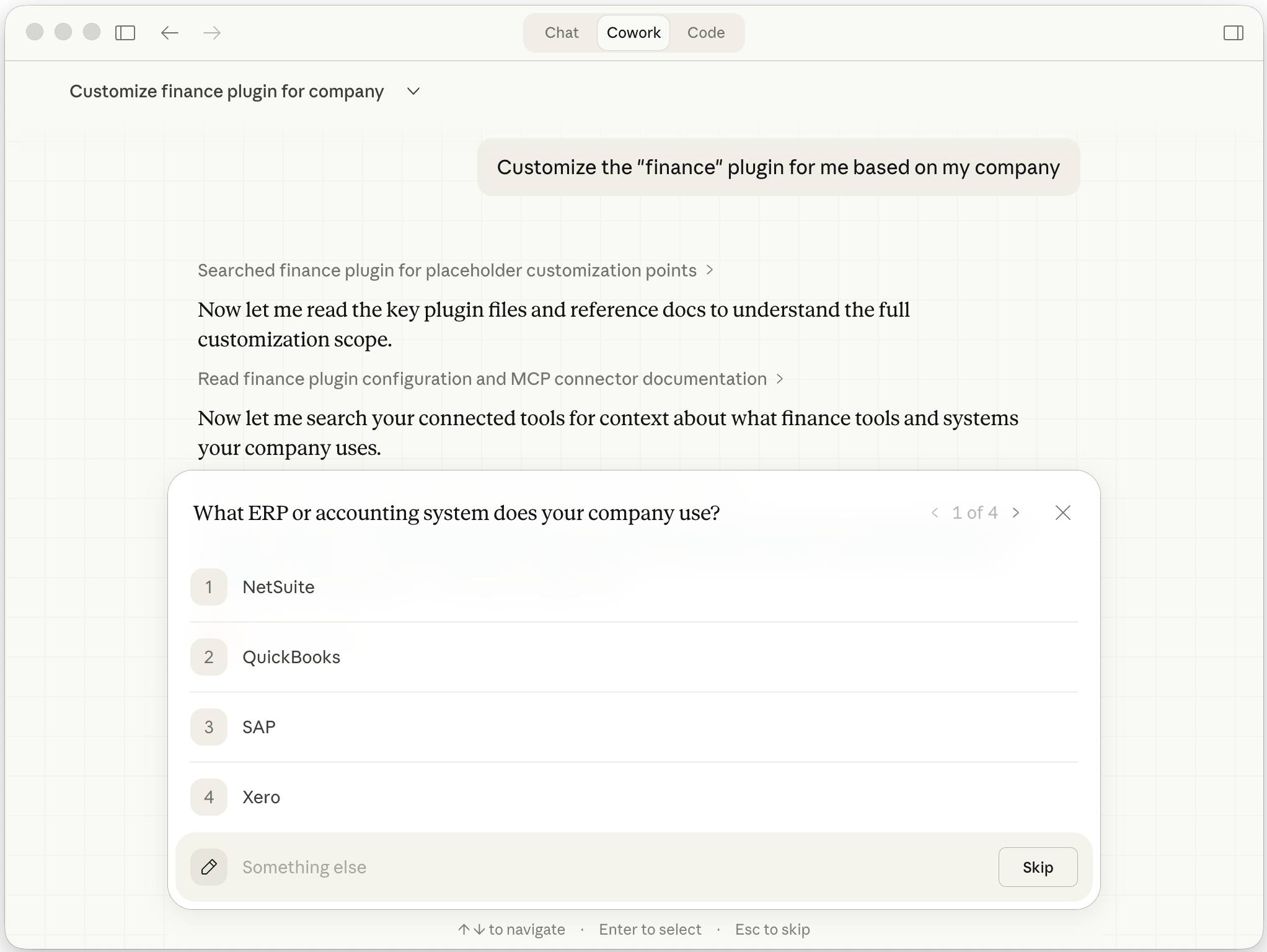
In the plugin settings, click Customize on any installed plugin. Claude will open a chat in Cowork and guide you through adjusting the plugin to suit your needs.
Your Tools
Plugins describe tool connections using generic labels—"CRM," "design tools," "analysis platforms"—instead of specific product names. Customization maps these labels to your actual tools so the plugin knows where to retrieve data and record results.
If Claude references a tool you're not already connected to, it will immediately display the connector for you to verify. If no connector exists for your platform, Claude will adjust the workflow to prompt you to manually enter it. You can browse and manage connectors directly in the settings.
Your Processes
The skills that appear when you type / in the chat are structured workflows—each process goes through a step and produces an output. Until you provide information about your workflow, Claude will request context each time you run a process. After customization, Claude already knows your tools, data sources, and framework.
If a workflow includes separate phases that can run in parallel—gathering from multiple sources, processing large documents—mentioning this during the customization process allows Claude to configure sub-agents to break down the work.
Your Expertise
Some contexts aren't tied to a specific workflow but apply to the entire plugin. Think of things like your brand tone, rating standards, or customer outreach conventions. These skills provide expertise that Claude automatically uses based on what you're doing.
Share existing documents and examples of your work during the customization process—brand guidelines, manuals, previously delivered products—to provide Claude with specific materials to work with. Claude will incorporate this relevant information into the plugin so you can build upon what your previous work looked and sounded like.
Customize by Role
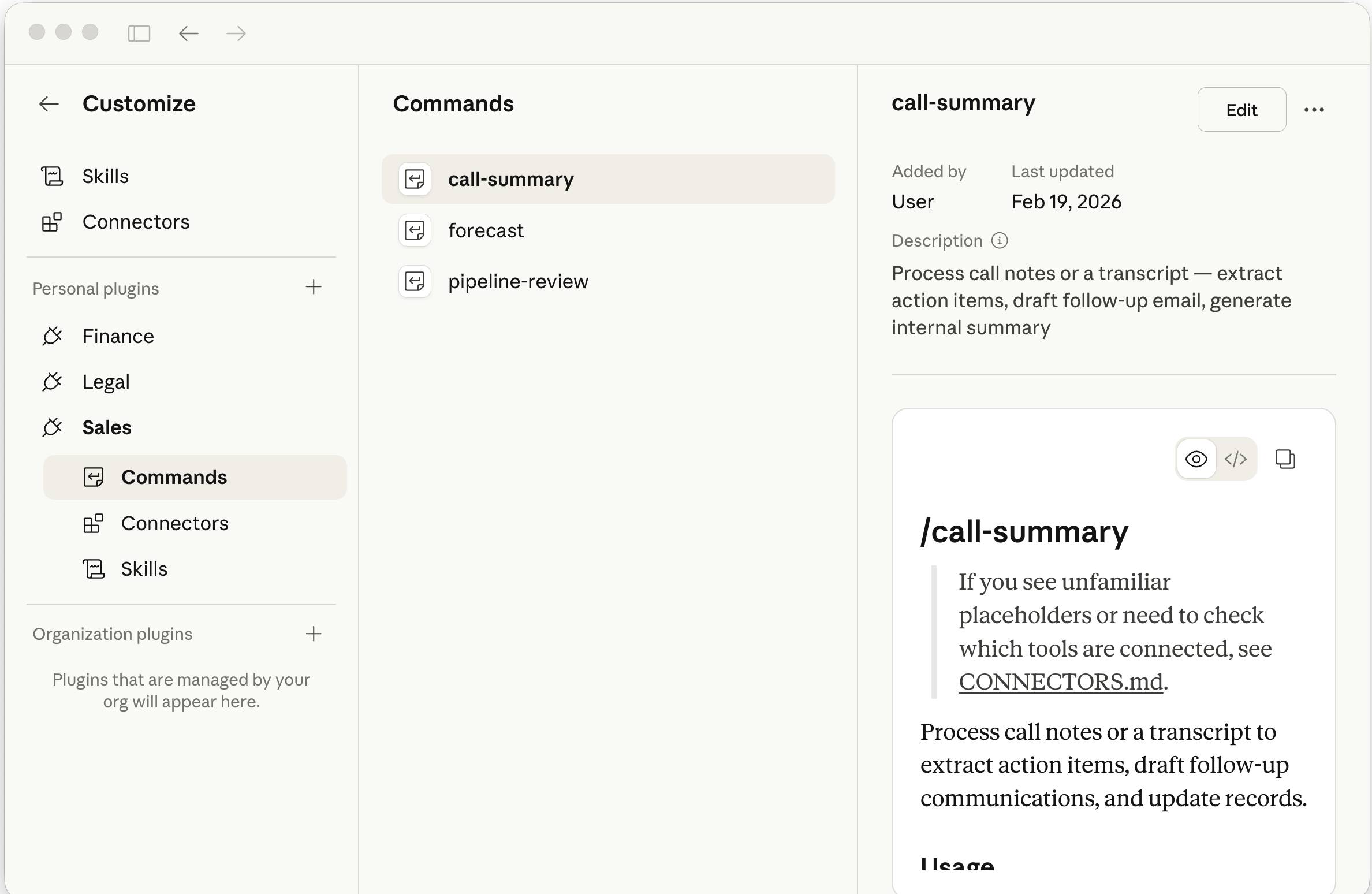
Plugins become more useful when they are specific to your team. What you customize depends on the work you do.
Sell
During the customization process, share your trading phases, your performance evaluation framework (MEDDIC, SPIN, Challenger, or your own), and your competitive position. Direct Claude to your CRM for account context.
Result:
/call-prepGenerate summaries using your trading framework. The order /forecastwill adjust the weighting for your sales process based on the probability of each stage.
Tip:
- If previous successful customer outreach proposals or activities are stored on a shared drive or CRM, point Claude to that. New drafts will inherit the structure and focus of what worked.
- Custom skills can be run on a schedule:
/pipeline-reviewevery Monday,/forecastevery Friday, your criteria are applied each time.
Finance
Share your account charts, key performance indicators, and closing procedures. Assign Claude to access your data warehouse to retrieve financial data.
Result:
/variance-analysisAnalyze deviations based on the factors you specify and mark what exceeds your thresholds. /reconciliationGenerate working papers in your format.
Tip:
- Assign Claude to your working paper templates or memo formats. The output will match the structure your team has created.
- If the previous quarterly closing package or a misplaced memo is in the connected drive, let Claude know so he can reference it. The output will be consistent across periods, and Claude will mark what has changed.
Legal
Share your standard perspectives on each type of clause: Which clauses are acceptable, which require negotiation, and which need to be escalated.
Result:
/review-contractMark the terms based on your perspective with your severity rating. /triage-ndaFilter based on your default settings for deadlines, jurisdiction, and exclusion clauses.
Tip:
- If your team retains approved terms (compensation clauses, contingency plans), please share them or show Claude where they are stored. Claude will suggest alternative terms from your library when discrepancies are detected.
- Previous revisions help Claude understand your negotiating style—the level of directness, the assertiveness of your backup options, your reasoning—and it will apply that to new proposals.
Marketing
Share your audience segment, channel mix, success metrics, and style guide.
Result:
/campaign-planBuild summaries that target your audience across your channels. /draft-contentCreate content in your own voice for your content types.
Tip:
- Claude reads visual reference materials—brand guide PDFs, PPTX templates, screenshots of your website—and identifies colors, fonts, and layouts. The output reflects that.
- Content you're satisfied with (emails, posts, orangepaign summaries) can help Claude understand the tone and structure more quickly and accurately than a description of your writing style.
FAQ
What is the best way to customize plugins in claude cowork?
Learn how to customize plugins in claude cowork with practical instructions, useful tips, and troubleshooting guidance for common issues.
What should you prepare before you customize plugins in claude cowork?
Key takeaway: Learn how to customize plugins in claude cowork with practical instructions, useful tips, and troubleshooting guidance for common issues.
What common mistakes should you avoid?
In Cowork, plugins provide Claude with expertise in your field—sales methodologies, financial frameworks, legal review guides, marketing orangepaign structures.
Related Articles
 The Skill and Plugin Ecosystem in Claude Cowork10 minutes read
 How to Use Claude Cowork to Run Your Business with AI12 minutes read
 What Is Claude Cowork?: What You Need to Know8 minutes read
 Setting up and Running Claude Cowork for the First Time5 minutes read
 Things to Know About Claude Cowork11 minutes read
 How to Build a Plugin from Scratch in Claude Cowork9 minutes read
Reader Comments 0
Sign in with email or Google to join the discussion.