This guide explains how to turn on Anti-malware Protection on Windows, with clear steps, practical tips, and important checks before you begin.
As data encryption and ransom attacks are increasing, enabling this feature is essential.
Ransomware is a type of malware that encrypts all data on a computer and ransom (usually digital currencies like Bitcoin to decode data).
How to enable Ransomware Protection
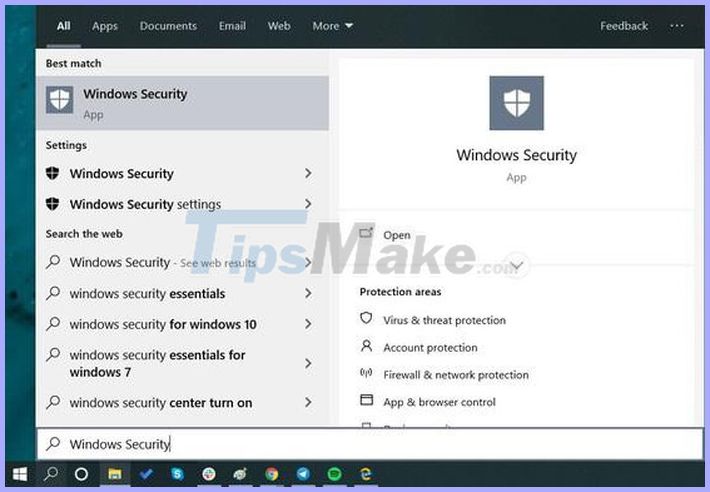
First, click the Start menu on Windows 10 and type in the Windows Security command line search box, then press Enter.
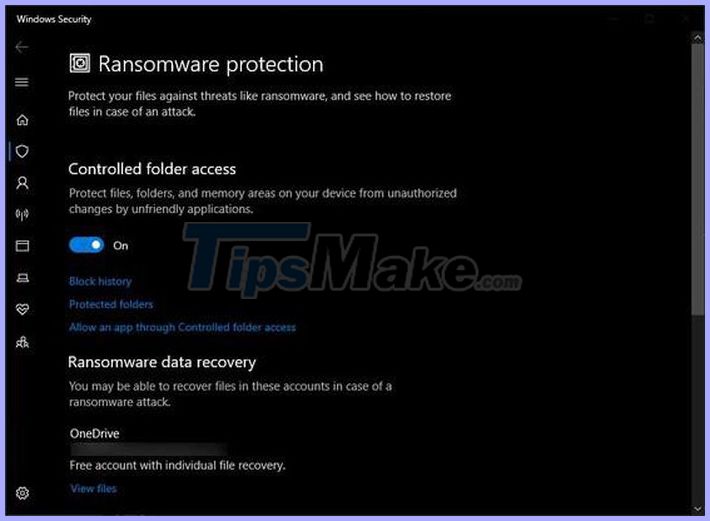
Next, users just need to find the item Virus & threat protection - Ransomware protection and enable the Controlled folder access option. Finally, restart your computer to apply the changes.
From now on, your computer will be protected from data encryption attacks, of course, everything will be relative.
Users need to be proactively alert, not open and click on links and attachments in emails containing. doc. pdf. zip. rar files. sent from people strange, or if an email is sent from someone you know, but the way you set the subject or the language is different.
Finally, notify the system administrator responsible for detecting suspicious files and links.




Reader Comments 0
Sign in with email or Google to join the discussion.