Table of Contents
This practical guide explains how to install hot corners for windows 10 with clear steps and useful context. It also covers common requirements, potential problems, and the details that can help you get better results.
A similar feature is also available in the Linux operating system through the GNOME desktop environment. However, this useful feature is not available on Windows. Instead, users will have to install a new open source application specifically for Windows 10 also called 'HotCorners'.
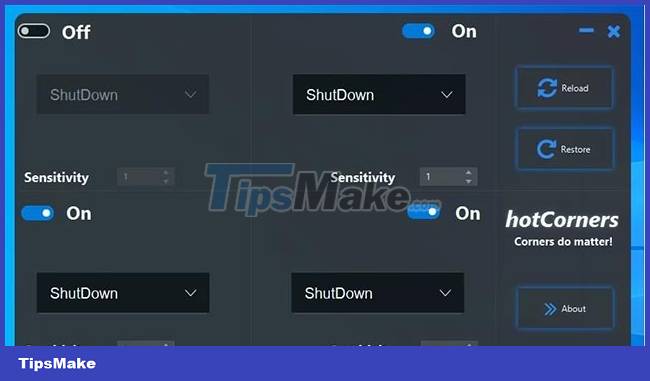
Through HotCorners, you can set up each corner of the screen to quickly execute a specified action, such as launching a program, shutting down the computer, signing out of Windows, turning off the screen, or opening the Task Manager.
Each screen corner can be independently configured for certain tasks as shown below:
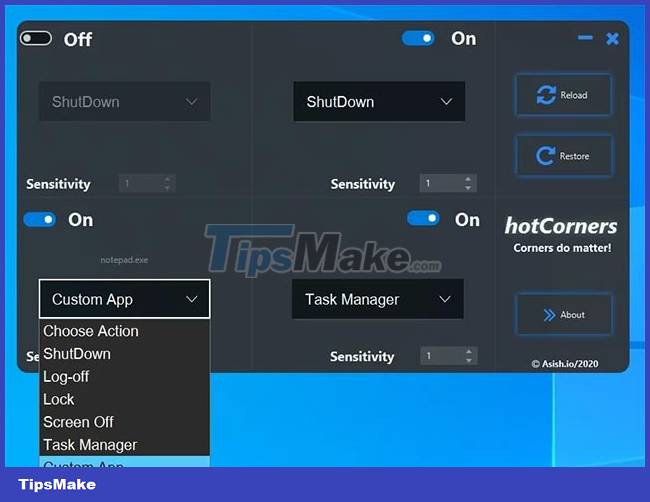
For example, you can set up the Windows Calculator application to launch when you move the pointer to the top right corner of the screen, access the Task Manager when you drag the pointer to the bottom left corner of the screen.
How to Install Hotcorners on Windows 10
To install HotCorners on Windows 10, you first need to make sure your computer has the latest version of the Java runtime installed. Then, follow these steps to use HotCorners:
- Download the HotCorners app from SourceForge.
- Open the HotCorners installer and follow the instructions.
- After successful installation, HotCorners will automatically run at system startup, and you can configure the application as you like.
If you try to launch HotCorners and get an error message that says Windows doesn't know how to open files, this means you don't have Java installed.
Conclusion
Understanding Hot Corners makes it easier to compare options, avoid common mistakes, and apply the information in this guide more effectively. Review the relevant requirements before making changes or choosing a solution.
FAQ
How do you install hot corners for windows 10?
Follow the steps in this guide in order, confirm the required settings or tools, and verify the result before making additional changes.
Is it safe to install hot corners for windows 10?
It is generally safe when you follow the recommended instructions, use trusted tools, and avoid changing settings you do not understand.
What should you do if the process does not work?
Recheck the requirements, restart the device or application when appropriate, and review each step for missed settings or compatibility issues.
Related Articles
 Cornering Steps in Autocad Trong4 minutes read
 YouTube Is Gradually Changing the Rounding of Video Corners for All Platforms4 minutes read
 Windows 11 Transparency and Rounded Corners Don't Affect PC3 minutes read
 How to Round the Corners of a Selection in Photoshop Is4 minutes read
 How to Rounded Corners of Photos in Photoshop4 minutes read
 Work Efficiently on Mac with Active Screen Corners7 minutes read
Reader Comments 0
Sign in with email or Google to join the discussion.