Table of Contents
Microsoft has introduced a feature that lets you continue using your favorite Android apps seamlessly right on your Windows 11 PC.
Windows 11 build 26120.5761 (Beta 24H2), Microsoft has introduced a feature that lets you continue using your favorite Android apps seamlessly right on your Windows 11 PC. With this feature, you can continue using or listening to Spotify songs, for example, from your phone to your computer. Here is a guide to enable Android app continuation mode on Windows 11.
How to continue using Android apps on Windows 11
Step 1:
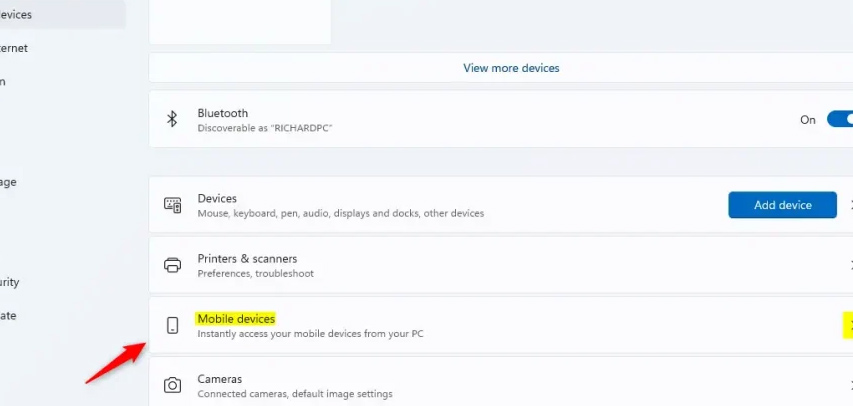
You access Settings On your computer, then click on Bluetooth & devices On the left. Then you look to the right And select Mobile devices To adjust.
Step 2:
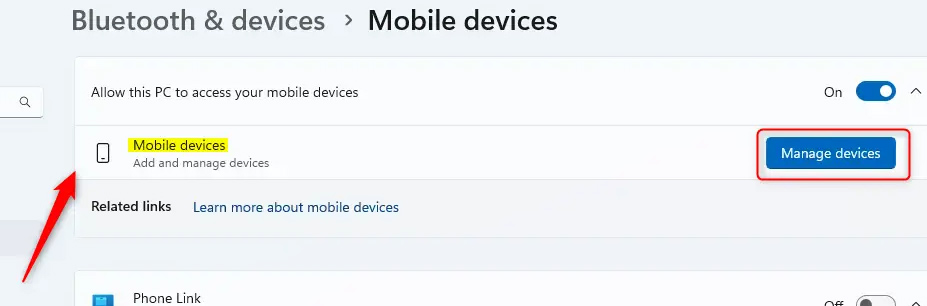
Switch to the new interface, Click Manage devices In Allow this PC to access your mobile device .
Step 3:
In the My devices section, Expand the mobile device you want to use . Then, Tap Resume And enable this mode.
You then have the option to continue using the Android app on your computer as shown and the message below will appear.
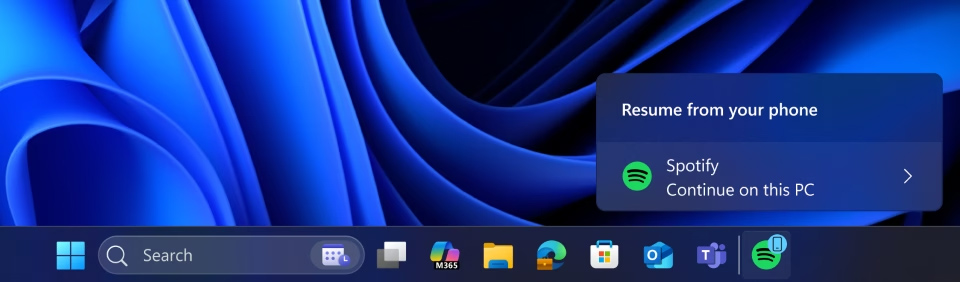
App Resume in Windows 11 enhances seamless integration between your mobile device and PC. You can easily continue using their favorite Android apps directly on their Windows 11 PC for a smoother experience.
FAQ
How do you enable Android app resume mode on Windows 11: step-by-step guide?
In practical terms, Microsoft has introduced a feature that lets you continue using your favorite Android apps seamlessly right on your Windows 11 PC.
What should you check before getting started?
Review the requirements, compatible device or software version, and any warnings described in the guide before making changes.
What should you do if the steps do not work?
Repeat the steps in order, confirm that your app or system is up to date, and review the troubleshooting details provided above.
Related Articles
 Resume Windows 11: How to Enable Resume Feature in Windows 113 minutes read
 How to Enable USB Debugging Mode on Android7 minutes read
 How to Enable Dark Mode in Microsoft Office on Android3 minutes read
 How to Enable Game Mode on Windows 102 minutes read
 How to Enable Experimental Windows 11 Mode on Google Chrome4 minutes read
 Focus Mode Android 10: How to Enable Android 10 Focus Mode3 minutes read
Reader Comments 0
Sign in with email or Google to join the discussion.