Table of Contents
The easiest way to pin someone's chat to your Android phone's home screen is to use the WhatsApp chat shortcut feature.
Using WhatsApp shortcuts gives us quick access to a conversation when we need it immediately. The easiest way to pin someone's conversation to the home screen of an Android phone is to use the built-in WhatsApp feature. This feature lets you add any contact to the home screen. Here's how to create a WhatsApp chat shortcut.
How to create WhatsApp chat shortcuts
Step 1:
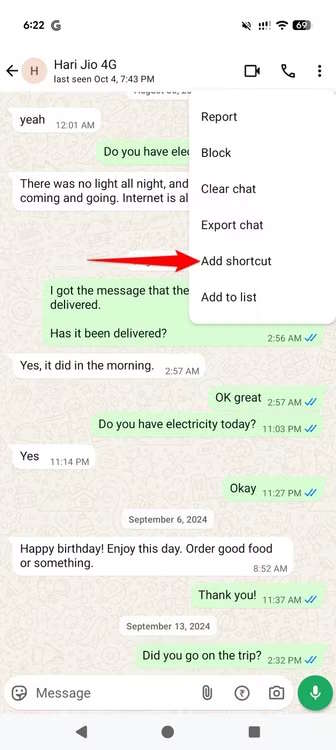
Open the WhatsApp conversation you want to create a shortcut for. Next, tap the 3-dot icon in the top right corner and select More > Add Shortcut.
Step 2:
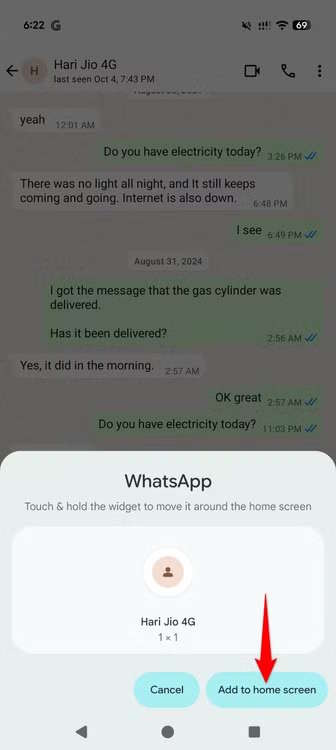
Now a notification screen appears to create a shortcut for this WhatsApp conversation, Click Add to Home Screen Below to do so.
On your home screen, you'll see a WhatsApp chat shortcut appear. Whenever you tap this shortcut, it will automatically open the relevant chat in the WhatsApp app on your phone.
To delete a chat shortcut, just drag it and select Delete. Deleting a shortcut will not delete the conversation it's associated with.
FAQ
How do you create WhatsApp chat shortcuts: step-by-step guide?
In practical terms, the easiest way to pin someone's chat to your Android phone's home screen is to use the WhatsApp chat shortcut feature.
What should you check before getting started?
Review the requirements, compatible device or software version, and any warnings described in the guide before making changes.
What should you do if the steps do not work?
Repeat the steps in order, confirm that your app or system is up to date, and review the troubleshooting details provided above.
Related Articles
 How to Create Whatsapp Chat Shortcuts3 minutes read
 How to Create AI Images in WhatsApp Chat: Step-by-Step Guide3 minutes read
 How to Create Whatsapp Contact Shortcuts on iPhone4 minutes read
 How to Search WhatsApp Chat History on Your Phone4 minutes read
 How to Transfer Whatsapp Chat History from Android to Iphone4 minutes read
 How to Mute Whatsapp Chat Group Notifications on Iphone and Android4 minutes read
Reader Comments 0
Sign in with email or Google to join the discussion.