Table of Contents
A strong password should be long, unique, and difficult to guess. The easiest way to achieve all three is to let a password manager generate and store a different random password for every account. For the few passwords you must remember, use a long passphrase made from unrelated words rather than a short, complicated-looking pattern.
The best default: generate a unique password
- Use a reputable password manager's generator.
- Choose a long random password; 16 characters or more is a practical starting point when the service allows it.
- Include letters, numbers, and symbols only when the site's rules require them. Length and uniqueness matter more than predictable substitutions.
- Save the password to the correct website entry and let the manager fill it only after you verify the domain.
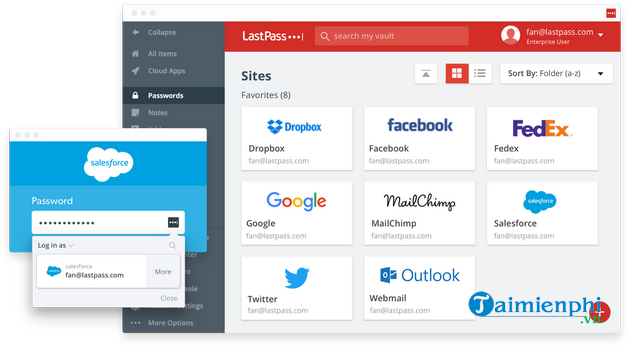
A password manager also makes breach response manageable: if one site is compromised, only that site's unique password must be replaced. TipsMake's password manager overview explains the main types and selection criteria, while the Bitwarden guide shows how generation and autofill work in practice.
When you need a password you can remember
Use a passphrase containing several unrelated words that you can visualize but that other people would not associate with you. Add length before adding confusing substitutions. Avoid famous quotations, song lyrics, keyboard walks, dates, addresses, pet names, and details visible on social media.
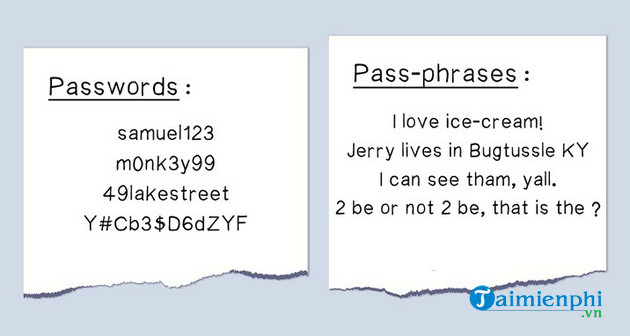
Do not copy a sample passphrase from an article, and do not reuse the same base phrase with a site name or changing number. Attackers know those patterns. If a service permits spaces, they can make a passphrase easier to type; follow the service's actual requirements.
Use a different password for every account
Password reuse turns one breach into access to several accounts. The email account deserves special protection because it can reset many other passwords. Give email, banking, cloud storage, work, and password-manager accounts completely independent credentials.
Turn on multi-factor authentication or a passkey
A strong password is still vulnerable to phishing and credential theft. Enable multi-factor authentication, preferably with a passkey, hardware security key, or authenticator app when the service supports it. Store recovery codes in a secure place separate from the everyday device.
See how to set up Microsoft Authenticator for two-factor verification. Never approve an unexpected sign-in prompt, and never give a one-time code to someone who contacts you.
Avoid these weak password habits
- Short “complex” passwords: A capital letter, number, and exclamation mark do not rescue a short, predictable word.
- Personal information: Names, birthdays, teams, schools, and phone numbers are often easy to research.
- Minor reuse: Adding “1,” the year, or the site name to the same password still creates a recognizable pattern.
- Password hints: A hint that reveals the structure or subject can help an attacker.
- Saving passwords in plain text: An unencrypted note or spreadsheet is easy to copy.
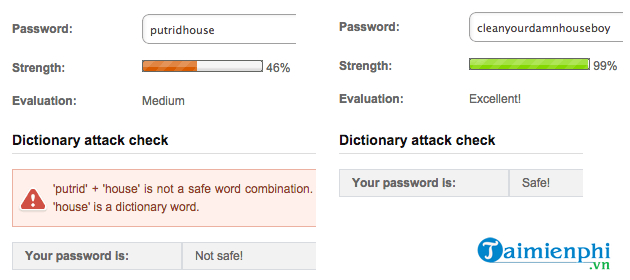
Do not change passwords on an arbitrary schedule
Routine forced changes often lead to small, predictable variations. Change a password when there is evidence or a credible warning that it was exposed, when you accidentally shared it, when it was reused elsewhere, or when an account shows unfamiliar activity. Otherwise, keep the strong unique password and focus on multi-factor authentication and recovery readiness.
If a password may be compromised
- Use a trusted device and navigate directly to the service.
- Change the affected password to a new unique one.
- Sign out other sessions and review recent account activity.
- Change any other account that reused the password.
- Enable multi-factor authentication and update recovery information.
- Scan the device if the password may have been captured by malware.
Finally, protect the password manager itself with a long, unique master passphrase and multi-factor authentication. Keep its emergency or recovery information somewhere you can reach if your main device is lost.
Related Articles
 How to Set a Secure Password: Step-by-Step Guide12 minutes read
 7 Attacks That Can Defeat a Strong Password7 minutes read
 List of Easy Passwords to Crack in 2023, in Less Than a Second Explained3 minutes read
 How to Use Ascii Characters to Create Strong Passwords5 minutes read
 5 Websites Create the Most Powerful Random Password7 minutes read
 How to Use the Smart Lock Password Generator for Chrome5 minutes read
Reader Comments 0
Sign in with email or Google to join the discussion.