Table of Contents
A PDF can require a password to open the file, or it can open normally while restricting editing, printing, or copying. The correct solution depends on which protection is present. Remove or recover security only when you own the document or have the owner's authorization.

If you know the password
Open the document in a trusted full PDF editor, enter the password, and open its security or document-properties settings. Change the security method to none, confirm the password when requested, and save a new copy.
Keep the protected original until you have opened and checked the new file. Removing security or editing a digitally signed PDF can invalidate its signature, so preserve the signed original for verification and records.
If the password is forgotten
There is no universal reset or backdoor for properly encrypted PDFs. A recovery tool tests candidate passwords. Long, random passwords may be impractical to recover, while remembered clues can narrow the search substantially.
The legacy PDF Password Cracker interface shown in the original article loads a local PDF and offers several search modes.
- Dictionary: tests words and variations from a list.
- Key or mask search: limits candidates using known length, prefix, suffix, character positions, or likely characters.
- Brute force: tests all combinations in the selected character set. Its workload grows exponentially with password length.
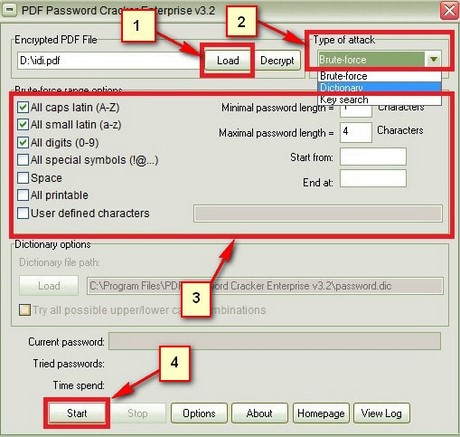
Use the smallest credible length range and character set. Check password managers, document notes, email messages, previous versions, and the original sender before starting a long search.
Save and verify the recovered copy
If the authorized tool finds the password or creates an unprotected copy, save it under a new filename and open several pages. Test links, forms, attachments, fonts, and signatures that matter to the document.
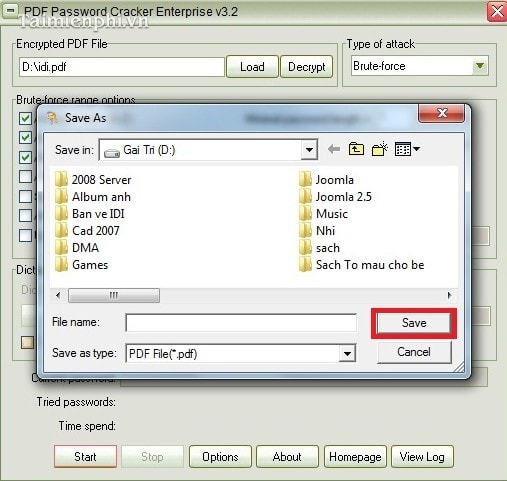
Do not overwrite the only copy until verification is complete. A password problem is different from a corrupt PDF; “damaged file” or parse errors may require another source copy rather than a password search.
Security and privacy precautions
- Do not upload confidential PDFs to an unknown online “unlock” service.
- Avoid old installers from download mirrors. Verify the publisher, digital signature, license, and current operating-system support.
- Work on a copy and keep the source offline when the document contains personal, legal, financial, or business information.
- Do not mistake a viewer's print workaround for proper password removal; it may flatten forms, remove links, reduce quality, or violate document permissions.
When recovery is not possible
Ask the document owner for the password or an unprotected copy. Look for an earlier export, cloud version history, or the source document used to create the PDF. For authorized editing after access is restored, see TipsMake's list of PDF editing tools and its overview of PDF readers.
Afterward, store the password in a password manager and retain a verified backup. If the file must remain confidential, replace the removed protection with an approved access-control or encryption method.
Related Articles
 Recover WinRAR File Passwords Using WinRAR Password Cracker3 minutes read
 Recover, Recover the Rar Password with Winrar Password Cracker3 minutes read
 What Happens to Passwords When You Delete a Password Manager App Explained7 minutes read
 Microsoft Allows Removing Microsoft Account Passwords3 minutes read
 How to Remove PDF File Password7 minutes read
 The US Seeks to Abandon the Use of Passwords4 minutes read
Reader Comments 0
Sign in with email or Google to join the discussion.