Table of Contents
Windows 8 and 8.1 support local accounts and Microsoft accounts. A local password applies only to that PC; a Microsoft-account password is tied to the online account and cannot simply be left blank. Identify the account type before changing anything.

Support note: Windows 8.1 reached end of support in January 2023. Microsoft no longer provides normal security updates for it, so an internet-connected PC should be moved to a supported operating system. See the Windows 8.1 lifecycle page.
Create a password for a local account
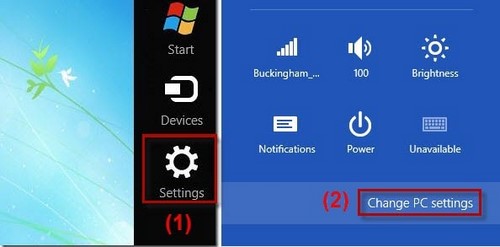
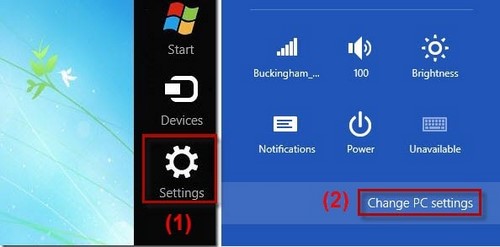
- Open the Charms bar, select Settings, then Change PC settings.
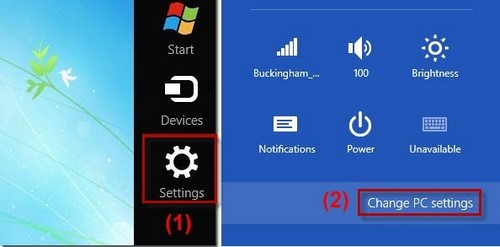
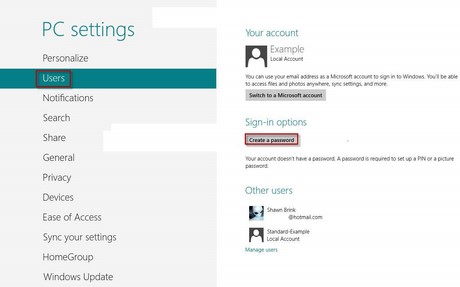
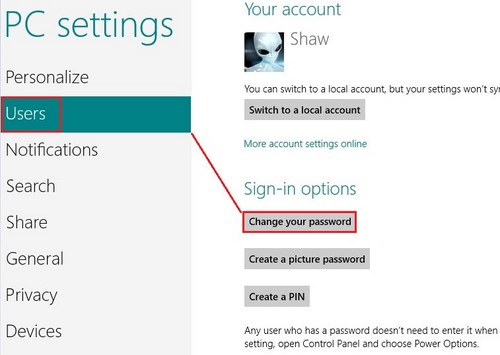
- In Windows 8.1, choose Accounts > Sign-in options. In some Windows 8 screens, the equivalent page is named Users.
- Under Password, select Add or Create a password.
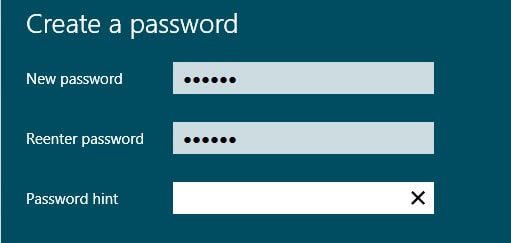
- Enter and confirm the password. Add a hint that helps you but does not reveal the password itself, then finish the wizard.
Press Windows + L to lock the PC and test the new password while you still have access to the account.
Change an existing password
The quickest path is often Ctrl + Alt + Delete > Change a password. You can also return to PC settings > Accounts > Sign-in options and select Change.
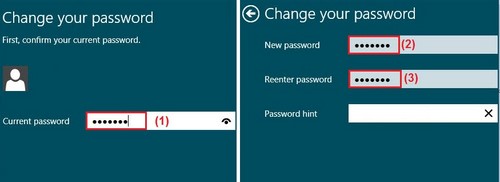
- Enter the current password.
- Enter and confirm the new password.
- Complete the wizard, lock the PC, and test the new password.
For a Microsoft account, the change applies to Microsoft services as well. Keep another signed-in device or current recovery method available before changing it.
Remove a local-account password
Removing the sign-in password allows anyone with physical access to open that account. It does not decrypt a BitLocker-protected drive, and it is not appropriate for a shared, portable, or work-managed PC.
- Open the Password Change screen and enter the current local password.
- Leave the new password and confirmation fields blank.
- Select Next > Finish.
A Microsoft account password cannot be removed this way. To use a passwordless local account, first switch to a local account through account settings, understanding that Microsoft sync and recovery behavior will change.
If you forgot the password
- For a Microsoft account, use Microsoft's official account-recovery process from another trusted device.
- For a local account, use the password-reset disk or security questions if they were configured.
- On a managed PC, contact the administrator. Do not use untrusted password-bypass utilities.
Store new credentials in a reputable password manager; TipsMake compares password-management options. Upgrading the unsupported operating system is more important than adding third-party folder-locking software.
Related Articles
 Summary of How to Create Strong Passwords and Manage the Most14 minutes read
 Instructions to Create, Change, Delete Windows 7 Login Password3 minutes read
 How to Change Your Windows or MacBook Desktop Wallpaper to a High-Resolution Image11 minutes read
 How to Create Secure Passwords on Fastword3 minutes read
 How to Export and Delete Saved Passwords in Firefox4 minutes read
 How to View and Quickly Delete Saved Passwords on Chrome9 minutes read
Reader Comments 0
Sign in with email or Google to join the discussion.