Table of Contents
WinRAR Password Cracker is a legacy tool that tests candidate passwords against an encrypted RAR archive. It does not remove modern encryption instantly, and it cannot guarantee recovery. Use it only for an archive you own or have explicit permission to access.

Prepare the archive and your password clues
Make a copy of the archive and keep the original unchanged. If it is a multipart archive, collect every volume. Open the copy with WinRAR or another trusted RAR tool to confirm that the problem is a password prompt rather than a CRC error, truncated download, or missing part.
Search your password manager, notes, email, filename, and old naming patterns. Record likely length, words, dates, capitalization, separators, and known prefixes or suffixes.
Load a local working copy
In the old interface shown below, select Open File and choose the copied archive. Verify the full path so you do not spend hours testing the wrong file.
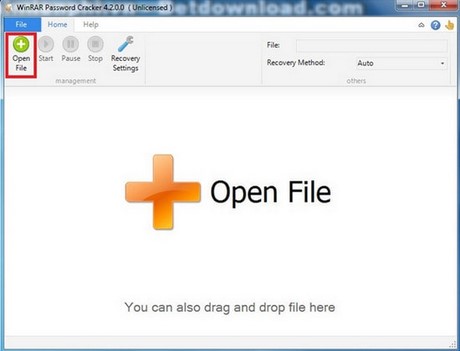
Do not download the discontinued-looking installer from an unknown mirror. Check the publisher, digital signature, malware-scan result, license, and current Windows compatibility before running any recovery utility.
Choose a recovery method before starting
- Dictionary: start here when the password was based on a word, phrase, name, or date. Add personal variants you are authorized to test.
- Mask or constrained search: use it when you know part of the password or its format. Although not shown as a separate method in every version, any setting that limits length and character positions can reduce the search dramatically.
- Brute force: use only after narrowing the length and character set. Testing every combination becomes impractical quickly as passwords get longer.
- Auto: convenient, but review the chosen range. An automatic search may waste time on characters or lengths you never used.
Configure Recovery Settings before selecting Start. Begin with the smallest credible search and expand it only after a complete pass finds nothing.
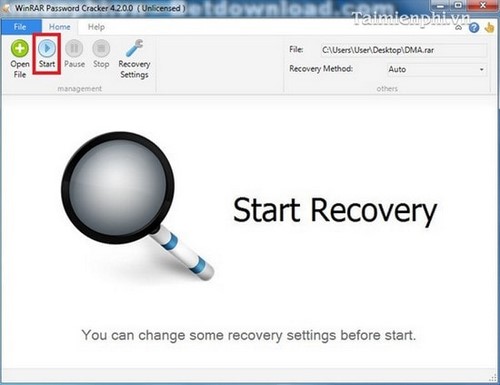
Monitor and verify the result
Keep the computer ventilated and connected to power. A long candidate search can sustain CPU load. If the tool reports a password, test it in a trusted archive application and extract to a new folder. Verify representative files before deleting the encrypted copy.
A reported candidate that does not open the archive may indicate a damaged file, unsupported RAR version, or false result. Recheck the archive with another trusted reader rather than immediately starting a broader search.
Protect sensitive data
Keep confidential archives offline; do not upload them to an unknown unlocking service. Such a service receives the encrypted file and may receive your password hints. Use a trusted device and local tool for personal, legal, financial, or business data.
If the search is not feasible
Ask the creator for the password or a fresh archive, restore an older extracted copy, or check backups and version history. Strong encryption is intended to resist guessing, so there may be no practical recovery path for a long random password.
For normal archive access, see extracting RAR and ZIP files and RAR-compatible applications. Store any recovered password in a password manager and keep a verified backup.
Related Articles
 Recover, Recover the Rar Password with Winrar Password Cracker3 minutes read
 Recover WinRar Password Using RAR Password Unlocker3 minutes read
 Remove or Delete PDF Passwords Using PDF Password Cracker3 minutes read
 The 5 Best Microsoft Office File Recovery Tools6 minutes read
 How to Remove PDF File Password7 minutes read
 How to Crack Winrar Password - Find the Winrar Compressed File Password6 minutes read
Reader Comments 0
Sign in with email or Google to join the discussion.