Table of Contents
WinRAR cannot reveal or reset a forgotten archive password. Recovery tools work by testing candidate passwords until one successfully decrypts the archive, so success depends on how much you remember and how strong the password is. Use these methods only on archives you own or are authorized to access.

First confirm that the archive is encrypted
Open a copy of the archive with WinRAR or another trusted RAR-compatible application. If extraction asks for a password, keep the original file unchanged and work on the copy. A CRC error, “unexpected end of archive,” or missing volume can indicate corruption or an incomplete multipart download rather than a wrong password.
Check password managers, old notes, filename hints, email messages, and the person who created the archive before running a search. A remembered fragment can reduce recovery time dramatically.
What the legacy RAR Password Unlocker interface offers
The tool shown in the original article asks you to open an archive and choose a search method.
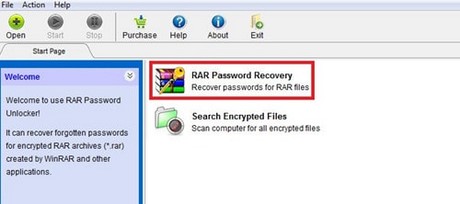
- Dictionary attack: tests words and variants from a list. It is useful when the password was based on a word, name, or familiar phrase.
- Mask attack: limits candidates using clues such as length, known characters, prefixes, suffixes, and character positions. This is usually the best option when you remember part of the password.
- Brute force: tests every allowed combination. The search grows exponentially as length and character set increase, so a long random password may be impractical to recover.
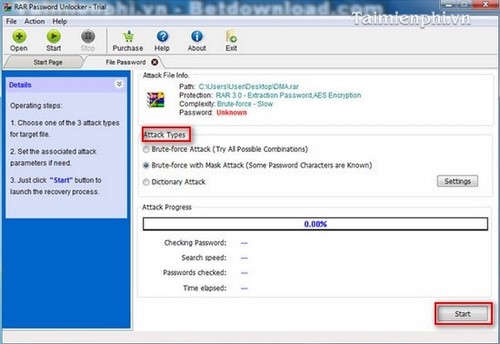
Configure the smallest credible search
Before selecting Start, enter every reliable clue:
- minimum and maximum length;
- lowercase, uppercase, digits, and only the special characters you may have used;
- a known beginning or ending;
- likely substitutions such as
a/@oro/0; - words, dates, or formats you used at the time.
Do not assume the software is “highly effective” for every archive. Strong modern encryption is designed to resist guessing, and no legitimate tool can guarantee recovery.
Download and privacy precautions
The screenshots and product instructions are old. Do not obtain the installer from an unknown mirror. Verify the publisher, digital signature, malware-scan result, licensing, and current operating-system support before running any password tool.
Keep sensitive archives offline and do not upload them to an untrusted “online unlock” service. Such a service receives the encrypted file and may also receive password clues. Use a dedicated, trusted computer for confidential business or personal data.
If recovery is not practical
Look for an unencrypted backup, an extracted copy, a previous version, or the original sender. If the archive is part of a multipart set, collect every volume before testing. For normal extraction and format support, see how to extract RAR and ZIP files and TipsMake's list of RAR-compatible tools.
After recovering the files, store the password in a password manager and create a verified backup. Do not remove encryption from sensitive data unless you have another appropriate protection method.
Related Articles
 Recover WinRAR File Passwords Using WinRAR Password Cracker3 minutes read
 Recover, Recover the Rar Password with Winrar Password Cracker3 minutes read
 How to Removing DNS Unlocker Adware5 minutes read
 How to Crack Winrar Password - Find the Winrar Compressed File Password6 minutes read
 Link Download Unlocker 1.9.2: Tool to Delete Any File on5 minutes read
 How to Unlock iPhone Without Passcode Using Passfab iPhone8 minutes read
Reader Comments 0
Sign in with email or Google to join the discussion.