Table of Contents
Cốc Cốc Mobile includes a built-in ad blocker, and current versions normally enable it by default. If ads appear, open the browser's settings, choose Ad blocking, and turn the feature on. You do not need a separate blocker for ordinary web pages opened inside Cốc Cốc.
Enable ad blocking on Android or iPhone
- Update Cốc Cốc from Google Play or the App Store.
- Open Cốc Cốc Mobile.
- Open the browser menu and select the settings gear. Depending on the release and phone layout, the menu or gear may appear at the bottom or top of the screen.
- Select Ad blocking or Ad filtering.
- Turn on Enable ad blocking.
- Return to the page and reload it.
Cốc Cốc's official mobile ad-blocking page says the feature uses Adblock Plus technology, is enabled by default, and provides per-site and filter-mode controls.
Follow the older iPhone interface
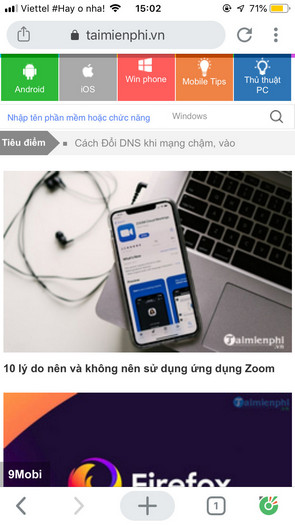
The screenshots below show a previous iPhone version. The current labels may say Ad blocking instead of Ad Filtering, but the sequence remains useful if your app still has this layout.
1. Open the Cốc Cốc menu.
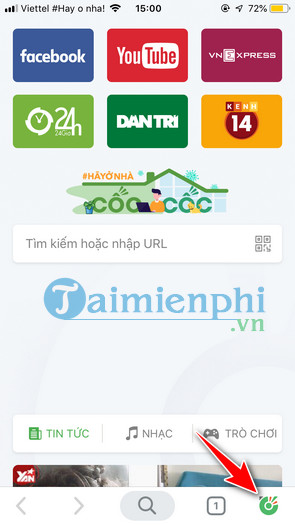
2. Select the settings gear.
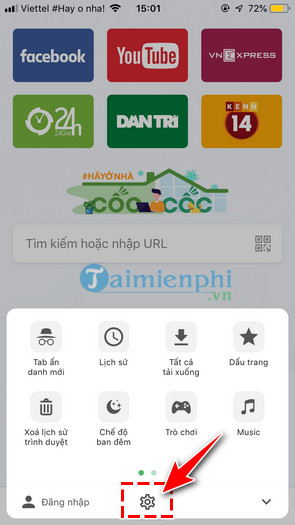
3. Open Ad Filtering.
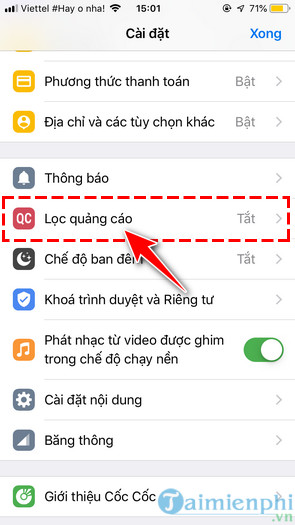
4. Turn the feature on.
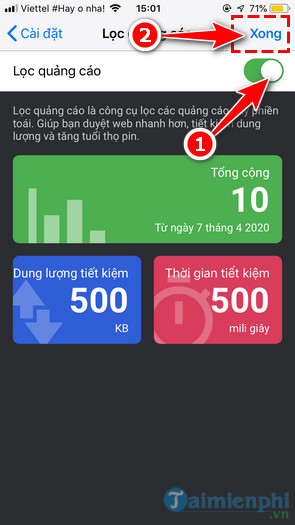
5. Reload a page to test.
Allow ads on one trusted website
A blocker can sometimes hide video, login, payment, comment, or consent controls. Make a narrow exception instead of turning it off everywhere:
- Open the affected site in Cốc Cốc.
- Select the shield icon or site-control button near the address bar.
- Turn ad blocking off for that site.
- Reload and test the missing feature.
- Turn blocking back on when the exception is no longer needed.
Only allow a site you intended to visit. If a page contains fake download buttons, redirects, or suspicious permission prompts, leave it instead of disabling protection.
Change filter mode and acceptable ads
Current Cốc Cốc releases may offer standard and stronger filtering modes, an Acceptable Ads option, and a list of allowed sites. Start with the default mode. A stricter mode can remove more page elements but may also cause more breakage.
Do not enable every available list automatically. Add a regional or specialized list only to solve a specific problem, then test your usual sites.
What the mobile blocker can and cannot do
- It filters web content opened inside Cốc Cốc.
- It may reduce data used by blocked network requests, but savings depend on the site and content.
- It can block many YouTube ads in the Cốc Cốc web player, but results can change when YouTube updates.
- It does not change ads inside unrelated native apps such as games or the official YouTube app.
- It cannot automatically remove sponsorships spoken or embedded directly in a video.
- It does not replace Safe Browsing, operating-system updates, or careful handling of downloads.
If ads still appear
- Update Cốc Cốc and restart the app.
- Confirm that ad blocking is enabled globally and not disabled for the current site.
- Reload the page or open it in a new tab.
- Restore the default filter mode if you changed advanced settings.
- Remove or disable duplicate DNS, VPN, or browser-blocking tools during testing.
- Clear the affected site's data if an old consent or anti-adblock state persists.
If the issue is specifically YouTube, see our Cốc Cốc YouTube ad-blocking guide for desktop and mobile troubleshooting.
If a page stops working
- Disable blocking for that site and reload.
- If the feature returns, re-enable blocking and use a less strict mode or remove a custom list.
- Check whether the problem also occurs with ad blocking off. If it does, the site, connection, or browser cache may be responsible.
- Report a reproducible issue to Cốc Cốc support with the page URL, browser version, phone model, and steps.
For advertising inside native Android or iPhone apps, browser settings are not enough. Our guide to reducing in-app ads safely explains official ad-free purchases, Safari blockers, and the privacy tradeoffs of DNS or VPN filtering.
Related Articles
 How to Block Any Call on Your Android Phone7 minutes read
 How to Block Ads on Android Without Rooting the Device4 minutes read
 How to Block Pop-up Ads on Android Devices6 minutes read
 How to from AZ How to Block Calls and Messages on Android Nougat5 minutes read
 Prevent Advertising Notifications on Android5 minutes read
 How to Block All Incoming Calls on Android: Practical Guide6 minutes read
Reader Comments 0
Sign in with email or Google to join the discussion.