Table of Contents
This guide provides a practical overview of Google has supported vietnamese virtual keyboard for gmail with clear explanations and useful details. It focuses on the information users are most likely to need.
A great feature to help you type Vietnamese in the Gmail Editor without having to install accent programs like Vietkey, Unikey, this helps when you use a computer without a typing program.
How Google Has Supported Vietnamese Virtual Keyboard for Gmail Works
Virtual keyboard Feature is available in Gmail since 2009 but it is only now supported in Vietnamese.
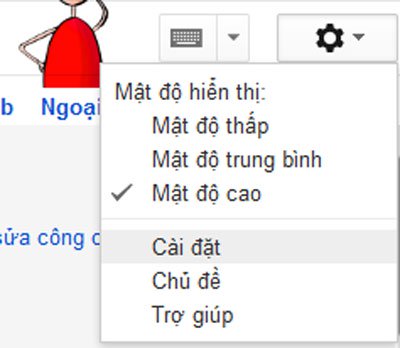
First login to your Gmail account, click the Settings wheel icon (this article illustrates the Vietnamese language, the steps in the English language are similar).
At the General tab, click Enable input tool - Use IME, transliteration or Virtual keyboard To enter the language you choose
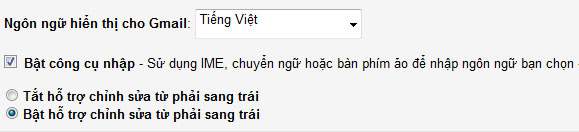
At this time, the Input Tools panel appears, drag down the scroll bar and find the virtual keyboard you want to use when editing the mail, here I choose the 4 supported Gmail encoding is Vietnamese Telex, Vietnamese VIQR, Vietnamese TCVN 6064, ê Vietnamese (type in dictionary style). After clicking OK, make sure to select Enable support from right to left editing, then click Save changes.
Back to the main interface you will see 4 typing methods that have been integrated into Gmail.
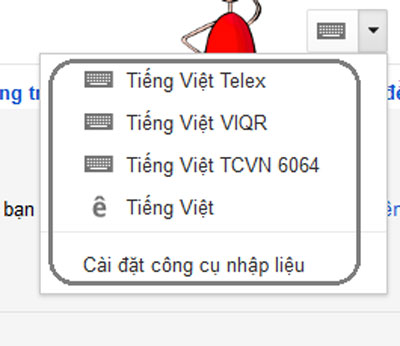
In the mail editor frame, select a typing method built into the virtual keyboard.
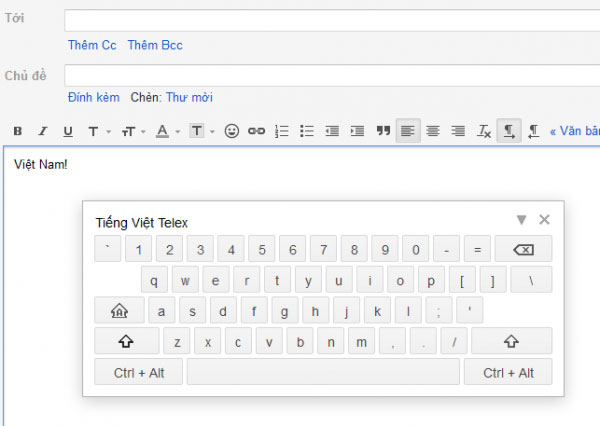
Telex typing method
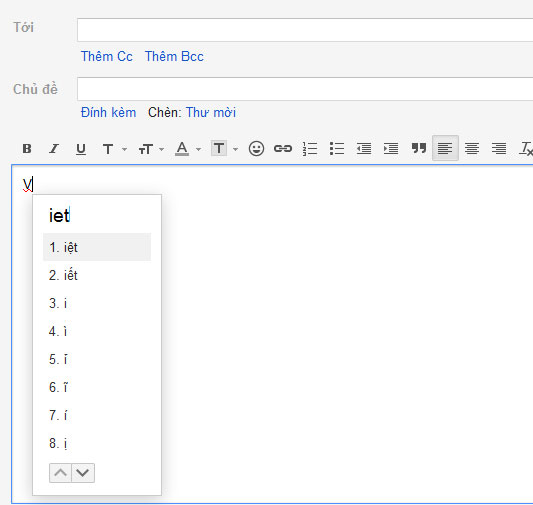
Type according to the suggested keyword
FAQ
What is the main benefit of Google has supported vietnamese virtual keyboard for gmail?
The main benefit is a clearer understanding of the topic and a practical way to apply the information covered in this guide.
What should I check before using Google has supported vietnamese virtual keyboard for gmail?
Confirm compatibility, review the required settings, protect important data, and use the latest supported version whenever possible.
What should I do if the result is different?
Repeat the steps carefully, verify permissions and version differences, and consult the product's official support documentation for changes not shown in the article.
Related Articles
 Instructions for Installing Google Vietnamese Virtual Assistant on5 minutes read
 Instructions for Switching to Vietnamese Language for Gmail2 minutes read
 6 Ways to Open Virtual Keyboard on Windows 109 minutes read
 Summary of Several Ways to Open Virtual Keyboard on Windows XP //8 minutes read
 How to Remove Vietnamese Keyboard from Win103 minutes read
 Finally the Virtual Assistant Google Assistant Also Officially Launched on May 6, After the Release3 minutes read
Reader Comments 0
Sign in with email or Google to join the discussion.