Table of Contents
This article provides a clear overview of Good Tips When Watching YouTube, YouTube Tips, with the main facts, useful context, and practical details organized for easy reading.
1. Automatically Replay YouTube Videos
YouTube only supports video playback only once and if you may need to watch the video again you have to press the Play button when the video ends. The YouTube Repeater service will help you to replay the current video when it finishes automatically To use this service, add a ' repeater ' after the YouTube link.
Quick Adsense WordPress Plugin: http://quickadsense. com/Example
https://www. YouTube. com/watch? v=FBnxwzBrtm4 to: http://www. youtuberepeater. com/watch? v=FBnxwzBrtm4
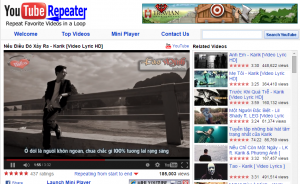 The default of the YouTube Repeater service is to play from the beginning to the end of the video, but you can play a certain part of the video by clicking Repeating from start to end and customize the start and end time parameters at the box Start at and End at.
2. Tips to Turn Off Ads When Watching YouTube
When watching videos on YouTube, advertising is probably the most annoying thing when it covers a part of the video, which makes you have to turn it off constantly or you can get it transferred via the advertising link. For Google Chrome browser: Visit the Chrome Web Store: https://chrome. google. com/webstore/category/apps
Step 1: Search for Adblock Plus in Search the Store.
Step 2: Click Free in Add-on Adblock Plus A window appears asking for confirmation of adding a new application to the browser. Click add (add) to confirm. 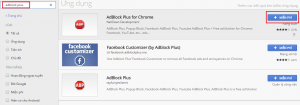
For Firefox:
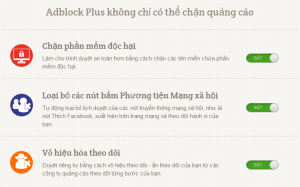
Add gadgets at the following link: https://addons. mozilla. org/en/firefox/addon/adblock-plus/ After entering the link, click Add to Firefox to install the add-on. 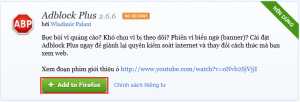 After that, you can choose one of 3 or all 3 available functions:
- Malware Blocking : Make the browser more secure by blocking domains containing malware.
- Remove Social Media Buttons : Prevent others from monitoring your Web browsing.
- Disable Tracking: Disable advertisements on the Website . If you may need to disable ads on YouTube, select Disable Tracking , by clicking switch from Off -> On mode .
3. Turn Off the Display of Related Videos
After the ad, the related video displays are also annoying for YouTube users. To turn off the display of related videos you click Share ( = ) → Embed (Embed) to get the embed code. You pay attention to the video link in the code and add to the end of the link '? Rel = 0' , for example from www. YouTube. com/embed/NE4x9B45OMA? list=RDLF-2UgmTZ4Y converted to www. YouTube. com/ embed / NE4x9B45OMA? list = RDLF-2UgmTZ4Y? rel = 0 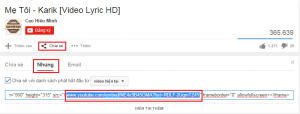
4. Download YouTube Videos to Your Computer
Method 1: Use software supporting Download Video YouTube. YouTube Downloader - YTD download YouTube videos easily
Method 2: To download videos to your device, you simply need to add 'pwn' before YouTube on the video link. Example: https://www. YouTube. com/watch? v=FBnxwzBrtm4 to: https://www. pwnyoutube. com/watch? v=FBnxwzBrtm4 A website will appear and you can choose the video format to download, such as FLV, MP4, or export the audio file from the video into an MP3 file. Note: This site does not support direct video downloading, it only lists websites that help you download videos in different formats. . 
5. Watch Videos When Blocked Users by Country
Some videos are restricted to viewers from specific countries' IPs. For some videos blocked in Vietnam will have the following message: The uploader has not made this video available in your country. Now, to be able to overcome the limit and watch the video, you change the YouTube link in the Address bar from YouTube. com/watch? v=xyz to YouTube. com/v/xyz. Immediately after that, the video clip will be played in the form of spreading the whole browser window, with no option to minimize. 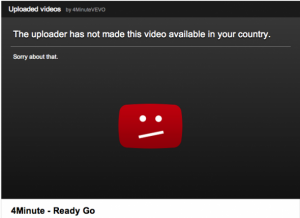
FAQ
What is the main focus of Good Tips When Watching YouTube, YouTube Tips?
The article explains the most important facts, context, and practical details related to Good Tips When Watching YouTube, YouTube Tips.
Who may find this information useful?
It is useful for readers who want a clear overview, practical context, and a better understanding of the subject.
What should readers verify before taking action?
Check current product versions, official requirements, regional availability, and any details that may have changed since the original publication.
Related Articles
 Simple Tips to Help You Stop Using Incognito Mode on YouTube7 minutes read
 How to View Youtube in the Form of Mini Window and Listen to5 minutes read
 Tips for YouTube May Be Unknown to Many People3 minutes read
 Tell You 5 Tips with YouTube: YouTube Tips6 minutes read
 5 Good Tips When Embedding YouTube Videos on Websites: Embed Clips3 minutes read
 Tips When Watching Videos on YouTube5 minutes read
Reader Comments 0
Sign in with email or Google to join the discussion.