
Technology
AudioPen: Turn Voice Notes into Edited Drafts
See how AudioPen turns spoken ideas into a draft, where it helps, and what to check before sharing or relying on the result.
Browse more Explore clear technology guides, practical tips and useful insights that help you understand devices, software and digital services.
See how AudioPen turns spoken ideas into a draft, where it helps, and what to check before sharing or relying on the result.

Review ChatGPT memory and custom instructions, edit a private summary, import it into Claude, and verify what the transfer actually retained.

Browse MeiGen prompt examples, adapt one to your subject, check model and credit settings, and refine the generated image.

Turn off Chrome's on-device AI model in Settings, understand what changes, and check the separate policy option for managed browsers.

Understand features and targets, read a small housing dataset, distinguish sampling from a census, and prepare data for evaluation.

Plan a short stomach-character storyboard, write a shot-level video prompt, generate test clips, and check continuity and health claims.
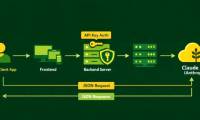
Create a server-side Claude API request with a protected key, then plan retrieval, tool use, cost controls, error handling, and evaluation.

Use Voyager folders, timeline navigation, layout controls, and Prompt Vault in Gemini while checking extension permissions and backup options.

Extract inventory rows from a messy message, flag missing units and dates, paste tab-separated data into Excel, and verify formulas.

Combine a curated NotebookLM source set with Gemini research and drafting, while keeping citations traceable and checking every outside claim.

Understand what everyday AI tools can do, where they make mistakes, and how to use them with checks for accuracy and privacy.

Generate a table, fill blank cells, or rewrite cell text in Canva Sheets with Magic Write, then review the suggested data before inserting it.

Use Magic Formulas to create Canva Sheets calculations from plain English, then test cell references, blank values, and conditions before copying the result.

Understand features, labels, models, training, inference, and learning methods through a simple house-price example and linear-model notation.

Create a Magic Write voice from your own writing sample, apply it to selected text, and check that the rewrite keeps the original meaning.

Use a task-based checklist to compare Claude 3 and GPT-4, while verifying current availability, costs, deployment terms, and output quality.

Turn notebook sources into a comparison table, specify useful columns, verify each row, and export the result for further analysis.

Use Gemini to organize a search-focused brief and draft, then verify facts, add original evidence, and check the finished page in Search Console.

Use Grok's response menu to export a PDF when available, or print to PDF from a browser and check the resulting file.

Plan a short stomach character scene, write a precise Veo prompt, generate a test clip in GeminiGen.AI, and review its audio and visuals.