Table of Contents
Canva's Magic Write can adapt selected text to a saved writing voice. A sample of your own prose helps the tool match tone, sentence length, and word choice. Treat the result as a draft: it can still change meaning or add claims that were not in the original.
Save a writing voice
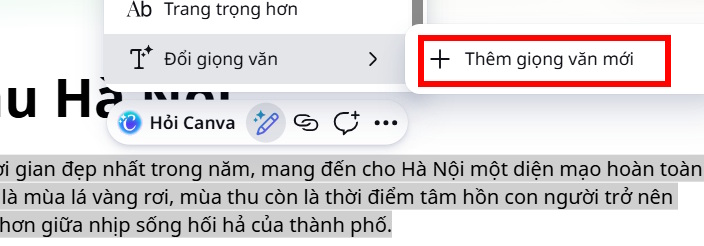
- Open a Canva design containing text, select the passage you want to rewrite, and open Magic Write → Change Voice.
- Choose Add New Voice if the option appears in your account.
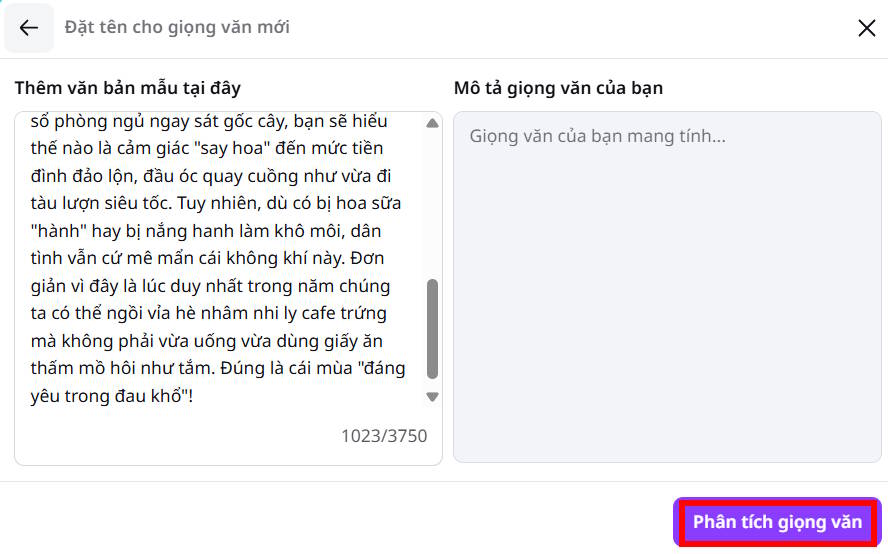
- Paste a representative paragraph you wrote or have permission to use. Choose a sample that reflects the intended audience; a casual social caption may be a poor model for a formal report.
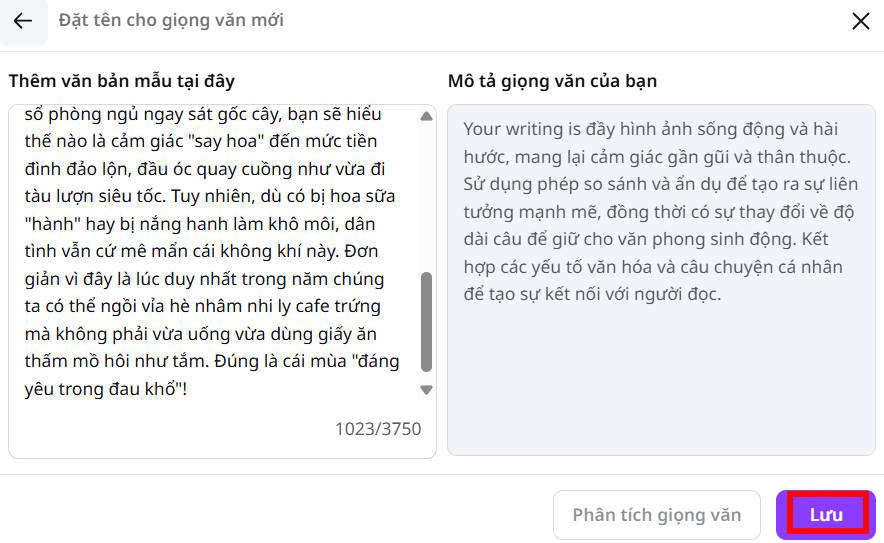
- Select Analyze the tone, review Canva's description, and save the voice.
Apply it and compare the text
Highlight a new passage, choose Magic Write → Change Voice, and select the saved voice. Compare the revised version line by line with the source. Restore omitted facts, correct changed names or figures, and remove wording that feels like an imitation rather than your style. If the result is too formal or playful, revise the sample or give a short instruction about audience and tone.
Canva describes personalized tone of voice as using a writing sample to guide Magic Write. The available controls may differ by plan or current interface. For other Magic Write tools, see TipsMake's Canva AI overview; for a more specific drafting request, see prompt output formats.
Do not paste private client material or another writer's work into a style sample without permission. A saved voice can guide wording, but you remain responsible for accuracy and the final edit.
Related Articles
 What Is Magic Write in Canva? Basic Usage of Magic Write: Clear Explanation6 minutes read
 Quickly Create Multiple-choice Questions from Slides4 minutes read
 Instructions on Creating Canva Sheets Using Magic Write: Explained5 minutes read
 How to Use Magic Morph in Canva AI: Step-by-Step Guide4 minutes read
 How to Write Mathematical Symbols in Canva3 minutes read
 Instructions on Creating Worksheets in Canva4 minutes read
Reader Comments 0
Sign in with email or Google to join the discussion.