Table of Contents
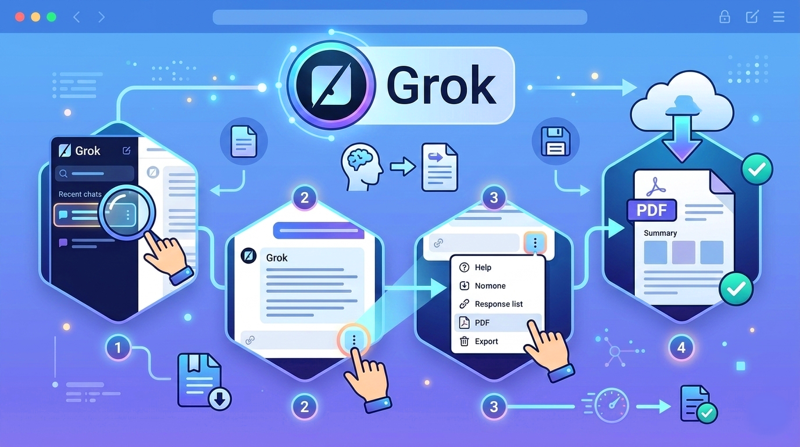
To save a Grok answer as a PDF, open the conversation, find the response you need, and check its options menu for Export to PDF. The screenshots below show that control in the web interface. If your version does not offer it, use your browser's Print command and choose a PDF destination.
Export a Grok response
- Sign in to Grok and open the conversation from your history.
- Locate the specific response. Open its More menu, commonly shown as three dots.
- If Export to PDF appears, select it and save the downloaded file. Open the PDF to check that code blocks, tables, and links are readable.
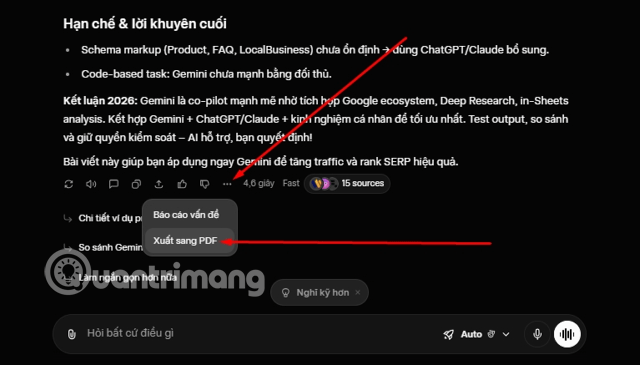
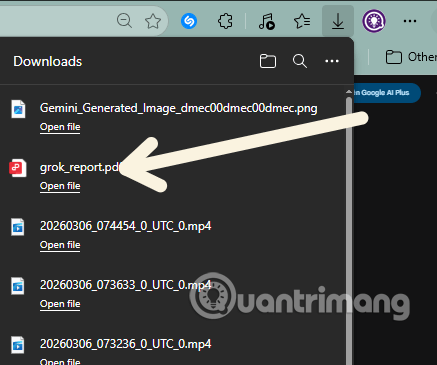
Menus can differ between grok.com, the X interface, and mobile apps. The screenshots document one interface and should not be taken as a guarantee that every version includes the same export option. If you need several messages, check whether the command exports only one answer or a larger conversation before sharing the file.
If the export option is missing
On a desktop browser, open the content you want to retain and press Ctrl+P (Windows or Linux) or Command+P (Mac). Choose Save as PDF or your system's PDF printer, inspect the page preview, and save. Browser printing may include navigation or truncate content hidden behind collapsed sections, so verify the result. TipsMake's browser print-to-PDF guide shows the same basic workflow for a different web page.
A PDF is a snapshot of an AI response, not proof that the answer is accurate or current. Check source links before citing it in a report. Also inspect the document for personal details before sharing or saving it on a shared computer. For controls over chat data, see Grok and other chatbot privacy settings.
Related Articles
 Instructions for Exporting Grok AI Chat History4 minutes read
 Experience the Hilarious Grok AI Chatbot on X3 minutes read
 How to Write Basic Code with Grok: Step-by-Step Guide11 minutes read
 More Professional, Easier Programming with Grok's Files Feature6 minutes read
 Negative Prompt AI Techniques5 minutes read
 What Is the Project Feature in Grok AI? How to Effectively Manage Your Projects with Grok10 minutes read
Reader Comments 0
Sign in with email or Google to join the discussion.