
Office information
How to Insert Header and Footer on PowerPoint When Printing
PowerPoint Create Header Footer is the focus of this article. Adding PowerPoint headers and headers to Header and Footer is similar to Word and Excel.
Browse more Find practical software and app guides, setup instructions, troubleshooting steps and productivity tips for popular desktop and online applications.
PowerPoint Create Header Footer is the focus of this article. Adding PowerPoint headers and headers to Header and Footer is similar to Word and Excel.

When sharing an Excel file, you don't want other people to edit the formulas, see the formulas, then lock the formulas again.
When aligning Word, you'll encounter some errors that make it impossible to adjust the layout, left or right margin of the text.

If you want to use the style of one text to another, you can copy the style between the two documents, export and import styles from the old Word file to the.
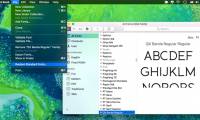
If you are not satisfied with the built-in fonts in Mac OS, why not download a new font from a free website and install it on your Mac?

Install Fonts on Linux is the focus of this article. The Linux system has many integrated fonts but you still can't find the font you need.
An image in a Microsoft Word document can replace thousands of words, but sometimes you want to quickly see the document, it can interfere with fast.
Co is a free and account-free web service that allows you to edit PDF files easily at any device without software.
Break Word Section is the focus of this article. Section Break on Word is used to divide text into different sections.
Lock Word File is the focus of this article. To restrict editing content on Word, we can lock that content but others can still read the content.

If you plan to hold a celebration, a birthday party, a wedding or a weekend party, then creating your own invitation can save you a lot of time and money.

PDFtk can not only split PDF files but also edit and modify these files. Follow the main steps and troubleshooting guidance.
Text Box on Excel is similar to creating on Word, helping you create artistic text frames, attracting content viewers.
On Excel, users can give a name to each individual cell or cell to easily remember the address of the corresponding cell when referring to the data area.

When PowerPoint presentations with older versions will often appear two black bands along the sides of the screen.

When you want to delete the entire link, the Hyperlink available in Word manually each link will take a lot of time.

Replace Microsoft Office is the focus of this article. Do not deny the best and most popular Microsoft Office today.

Separating Thousands of Excel is the focus of this article. In Excel, to separate units in a metric, we can use dots or commas.

You may be familiar with the basic concepts of Google Sheets, but Google spreadsheets have many great features you may not know.

When adding motion effects on PowerPoint, the presentation will create an attraction for viewers and increase the professionalism.