Table of Contents
Claude can help prioritize a Notion task database when the database contains reliable deadlines, effort estimates, dependencies, owners, and status fields. The connector reduces copying between tools, but it does not replace project judgment. Treat its output as a proposed plan that must be checked against capacity, business importance, and information that may not be written in Notion.
When the connection is worth using
The setup is most useful for a project with many tasks, competing deadlines, or dependency chains. It offers less value for a short personal list that is quicker to scan manually. If you are still choosing a workspace, compare Notion-style databases with these open-source note-taking apps.
Prepare the Notion database
Claude can reason only from information it can retrieve. Before connecting it, make the task schema consistent:
| Property | Why it matters |
|---|---|
| Task name | Identifies a specific deliverable rather than a vague topic |
| Status | Separates planned, active, blocked, and completed work |
| Due date | Shows time constraints; use a date only when it is real |
| Priority | Records the team's explicit importance level |
| Effort estimate | Lets the plan fit the available hours |
| Owner | Prevents assigning the same capacity twice |
| Dependencies | Shows which tasks unblock or wait for other work |
| Notes or acceptance criteria | Explains scope, risk, and what “done” means |
| Last updated | Helps identify potentially stale records |
Use relations for dependencies instead of hiding them in prose. Replace titles such as “Fix charging” with a concrete outcome such as “Validate USB-C port contact resistance and record pass/fail results.”
Connect Notion to Claude
Connector availability can depend on the Claude plan and organization settings, so check the current interface rather than relying on an old price or launch date.
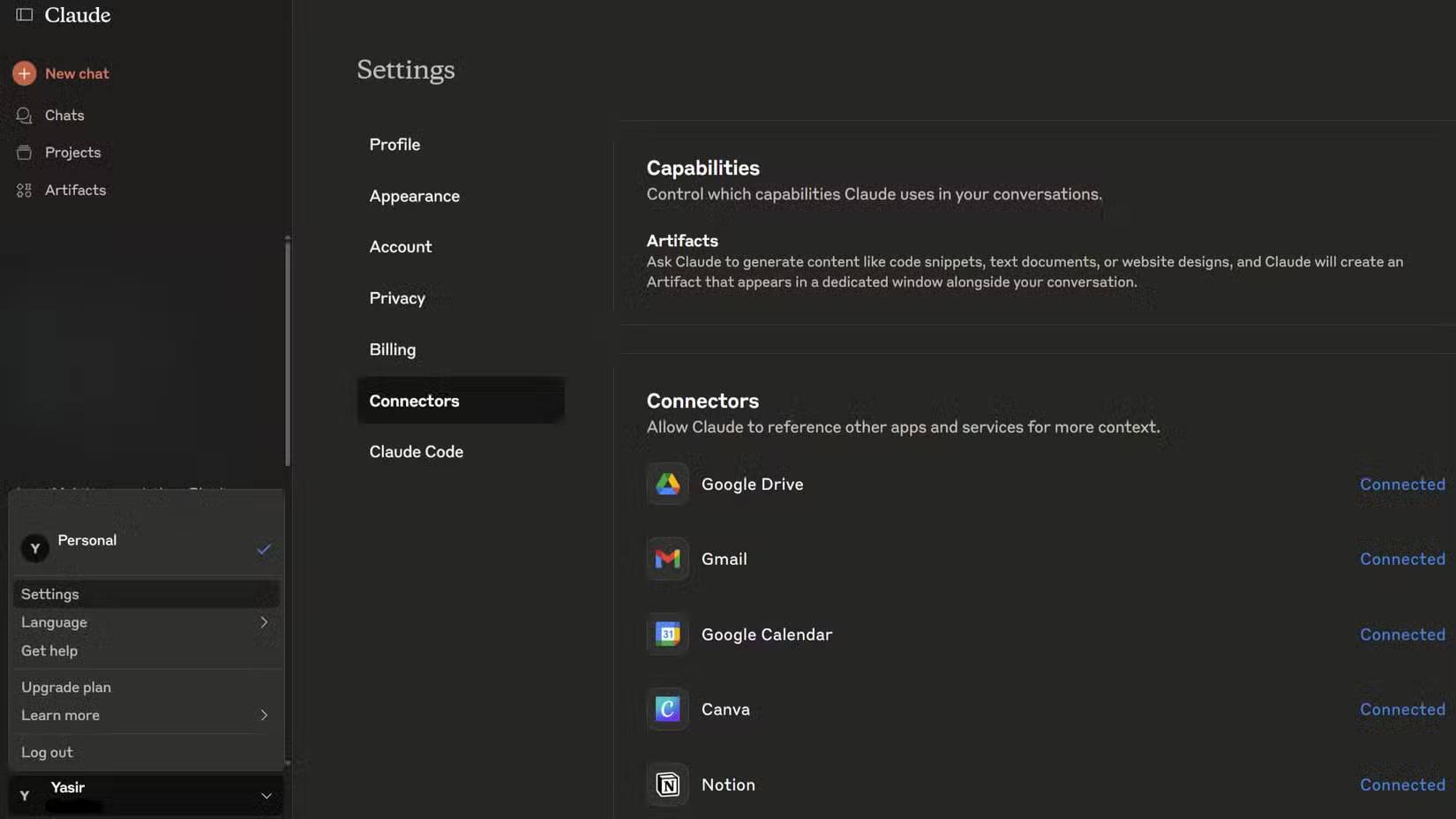
- In Claude, open Settings > Connectors, or open the Connectors Directory.
- Find Notion and begin the connection.
- Sign in to the intended Notion account and review the workspace, pages, and permissions being requested.
- Complete authorization, then return to Claude and verify that the Notion connector is enabled for the conversation.
- Review which connector tools may read or change data. Require approval for write actions until the workflow is well understood.
Anthropic's current connector guidance explains that connector access follows the permissions of the connected account. Claude should not be able to reach a Notion item that account cannot access, but a broadly privileged account can expose broadly available workspace content.
Ask for a plan that can be audited
A useful request defines the time window, available capacity, non-negotiable deadlines, and priority rules. It should also tell Claude not to invent missing facts.
Read the tasks in [database name] that are not complete.

Create a plan for the next 10 working days with a maximum capacity of 32 hours.

Priority order:
1. Tasks that unblock other work
2. Fixed external deadlines
3. High-impact work
4. Short tasks only when they do not delay a dependency

For each selected task, show:
- due date
- estimated hours
- dependencies
- reason for its position
- missing or conflicting data

Do not change Notion. Do not assume a deadline or estimate that is absent. Ask me to resolve conflicts before finalizing the plan.
This produces a reviewable recommendation rather than a bare ranked list. General assistants have different connector and planning strengths; the comparison of AI productivity tools can help if Claude is not the best fit for the rest of your workflow.
How dependency-aware prioritization helps
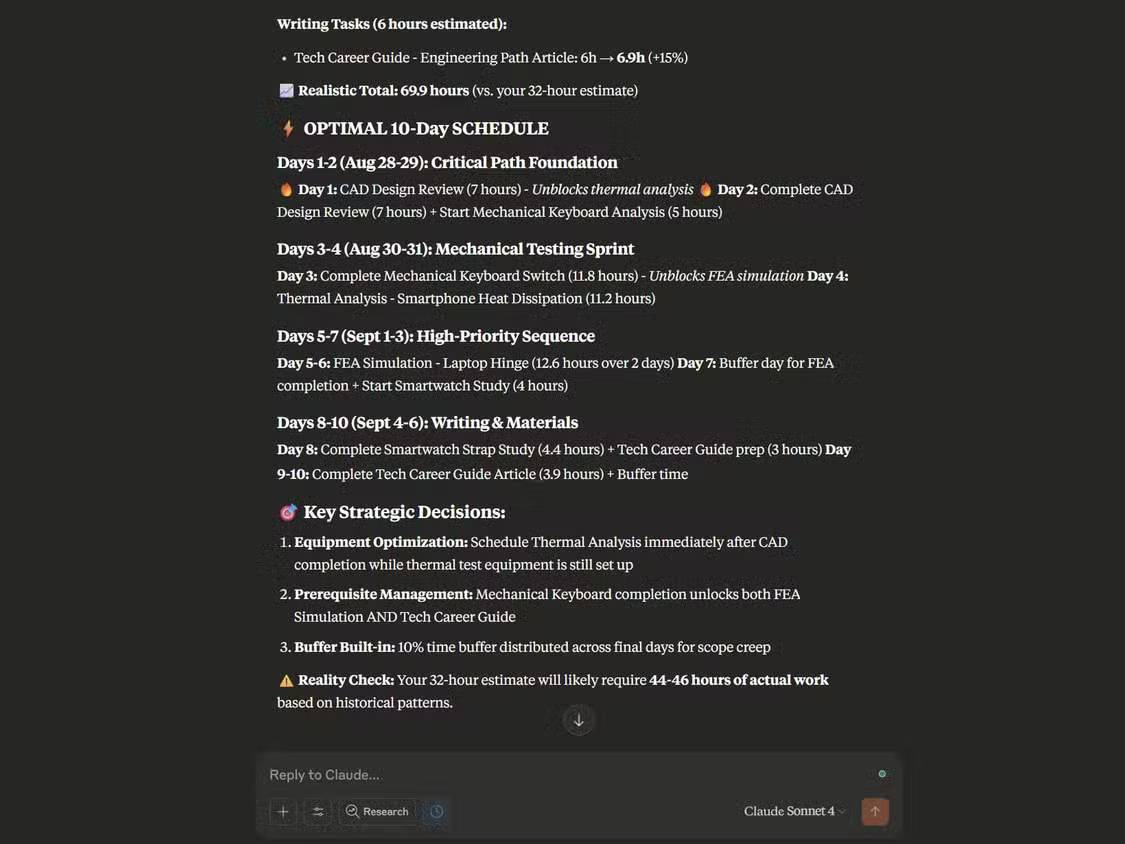
A task with a slightly later deadline may deserve attention first when several other tasks cannot start until it finishes. In the example shown below, design-review work is evaluated alongside estimated effort and downstream reviews rather than sorted by date alone.
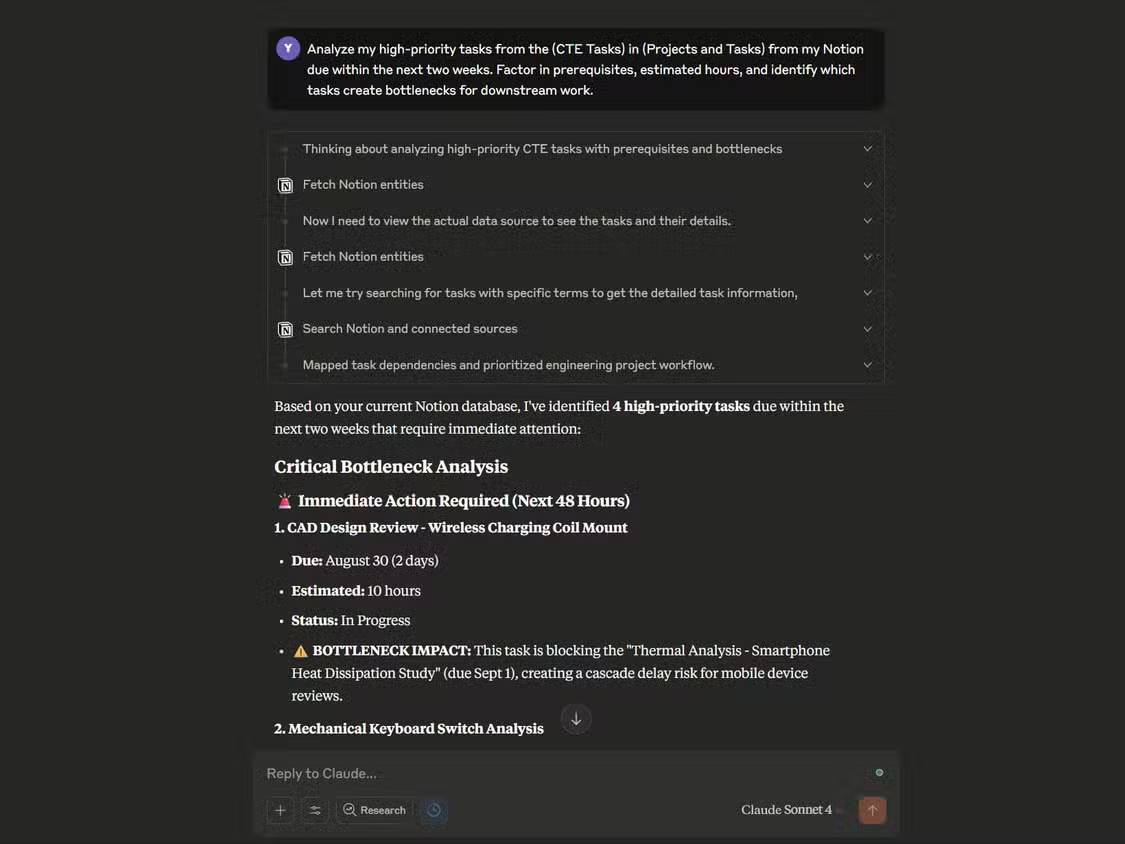
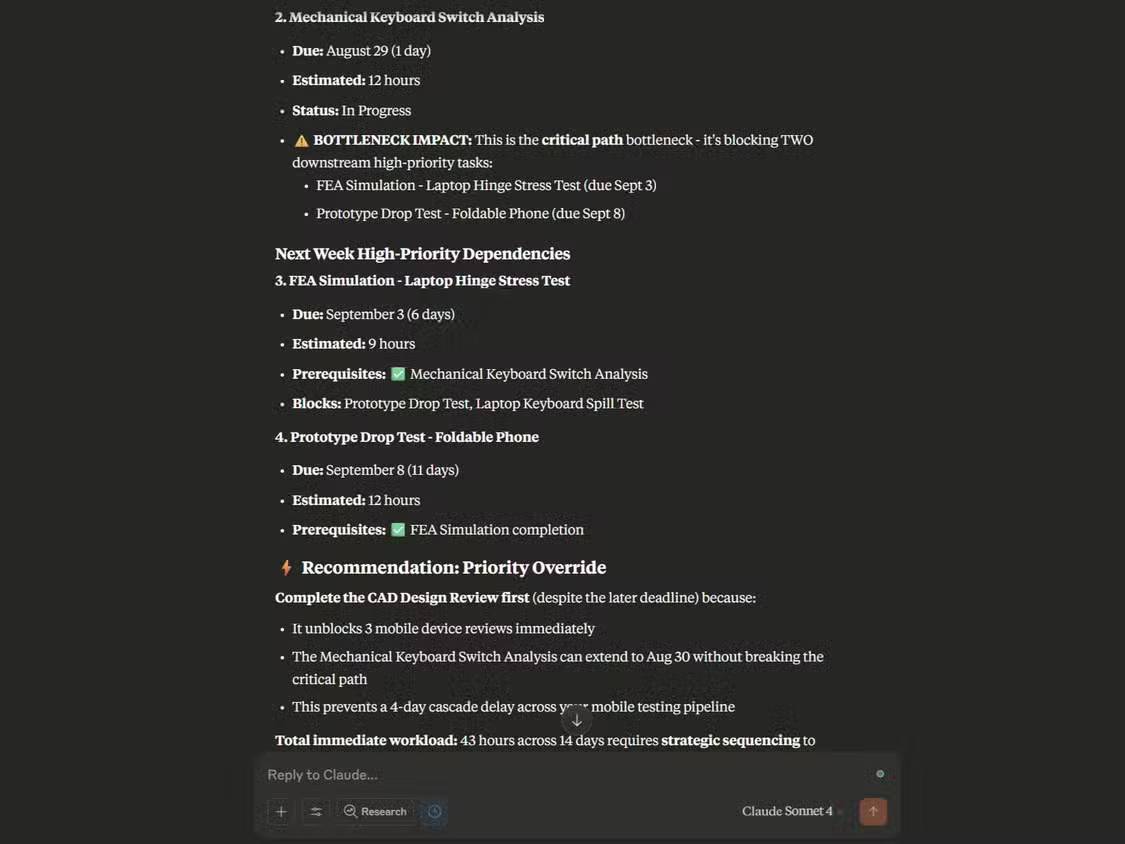
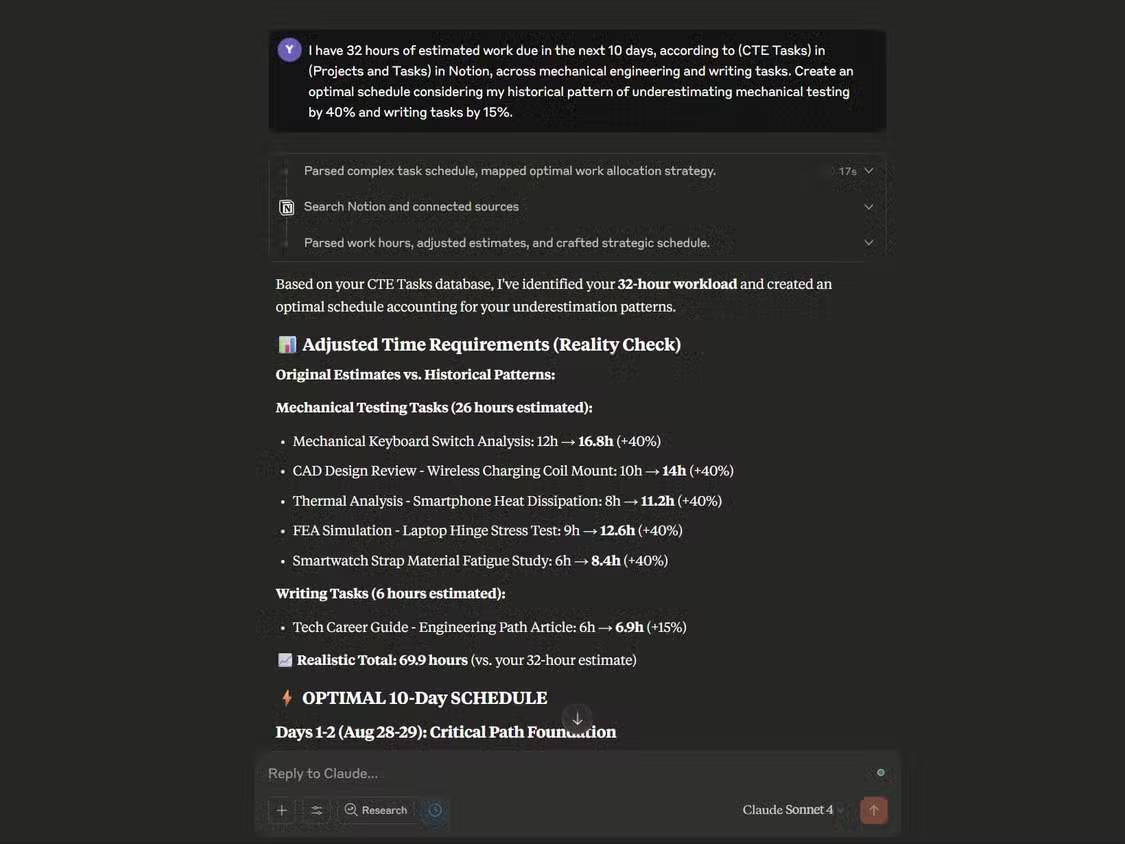
A capacity request should distinguish estimated effort from calendar duration. Four hours of work may occupy several days if it waits on a test, a client response, or a shared resource. Ask Claude to identify those assumptions rather than silently treating every task as continuously available.
Use impact analysis before moving a task
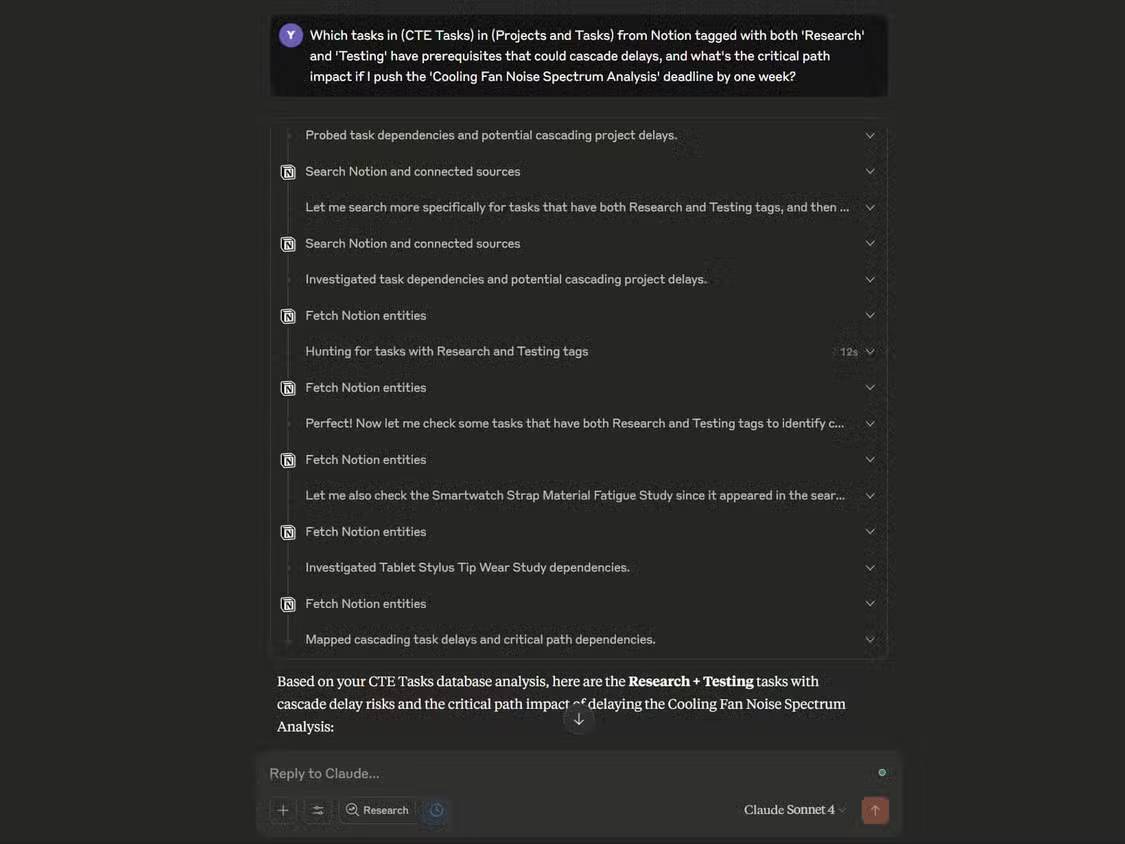
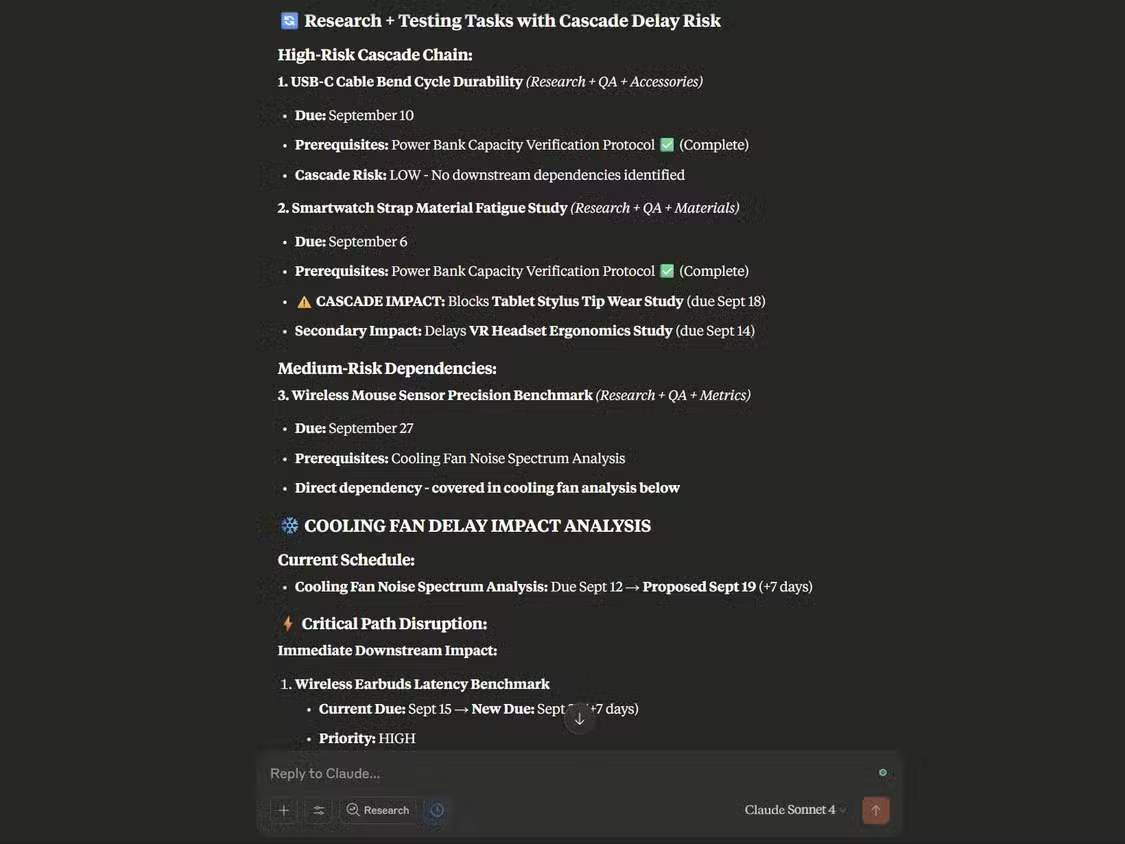
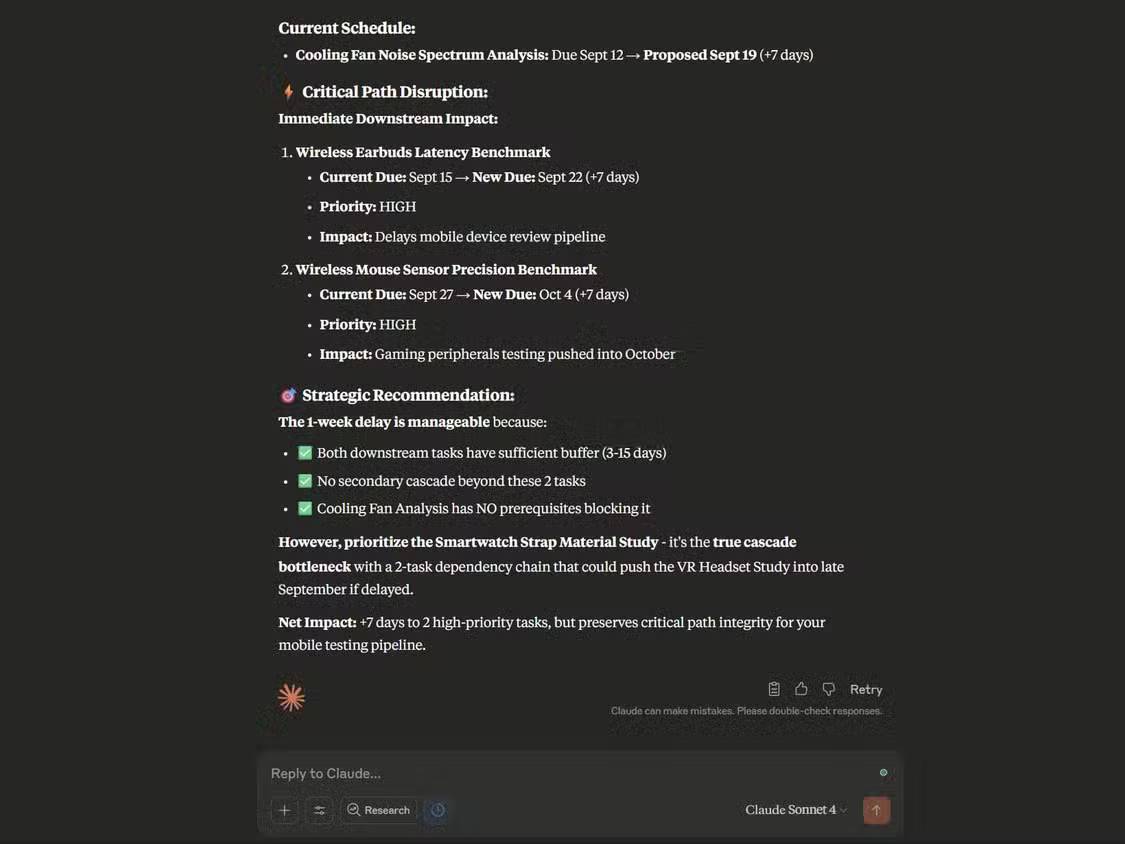
Before postponing an item, ask for the tasks that directly or indirectly depend on it. Then verify the relation fields in Notion. A plausible explanation is not proof that every dependency was retrieved or modeled correctly.
Check every recommendation
- Deadlines: Is the date fixed, preferred, or already outdated?
- Dependencies: Are they represented as relations, and are any external dependencies missing?
- Capacity: Does the plan include meetings, support work, and other commitments?
- Estimates: Are difficult and routine tasks being treated as equivalent because their labels look similar?
- Priority conflicts: If a task is marked High but the notes say it can move, ask a human to resolve the source data.
- Permissions: Did the connector retrieve only the intended workspace content?
- Writes: Preview proposed status, date, or assignment changes before allowing them.
Common limitations
Implicit knowledge is invisible
Claude cannot know that a client is flexible, a specialist is away, or a test rig is unavailable unless that information is accessible in the connected data or supplied in the request.
Inconsistent records produce misleading plans
Mixed date formats, duplicate status values, missing estimates, and free-text dependencies make comparisons unreliable. Clean the database before blaming the ranking logic.
Recent performance can distort an estimate
Completing several simple design tasks early does not prove that a complex simulation will finish early. Ask Claude to preserve the documented estimate and flag suggested changes for human approval.
Connector access expands the privacy surface
Do not connect a personal Claude account to confidential company pages unless organizational policy allows it. Workspace owners should review available controls, account access, and the consequences of granting read or write tools.
A safe operating pattern
- Begin with read-only analysis of a small, non-sensitive database.
- Compare the proposed order with a manual plan.
- Correct missing fields and dependency relations in Notion.
- Ask Claude to regenerate the plan and list what changed.
- Keep write actions approval-based, especially for assignees, deadlines, and status.
- Review connector access regularly and disconnect it when no longer needed.
If you need automation across several services rather than analysis inside one workspace, compare the options in this guide to AI workflow automation tools.
Related Articles
 Claude AI Can Use Computers Like Humans5 minutes read
 TOP best Claude alternative platforms14 minutes read
 Learn About Claude Opus 4.7: the Latest AI Model from Anthropic, Just Released12 minutes read
 3 Ways to Use Claude Code for Non-technical Tasks6 minutes read
 6 Fun Ways to Use Notion: Top Picks and Buying Guide12 minutes read
 9 Simple Tasks ChatGPT Can Handle in Seconds, Saving You Hours9 minutes read
Reader Comments 0
Sign in with email or Google to join the discussion.