Table of Contents
Claude can do more than answer questions. In supported Anthropic products, it can inspect what is on a screen and take actions such as clicking, typing, scrolling, navigating websites, or working with approved desktop tools. This is often called computer use.
The useful distinction is that computer use is an action capability, not a single universal Claude setting. The exact controls, supported apps, and availability depend on whether you are using Claude in a browser, a desktop workflow, Claude Code, a connector, or Anthropic's developer tools.
What Claude computer use can do
Computer use lets an AI agent operate an interface much as a person would. Depending on the product and the permissions you grant, Claude may be able to:
- open pages, follow links, fill forms, and move between browser tabs;
- read information displayed on a webpage or in an approved app;
- type, click, scroll, and select interface controls;
- organize files or use desktop tools within an allowed workspace;
- carry out multi-step tasks that combine research, data entry, and drafting.
For example, a supervised workflow could gather information from several pages, place it in a document, and prepare a draft email. It should not be treated as an unsupervised replacement for a person when a task involves money, private records, account permissions, or irreversible changes.
Where the feature appears
Anthropic offers related capabilities through several surfaces. Claude in Chrome can read and interact with websites in a supported Chrome session. Desktop-oriented workflows and Claude Code can work with files, applications, and development tools when access is approved. Developers can also build agents with Anthropic's computer use tool.
Connectors are different from screen control: they give Claude structured access to a service through that service's permissions. A connector may be more reliable than clicking through an interface, but it also inherits the access granted to the connected account. Product availability, plans, platforms, and beta limits can change, so check the settings and current documentation for the Claude product you use.
Why computer-controlling agents need supervision
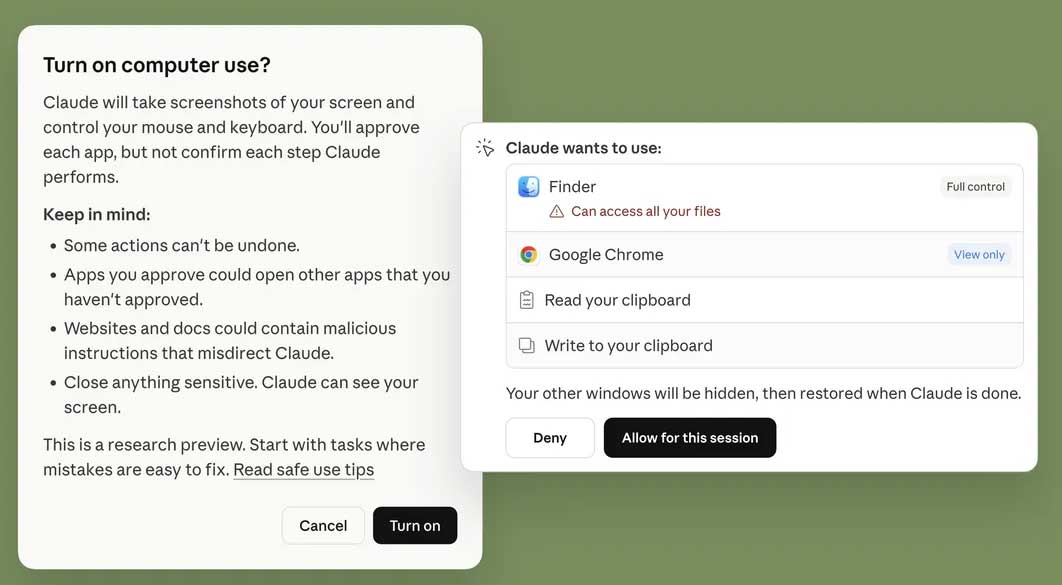
An AI agent can misunderstand an instruction, select the wrong control, or act on misleading content. One particular risk is prompt injection: text on a webpage, in a document, or in a message may try to instruct the agent to reveal data or perform an unrelated action.
Anthropic uses safeguards such as permissions and prompt-injection detection, but those controls do not make every workflow risk-free. Approval behavior also varies by product and action, so do not assume Claude will ask before every click.
How to use Claude computer use more safely
- Start with a narrow task. Specify the allowed site, folder, or application and define the expected output.
- Grant the least access required. Avoid broad file-system, account, or connector permissions when a limited folder or service is enough.
- Use a separate browser profile when practical. Keep unrelated logged-in accounts and sensitive sessions out of the agent's workspace.
- Supervise unfamiliar workflows. Watch the first run and pause if Claude enters an unexpected page or starts a different action.
- Require review before consequential actions. Personally approve messages, uploads, purchases, deletions, account changes, and publication.
- Treat external content as untrusted. Be cautious when a task opens email attachments, shared documents, or unfamiliar websites.
- Check the result. Verify files, recipients, form values, and summaries instead of assuming that task completion means the result is correct.
When using service integrations, review Anthropic's guidance on connectors and their permissions. Disconnect services that are no longer needed and periodically review what Claude can access.
Tasks that should remain human-controlled
Do not delegate high-impact decisions merely because the interface can be automated. Financial transfers, medical or legal decisions, security settings, credential management, employee actions, and permanent deletion deserve direct human review. For sensitive work, Claude is better used to prepare information or a draft than to execute the final action.
The practical takeaway
Claude computer use can remove repetitive clicking and connect several steps into one workflow, but its value depends on good boundaries. Give it a specific task, a limited workspace, and clear stopping conditions. Keep a person in control of anything private, irreversible, or financially significant.
Related Articles
 AI Is Being Deployed Effectively in Modern Warfare10 minutes read
 Claude AI User Guide: a Comprehensive Guide for 20268 minutes read
 Learn About Claude Opus 4.7: the Latest AI Model from Anthropic, Just Released12 minutes read
 3 Ways to Use Claude Code for Non-technical Tasks6 minutes read
 5 Applications That Can Be Replaced by Claude AI8 minutes read
 Why Should You Let Claude Handle Your Notion-related Tasks?8 minutes read
Reader Comments 0
Sign in with email or Google to join the discussion.