Table of Contents
To connect Telegram to n8n, create a bot with Telegram's official BotFather, save the bot token as an n8n credential, and then use a Telegram Trigger or Telegram action node in your workflow. The trigger receives messages and other updates; the action node sends messages, files, and chat actions.
The setup is straightforward, but two details matter: treat the bot token like a password, and use the chat ID from the incoming message data—not the update ID. This guide walks through a safe test from start to finish.
What you need
- A Telegram account.
- An n8n Cloud workspace or a self-hosted n8n instance. If you are new to the platform, start with this overview of AI automation workflows in n8n.
- A simple test workflow and permission to add the bot to the intended private chat, group, or channel.
For workflows that combine several services, it also helps to understand how n8n compares with other AI workflow automation tools.
1. Create the Telegram bot with BotFather
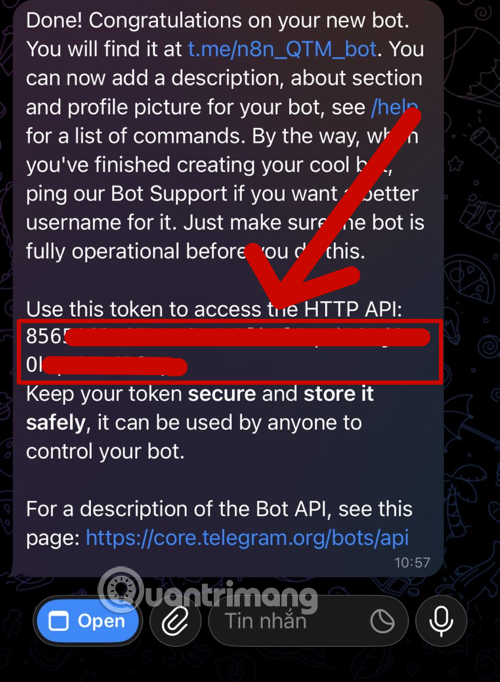
In Telegram, search for the verified @BotFather account and open the chat. Avoid similarly named accounts. Telegram documents the same process in its official bot tutorial.
- Send
/newbot. - Enter the display name that users will see.
- Choose an available username that ends in
bot. - Copy the access token BotFather returns.
Keep the token secret. Anyone who has it can make authenticated requests as your bot. Do not paste it into an article, screenshot, shared workflow, browser address bar, or chat message. If it has been exposed, revoke it in BotFather and create a replacement before continuing.
2. Add the Telegram credential in n8n
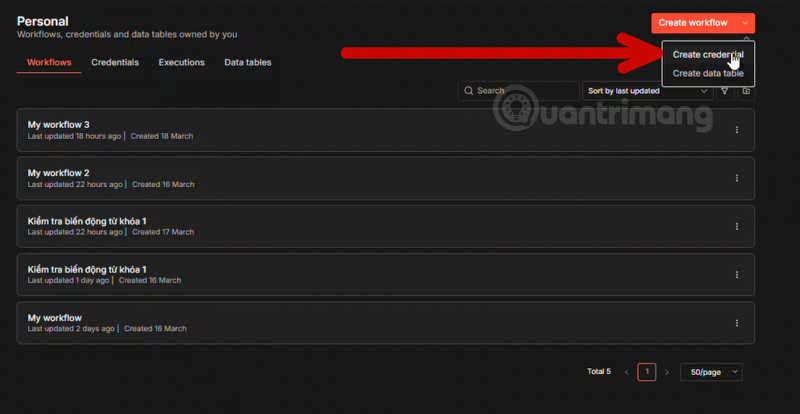
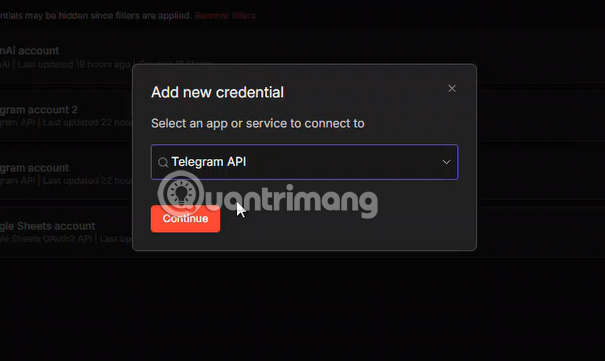
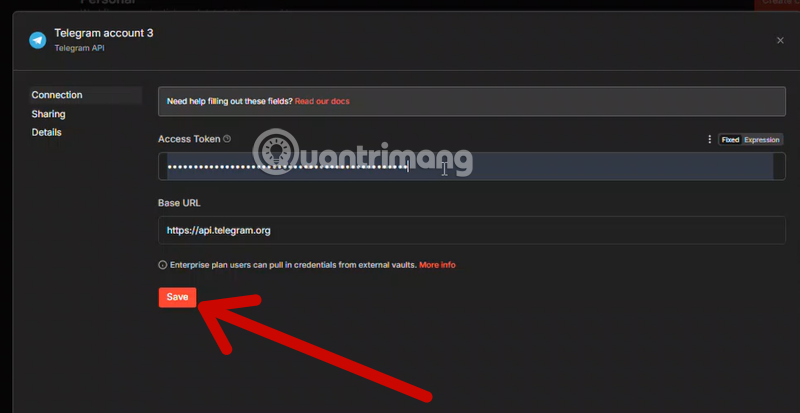
Open a workflow in n8n and add either a Telegram node or a Telegram Trigger node. In the credential selector, choose to create a new Telegram credential, paste the access token into the protected Access Token field, and save it. n8n's Telegram credential documentation describes the supported authentication method.
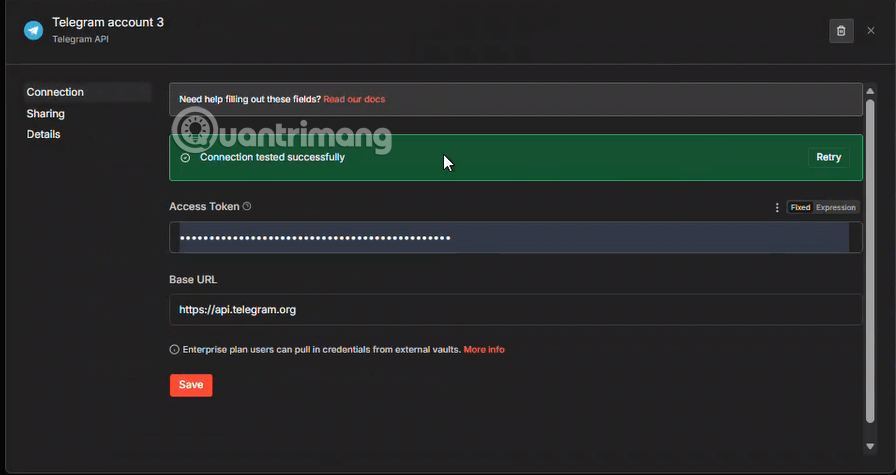
Give the credential a recognizable name if you manage several bots. Store production and test tokens in separate credentials so a test workflow cannot accidentally message real users.
3. Find the correct Telegram chat ID
A Telegram action node needs to know which chat should receive the message. The safest way to obtain the ID in n8n is from a test event:
- Add a Telegram Trigger node and select the credential you just created.
- Choose the message update you want to receive, then start listening for a test event.
- Open the intended Telegram chat and send the bot a message such as
/start. - Return to the n8n execution data and inspect
message.chat.id. Depending on the event type, the chat object may instead appear under a field such aschannel_post.
Do not confuse update_id with message.chat.id. The update ID identifies one incoming update; it is not the destination for a reply. Chat IDs are not a fixed number of digits, and group or channel IDs may be negative. For a public channel, some Telegram operations also accept a username in the form @channelusername.
Avoid manually placing the bot token in a getUpdates URL. A URL can be retained in browser history, server logs, monitoring systems, or screenshots. The n8n credential and trigger test keep the token out of that workflow.
4. Send a test notification
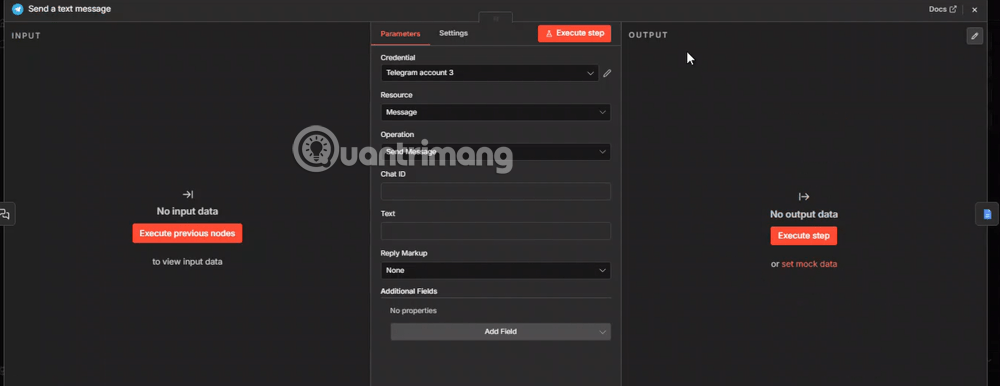
Add a regular Telegram node after a Manual Trigger or another test node. Select the saved credential, choose the message send operation, enter the chat ID, and write a short test message. Execute the node and confirm that the message reaches the correct chat.

When the destination is a group or channel, add the bot there first and grant only the permissions its task requires. A bot that only posts alerts should not automatically receive broad administrative rights.
5. Receive messages and build a two-way workflow
Use Telegram Trigger when an incoming message should start the workflow. A typical flow is:
- Telegram Trigger receives an update.
- An IF or Switch node checks the command and the sender or chat ID.
- The workflow retrieves or processes the requested data.
- A Telegram node sends the result back to
message.chat.id.
Keep early commands narrow and predictable, such as /status or /report. Treat all incoming text as untrusted input. Do not pass a Telegram message directly to a shell, database query, file path, or privileged API call.
Useful automation patterns
- Operational alerts: Send a message when a monitored workflow fails, an order needs attention, or a scheduled check finds an exception.
- Approval requests: Send a concise summary and wait for an authorized response before the workflow continues.
- Read-only reporting: Return a filtered sales, inventory, or service-health summary to an allowlisted chat.
- Structured data capture: Validate a user's answer before writing it to a spreadsheet or database. For a related setup, see the guide to creating Google credentials for n8n.
- AI-assisted replies: Summarize or classify a message, but remove sensitive data where possible and make clear when a response was generated automatically.
Security and reliability checklist
- Allowlist the chat IDs or user IDs permitted to run sensitive workflow branches.
- Never include the bot token in workflow output, error notifications, URLs, screenshots, or exported templates.
- Rotate the token immediately if it may have leaked.
- Validate commands and parameters against an explicit list. Never map a chat command directly to server restart, file deletion, or arbitrary code execution.
- Use HTTPS and a correctly configured public webhook URL for a self-hosted n8n instance that receives Telegram events.
- Test with a separate bot and chat before activating a production workflow.
- Plan for duplicate events, transient failures, and messaging limits. Use stable identifiers when deduplicating and add retries only where repeating the operation is safe.
- Escape or format dynamic text correctly when using Telegram's HTML or Markdown parse modes.
Troubleshooting
The trigger receives nothing
Confirm that the selected credential belongs to the same bot you messaged, the workflow is listening or active, and the bot can access the relevant chat. On a self-hosted installation, verify that n8n's webhook URL is publicly reachable over HTTPS and that the reverse proxy passes the required traffic.
The message is sent to the wrong place
Inspect the latest trigger event again and copy the value from the event's chat.id. Do not use update_id, message_id, or the sender's user ID unless the operation specifically calls for one of those values.
Formatting breaks the message
Check the node's parse mode and escape user-generated characters before inserting them into HTML or Markdown. During initial testing, send plain text first; add formatting only after delivery works reliably.
Related Articles
 How to Create a Telegram Bot and Connect to N8n Quickly8 minutes read
 A Guide to Creating a Telegram Bot That Anyone Can Do6 minutes read
 How to Downloading Telegram Videos, Saving Videos to Your Phone or Computer4 minutes read
 Instructions for Using Free Chat Software Telegram on Your Computer4 minutes read
 How to Create a Telegram Account on Computer and Phone3 minutes read
 Instructions for Playing Games on Telegram3 minutes read
Reader Comments 0
Sign in with email or Google to join the discussion.