Table of Contents
Online video editors are useful when you need to trim clips, add captions, build a social post, or create a presentation without installing a desktop program. The best choice depends on the job: Clipchamp and Adobe Express are approachable general-purpose editors, Powtoon and Wideo focus on animation, and InVideo emphasizes templates and AI-assisted creation.

Before uploading important footage, check the service's current export resolution, watermark rules, storage limits, and privacy terms. Plans change frequently, and a feature described as “free” may still require an account or place a watermark on the result.
Quick comparison
| Editor | Best for | What to check |
|---|---|---|
| Clipchamp | Everyday editing, screen recording, captions | Premium stock and brand features |
| Movie Maker Online | Basic edits without registration | Unusual interface and browser performance |
| WeVideo | Cloud projects, education, collaboration | Free exports have limits and a watermark |
| Magisto | Legacy automatic video creation | Web access now leads users toward Vimeo |
| Adobe Express | Template-based social videos | Some assets and tools require a paid plan |
| Wideo | Animated marketing and explainer videos | Export options vary by plan |
| Wave.video | Social video, recording, streaming | Free-plan length and watermark restrictions |
| Powtoon | Animated explainers and presentations | Free exports and premium assets are limited |
| Loopster | Legacy reference only | No dependable current editor page |
| Kizoa | Legacy slideshow and social-video editing | The original web service is no longer a reliable choice |
| InVideo | Templates and AI-assisted video creation | Free exports include a watermark |
1. Clipchamp: a practical all-round editor
Microsoft Clipchamp combines a timeline editor with templates, stock media, screen and webcam recording, automatic captions, text-to-speech, and other assisted tools. It is a strong starting point for trimming footage, combining clips, resizing video for social platforms, and producing tutorial or presentation videos.

The free editor can export at 1080p, but premium stock, brand controls, and some advanced features may require a subscription. Review any premium-item indicators before finishing a project so you do not have to replace assets at export time. For a phone-focused alternative, see our guide to editing videos with CapCut.
2. Movie Maker Online: basic editing without an account
Movie Maker Online handles common jobs such as trimming, joining, rotating, changing speed, adding transitions, and combining video with photos, text, or music. The service says it works without registration and exports without its own watermark.
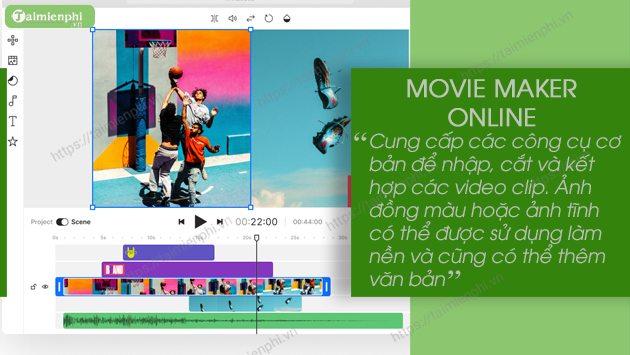
Its page layout is less conventional than a desktop-style timeline, so test it with a short, non-sensitive clip before committing to a large project. Browser-based rendering can also be demanding on older phones and computers.
3. WeVideo: cloud editing and collaboration
WeVideo is designed for browser-based editing across computers and mobile devices. It provides a timeline, templates, stock assets, narration and screen-recording tools, and features aimed at classrooms and teams. Cloud projects are useful when several people need to work from different devices.
The free version is best treated as a trial: publishing time is limited and exports carry a WeVideo watermark. Check the current plan comparison before starting a long project or using premium stock media.
4. Magisto: a legacy automatic video maker
Magisto became known for automatically turning selected photos and clips into short, music-driven videos. That simple workflow influenced many newer template and AI-assisted editors.
Magisto is now owned by Vimeo, and its web address directs users toward Vimeo's video tools. Anyone following an old Magisto tutorial should use Vimeo's current browser editor or choose another active service in this list instead of assuming old Magisto plans and features still apply.
5. Adobe Express: templates and quick social content
Adobe Express offers drag-and-drop editing, trimming, cropping, scene rearrangement, transitions, filters, text, music, and templates. It is particularly convenient for social posts and branded graphics because video, images, and other design formats share one workspace.
Projects save to an Adobe account and can be downloaded as MP4 files. Free templates and assets are available, but some stock content, resizing options, and brand features may be restricted to paid plans. Check the license shown for any stock asset you intend to publish commercially.
6. Wideo: animated explainers and marketing videos
Wideo is better suited to animated scenes, presentations, product demos, and explainer videos than to precise editing of long camera footage. Users can start with a template, upload their own media, and animate text, shapes, and objects with a drag-and-drop editor.
Choose it when motion graphics and reusable brand scenes matter more than advanced color or audio controls. Confirm the plan's export quality, video-length allowance, and branding rules before building a full campaign.
7. Wave.video: editing, recording, streaming, and hosting
Wave.video combines a browser editor with recording, live-streaming, and video-hosting tools. The editor covers trimming, layout changes, text, captions, stickers, transitions, and social-media formats, making it useful for creators who also publish live or hosted video.
The free plan has restrictions on video length and includes Wave.video branding in relevant outputs. Since limits differ across editing, recording, streaming, and hosting, check the specific feature you plan to use rather than assuming one limit applies to the whole platform.
8. Powtoon: animated presentations and explainers
Powtoon specializes in animated explainers, training materials, presentation-style videos, and whiteboard scenes. Ready-made characters, icons, layouts, and transitions let non-animators assemble a visual story without drawing each element.
A free plan is available, but export quality, premium templates, AI features, and branding controls are limited. It is a good fit for a short animated lesson or pitch; it is not a replacement for a detailed multi-track editor when you need careful work on camera footage.
9. Loopster: keep old references in context
Loopster was an early cloud video editor with trimming, splicing, music, transitions, and online project storage. It appears in many older comparison articles, but there is no dependable current official editor page to recommend.
Do not create an account or upload media through an unofficial page claiming to replace it. Use an active service such as Clipchamp, Adobe Express, or WeVideo, and verify the domain before signing in.
10. Kizoa: an older slideshow editor
Kizoa focused on slideshows and social videos made from photos, clips, music, transitions, text, and effects. The original service is now a legacy reference rather than a dependable recommendation.
If you find a Kizoa download on a third-party site, avoid treating it as an official continuation of the web editor. Pick a currently maintained service and upload only after checking its ownership, privacy policy, and export rules.
11. InVideo: templates and AI-assisted creation
InVideo provides templates, stock media, text and voice tools, and AI-assisted workflows that can turn a prompt or script into a draft video. It is useful for marketing clips, explainers, and social content when speed matters more than frame-by-frame control.
AI-generated drafts still need review. Replace irrelevant stock shots, correct captions and pronunciation, verify factual statements in the script, and check that you have permission to use uploaded or generated material. Free exports carry an InVideo watermark, while premium media and other capabilities depend on the plan.
How to choose an online video editor
- For simple cuts: choose a lightweight editor and test export quality with a short clip. Our online video-cutting guide may be enough if you do not need a full timeline.
- For social templates: compare Clipchamp, Adobe Express, Wave.video, and InVideo.
- For animation: Wideo and Powtoon provide purpose-built scene and character tools.
- For teamwork or school projects: review WeVideo's collaboration and account controls.
- For confidential footage: prefer a local editor or confirm exactly where files are processed and stored. See our list of free video-editing software for computers and phones.
Run a one-minute sample through any editor before uploading a large project. Check the result for watermarks, resolution, audio sync, caption accuracy, and the ability to reopen the project. That small test exposes plan restrictions and browser problems before they cost you time.
Related Articles
 The Most Effective YouTube Video Editing Websites6 minutes read
 5 Best Free Online Video Editing Websites8 minutes read
 Top Online Video Editing Websites, Making Online Videos7 minutes read
 Top 5 Online Video Editing Websites6 minutes read
 How to Edit Videos Online: Online Video Editing Services7 minutes read
 Top Best Video Editing Software on Computer13 minutes read
Reader Comments 0
Sign in with email or Google to join the discussion.