Table of Contents
CapCut itself can be downloaded free, but CapCut Pro is a paid subscription. Some eligible accounts in selected regions may see an official limited free trial. If no trial badge appears on your membership page, there is no legitimate setting that unlocks Pro for free. Avoid modified APKs, cracked desktop installers, shared accounts, and “activation” tools.
Download CapCut from an official source
- Android: Install CapCut from Google Play when it is available in your region.
- iPhone or iPad: Install it from Apple’s App Store.
- Windows or macOS: Use CapCut’s official download page.
- Web: Sign in to CapCut Online without installing the desktop app.
Check the developer name and app listing before installation. Availability, features, and plan names can differ by country, device, and platform.
Sign in to the account you want to use
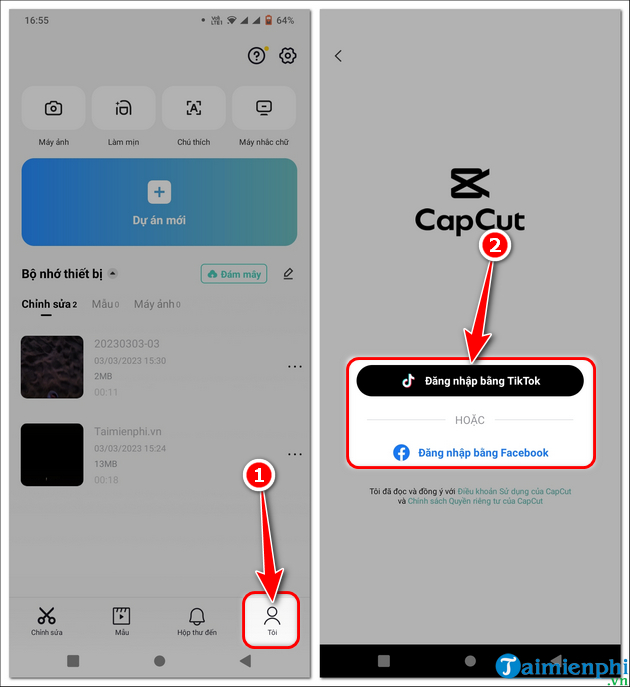
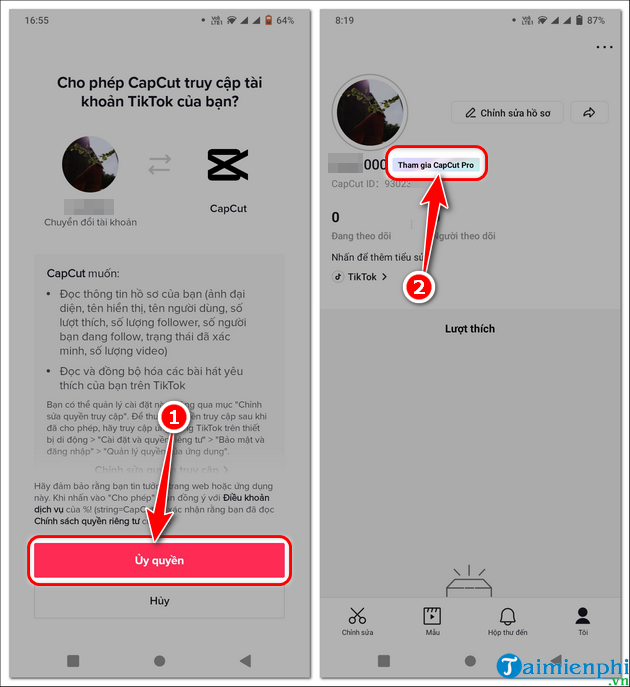
Open CapCut and sign in with a supported method. Use the same CapCut account on mobile, desktop, and web so the membership can be recognized across your devices. Review the permissions shown during social sign-in and approve only the access required to authenticate.
Subscribe on Android or iPhone
- Open CapCut and go to Me, your profile, or the account menu.
- Tap Join CapCut Pro, Get Pro, or the current upgrade label.
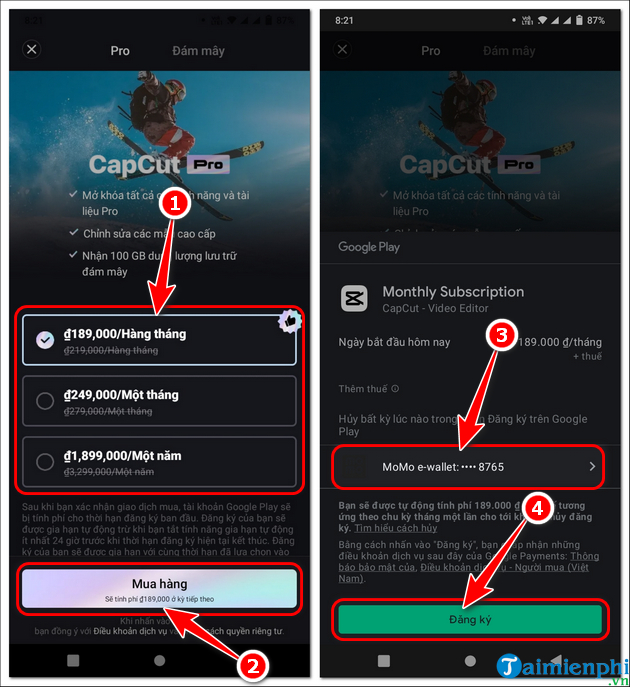
- Review the monthly and annual plans displayed for your account.
- If an official free-trial badge is available, select that specific offer and read its length, eligibility, renewal date, and cancellation terms.
- Confirm a paid subscription through Google Play on Android or the App Store on iOS.
Mobile subscriptions are normally managed through the app-store account used for the purchase. Keep the receipt and make sure CapCut is signed in to the intended profile.
Subscribe on desktop or the web
- Open CapCut Desktop or CapCut Online and sign in.
- Click your profile, Upgrade, or Join Pro.
- Choose the plan offered in your region.
- Review the final price, taxes, billing interval, included benefits, and renewal terms on the checkout page.
- Complete payment through the official CapCut page, then return to the app and allow the membership status to refresh.
How the official free trial works
CapCut states that a trial is available only to eligible users in selected countries or regions. The exact offer can change. Your account must display a Free Trial badge on the relevant plan; if it does not, do not follow third-party instructions that promise to force eligibility.
Before starting a trial, check whether it automatically renews into a paid plan, which account handles the billing, and the last date to cancel. Trial and subscription rules shown at checkout take precedence over old screenshots or articles.
What CapCut Pro may include
| Area | Typical Pro benefit |
|---|---|
| Editing tools | Access to selected advanced and AI-assisted features. |
| Assets | Premium templates, effects, transitions, fonts, stickers, or stock media. |
| Export | Additional export options where supported by the device, project, and plan. |
| Cloud and collaboration | Expanded storage or account features, depending on the current plan. |
| AI usage | Some plans include credits, but certain AI tools can still have separate limits. |
Do not assume that every song or asset can be used commercially without restrictions. Check the license attached to the material and the rules of the platform where you will publish.
If Pro does not activate after payment
- Confirm that CapCut is signed in to the same account used at checkout.
- Check the subscription status in CapCut and in Google Play or the App Store when purchased on mobile.
- Restart the app and sign out and back in if the membership status is stale.
- Update CapCut from the official store or download page.
- Keep the transaction receipt and contact official CapCut support if the status remains inactive.
Avoid unofficial “free Pro” downloads
Modified apps can contain malware, steal login details, expose private videos, break cloud sync, or stop working after an update. They may also violate CapCut’s terms and mobile-platform security rules. Use the free CapCut tier, an official trial when offered, or a legitimate alternative instead.
See CapCut’s current instructions for the official Pro free trial and joining CapCut Pro. New users can follow the TipsMake guide to edit videos with CapCut or compare CapCut and Adobe Premiere Pro.
Related Articles
 Instructions for Using Capcut on the Latest Computer4 minutes read
 CapCut Free vs. CapCut Pro: Key Differences8 minutes read
 Battlefield 1 and Battlefield 4 Are Available for Free to Download4 minutes read
 Capcut - All-in-one Video Editing Tool: Capcut App11 minutes read
 Coke Pro: How to Install and Use Coc Coc Pro on Your Phone3 minutes read
 Fitbit Free Premium Pack for 90 Days3 minutes read
Reader Comments 0
Sign in with email or Google to join the discussion.