Table of Contents
Camtasia 9 is a legacy Windows release of TechSmith’s screen recorder and video editor. It can record the screen, webcam, microphone, and system audio, then arrange the material on a multitrack timeline with callouts, transitions, cursor effects, captions, quizzes, and export options. Use it only if you already have a valid license and your computer is compatible; most new users should install the current Camtasia release instead.
Camtasia 9 is no longer the current version
Old articles often provide third-party installers or instructions for making Camtasia “permanent.” Avoid cracked installers, key generators, modified files, and unofficial repacks. They can contain malware, may violate TechSmith’s license, and do not receive current security or compatibility fixes.
TechSmith’s current Windows compatibility information does not list Camtasia 9 as supported on Windows 11 or current Windows 10 22H2. A program may still launch outside its supported range, but recording, media decoding, activation, drivers, and export can fail. Test your existing licensed copy before relying on it for an important project.
How licensed users can download Camtasia 9 safely
- Sign in to the TechSmith account associated with the original purchase.
- Open the account’s Keys area.
- Locate the Camtasia 9 license. If the key is not listed, add the purchased key to the account or check whether another email address or reseller was used.
- Use the download option attached to that legacy key.
- Verify that the installer comes from TechSmith before running it.
TechSmith’s legacy-download process is the safest source because it pairs the installer with the version your license unlocks.
Compatibility checks before installation
| Check | Why it matters |
|---|---|
| Windows version and 64-bit support | Camtasia 9 was built for older Windows releases and is not listed for current Windows versions. |
| CPU, RAM, and free disk space | Long or high-resolution projects need more memory, processing capacity, and temporary storage than the installer alone. |
| Graphics and display drivers | Outdated drivers can cause preview, capture, or rendering problems. |
| Microphone and audio permissions | The recorder needs access to the input devices you plan to capture. |
| License key and account access | Have the legitimate activation details available before removing an existing working installation. |
Back up Camtasia project files, source media, custom assets, and license information before changing the installation. If you need supported specifications for a new computer, use the requirements for the current Camtasia version rather than the old numbers in legacy download posts.
Install Camtasia 9 from the official installer
- Close screen-recording and video-editing applications.
- Run the TechSmith installer obtained through your account.
- Read and accept the license terms, then choose the installation options.
- Complete installation and restart Windows if requested.
- Launch Camtasia and activate it with the license that matches version 9.
- Use TechSmith’s update option to install the last maintenance release offered for that version.
Do not disable antivirus protection or change Windows security settings simply because an unofficial guide tells you to do so.
Main parts of Camtasia 9
- Camtasia Recorder: Captures a full screen, window, or selected area with microphone, system audio, and optional webcam.
- Camtasia Editor: Arranges recordings, video, images, and audio on a timeline and provides editing and annotation tools.
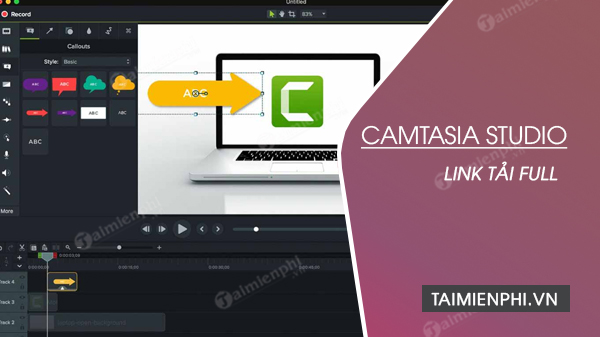
Useful Camtasia 9 features
- Screen, webcam, microphone, and system-audio recording.
- Trimming, splitting, moving, and layering clips on multiple tracks.
- Callouts, shapes, text, arrows, highlights, and cursor effects.
- Pan, zoom, animations, transitions, and visual effects.
- Basic audio-level editing and fade controls.
- Captions and interactive quiz elements for supported outputs.
- PowerPoint integration and presentation recording.
- MP4 and other export choices available in that release.
Export capability depends on the project, installed codecs, operating system, and hardware. Do not assume that a legacy installation will handle every modern phone or camera format.
Create a first project
- Open Camtasia Recorder and choose the capture area, microphone, system audio, and webcam.
- Make a short test recording and check audio levels before recording the full session.
- Stop the capture and send it to Camtasia Editor.
- Trim mistakes, split clips, and arrange the timeline.
- Add callouts or zoom effects only where they help the viewer follow the action.
- Preview the entire project and export a short test before the final render.
When to upgrade
Use a current Camtasia release if you need official support for modern Windows or macOS, current codecs, newer hardware, recent templates, or current collaboration features. Upgrading is also the safer choice when Camtasia 9 crashes, cannot activate, or fails to import media on a new computer.
TechSmith explains how licensed customers can download a previous version and publishes the current Camtasia system requirements. To compare alternatives, see TipsMake’s list of screen recorders with audio and its guide to highlighting objects in Camtasia.
Related Articles
 Download Camtasia 2020.0.13: a Powerful Video Editor for5 minutes read
 Instructions on How to Use Camtasia Studio from AZ7 minutes read
 Shortcuts in Camtasia Studio6 minutes read
 How to Fix the Error That Cannot Open Camtasia on Windows 108 minutes read
 Download Link Naraka Bladepoint Mobile for Android and iOS3 minutes read
 How to Adjust Video Audio on Camtasia Studio10 minutes read
Reader Comments 0
Sign in with email or Google to join the discussion.