Table of Contents
This guide covers the appearance of malicious code makes imessage on iPhone be stifled with practical context and easy-to-follow details. Use it to understand the subject and apply the information confidently.
The only way to deal with this malicious code is to reboot the device, but in some cases even if it has restarted, the error is repeated.
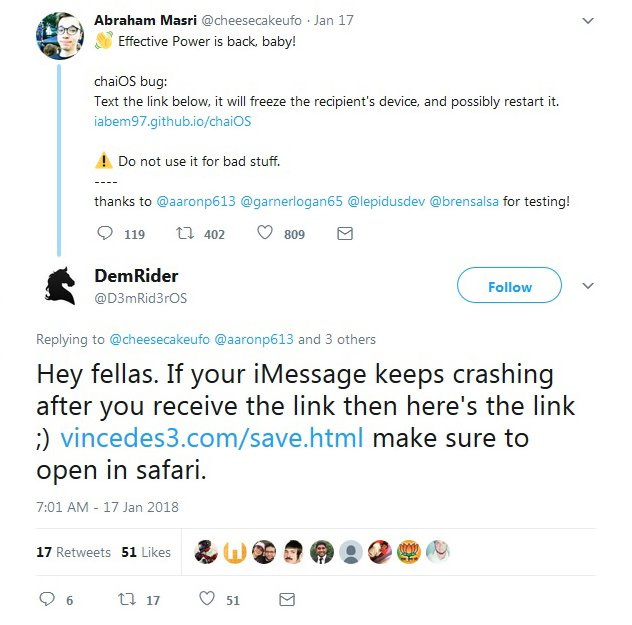 Share the iPhone's iMessage app crash and how to fix it.
ChaiOS affects both the source device and the target device. Although it does not cause any damage to the device, it makes the user experience annoyance. Currently, there has not been any feedback on this new error from the US company.
Instructions to fix the link hanging iPhone's iMessage app.
To fix the link error hanging iMessage, users open the link vincedes3. Com/save. HTML with Safari on iPhone. Website opens, you follow the requirements above that it is possible to enter the normal messaging app. Finally delete the message that stifles the app.
FAQ
What should I check before following these steps?
Confirm device and software compatibility, save important data, and make sure you have the required permissions, files, and account access.
Why might the process not work?
Common causes include outdated software, missing permissions, incompatible hardware, an unstable connection, or completing a step in the wrong order.
Can I undo the changes if necessary?
That depends on the tool or setting. Use built-in restore options when available, keep a backup, and record the original configuration first.
Related Articles
 Google Detected an Imessage Error That Caused the Iphone to3 minutes read
 How to Fix Errors Waiting to Activate Imessage on iPhone7 minutes read
 How to Fix Cannot Log in to IMessage on Mac5 minutes read
 14 Games on the App Store Contain Malicious Code, iPhone Users Be Careful4 minutes read
 How to Use IMessage on iPhone4 minutes read
 the New Facebook Virus, a Malicious Code That Is Spreading Rapidly Through4 minutes read
Reader Comments 0
Sign in with email or Google to join the discussion.