Table of Contents
AI changes product design because the same input does not always produce the same output, the system may be wrong without knowing it, and quality can shift when models, prompts, data, or tools change. Designers therefore need to shape more than screens: they need to define the desired outcome, expose uncertainty, create recovery paths, and build a feedback system that shows whether the product is actually helping users.
Product design is not only interface design
A product designer already works across user needs, business constraints, technical behavior, accessibility, and measurement. AI extends that responsibility. The interface still matters, but it is one layer in a system that also includes:
- the user's intent and the context collected from them;
- the model, prompts, retrieval sources, and connected tools;
- rules that constrain what the system may do;
- the generated output or action;
- human review, correction, and escalation;
- evaluation data and product metrics.
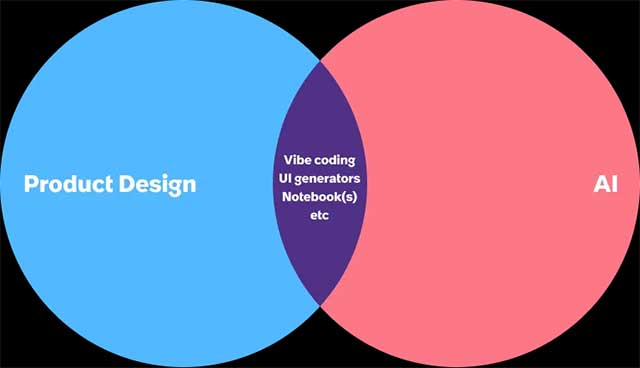
A polished chat box cannot compensate for missing sources, an unsafe action model, or an output that users cannot verify. Conversely, a technically capable model can fail as a product if it asks for too much effort, hides its limitations, or provides no way to recover from a mistake.
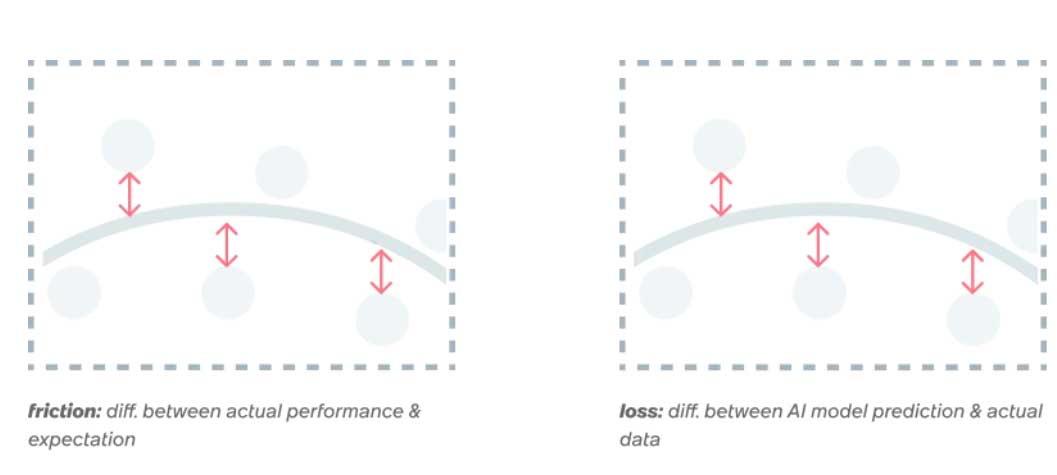
Use the loss-and-gradient analogy carefully
Machine-learning training often minimizes a mathematical loss function. A gradient indicates how model parameters should change to reduce that objective. Product teams also measure gaps between intended and observed outcomes, but UX friction is not literally a model's loss, and an A/B-test result is not a gradient.
The analogy is useful only at a high level: both disciplines improve a system through observed error and iteration. Product decisions still require causal reasoning, qualitative research, ethics, accessibility, and business judgment. A metric can point to a problem without explaining why it happened.
Start with the job, not the model
Define the user outcome in terms that can be observed. “Add an AI assistant” is a feature idea; “help a support agent find the relevant policy and draft a grounded reply in under three minutes” is a product outcome.
For each proposed AI capability, document:
| Question | Example |
|---|---|
| Who is the user? | A support representative handling billing questions |
| What decision or task are they completing? | Identify the applicable policy and write a response |
| What source should ground the answer? | The current approved policy library |
| What errors are unacceptable? | Invented refunds, exposure of another customer's data |
| What should happen when confidence is low? | Show sources, state the gap, and route to a specialist |
| How will success be measured? | Resolution quality, handling time, correction rate, escalation rate |
Design for variability and uncertainty
Traditional software normally maps a known action to a defined result. AI output is probabilistic, so the experience must handle a range of quality.
- Constrain inputs: give examples, structured fields, templates, or selectable scope where free-form prompts create ambiguity.
- Ground outputs: show the documents, records, or data used when verification matters.
- Preview consequential actions: let users review recipients, values, and changes before execution.
- Preserve reversibility: support undo, version history, drafts, and recoverable deletion.
- Make limits actionable: replace vague disclaimers with a clear next step, such as requesting missing data or escalating.
- Separate suggestion from fact: label generated options, extracted data, and confirmed records differently.
Generative-interface tools can speed up prototyping, but code or layout generation does not remove these responsibilities. Our overview of Subframe's design-to-code workflow shows how generated UI still needs deliberate product structure.
Build feedback that diagnoses the problem
A thumbs-up rate alone rarely explains what to fix. Combine signals at several levels:
| Level | Useful signals | What they can reveal |
|---|---|---|
| Task | Completion, time, retries, abandonment | Whether the experience helps users finish the job |
| Output | Factual error, unsupported claim, edit distance, rubric score | Whether the generated result is usable and trustworthy |
| Interaction | Prompt reformulation, correction, undo, escalation | Where users struggle to steer or recover |
| Business | Resolution, conversion, retention, cost, risk | Whether local improvements support the wider product goal |
| Equity and access | Error and completion rates by relevant cohorts | Whether aggregate gains hide worse outcomes for some users |
Pair quantitative telemetry with interviews, usability tests, support tickets, and review sessions. A rising completion rate could mean that the product improved—or that users learned to accept a bad output because correction was too difficult.
Create an evaluation set before launch
An AI feature needs repeatable examples that represent normal cases, difficult cases, and unacceptable failures. For each example, specify the input, relevant context, expected characteristics, and a scoring rubric. Include:
- common user requests;
- ambiguous and incomplete inputs;
- out-of-scope requests;
- conflicting or malicious content in retrieved sources;
- sensitive data and permission boundaries;
- cases where the correct behavior is to refuse or escalate;
- different languages, abilities, and user contexts relevant to the product.
Run the set whenever a model, system prompt, retrieval pipeline, tool, or policy changes. A model upgrade can improve the average while making a critical edge case worse.
Design the human role explicitly
“Human in the loop” is too vague. Decide who reviews what, at which point, with which information, and what happens when reviewers disagree. The appropriate pattern depends on consequence:
- Low consequence: generate several reversible suggestions and let the user choose.
- Moderate consequence: require review before sending, publishing, or updating a record.
- High consequence: keep the system advisory, route decisions to qualified people, and preserve an audit trail.
Automation should reduce repetitive work without hiding responsibility. If nobody can explain, inspect, or reverse an important action, the product is not ready for that action.
Connect micro-interactions to outcomes
A useful measurement chain links three layers:
- Interaction quality: Can the user understand, steer, verify, and recover?
- Task outcome: Did they complete the intended job accurately and efficiently?
- Product impact: Did that completion improve the customer and business outcome without unacceptable cost or risk?
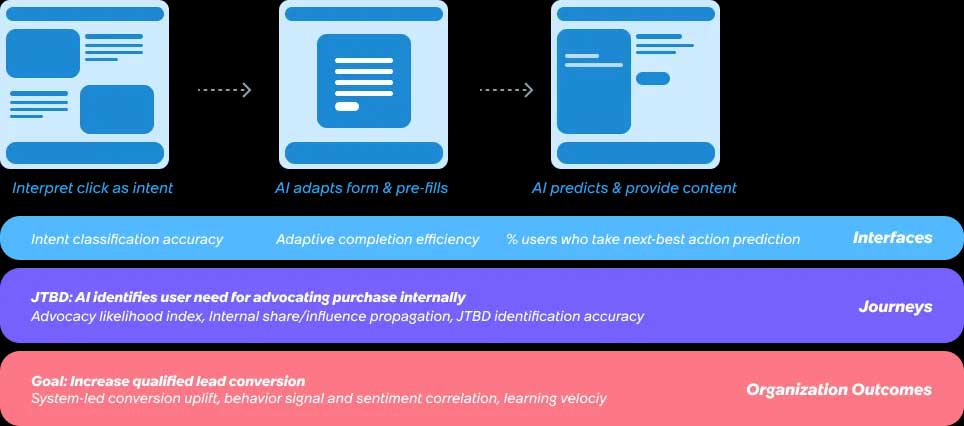
Optimizing one layer in isolation can backfire. A shorter response may look better in an interface metric but omit evidence needed for a sound decision. Fewer confirmation steps may raise completion while increasing costly mistakes.
A practical AI product-design loop
- Define a narrow user job and its unacceptable failures.
- Prototype the entire path, including uncertainty and recovery states.
- Create an evaluation set and baseline the current workflow.
- Test with representative users and realistic data.
- Launch to a limited group with monitoring and a rollback path.
- Review qualitative and quantitative signals together.
- Change one meaningful part of the system and rerun evaluations.
- Expand only when the improvement holds across users and edge cases.
AI does not turn design into automatic optimization. It makes the need for explicit objectives, measurable quality, feedback, and governance more visible. Designers who can connect interface decisions to system behavior and real user outcomes will shape better products than teams that treat model output as a finished experience.
For hands-on interface practice, see these free Figma courses. To compare tools that accelerate ideation and asset creation, browse our guide to AI tools used in design.
Related Articles
 Top 5 RAM Optimization Software, Enhance Computer Performance6 minutes read
 The Revolutionary Role of Technology in Product Design7 minutes read
 2 Ways to Back Up Product Key on Windows 10, 8 and 8.17 minutes read
 TOP best AI tools for website design9 minutes read
 How to Optimize Delivery Optimization Cache in Windows 107 minutes read
 How to Find the Product Key on Windows 8 or Windows 8.1?6 minutes read
Reader Comments 0
Sign in with email or Google to join the discussion.