Table of Contents
This practical guide explains how to create AI theme for outlook. Follow the steps in order, review the requirements first, and use the troubleshooting notes when a setting or option does not work as expected.
How to create AI theme for Outlook
Step 1:
At the Outlook interface, we select the gear icon on the toolbar. Next, select General > Appearance . Now you look at the interface next to it and you will see the Modern themes section with the Themes by Copilot setting . select the image icon to proceed to create the AI theme.

Step 2:
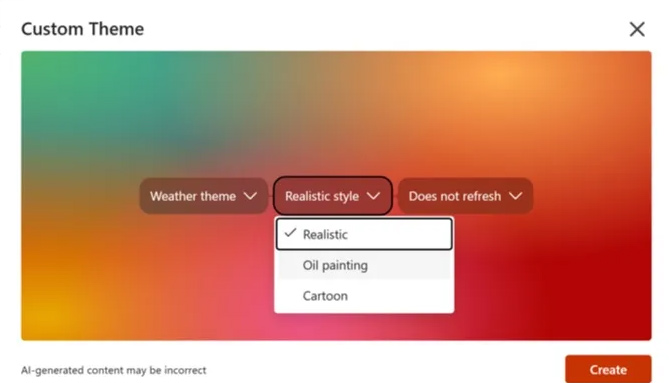
Displays the Custom Theme interface with the necessary steps for us to create an AI theme according to your requirements.
- Type: select Location or Weather.
- Location: if you choose Location theme, you will be asked to choose location in the next step but choosing Weather does not have this option.
- Style: choose realistic, oil painting or carton style.
- Refresh: select refresh option by day, week, month or no refresh.

Step 3:
After setting up, click Create, if you see a notification to enable location, you need to activate it on your computer. Finally, wait for the AI interface to create and click to install for Outlook.
Step 4:
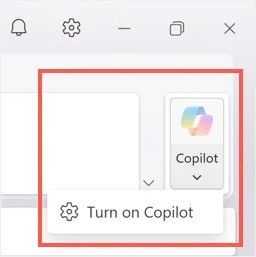
In case you don't see the Themes by Copilot option in Appearance, check if Copilot is enabled in Outlook. Click the Copilot icon in the Outlook interface and select Turn on Copilot.
FAQ
How to create AI theme for Outlook?
At the Outlook interface, we select the gear icon on the toolbar. Next, select General > Appearance. Now you look at the interface next to it and you will see the Modern themes section with the Themes by Copilot setting. select the image icon to proceed to create the AI theme.
What does this guide cover?
This guide explains create AI theme for outlook, including the main steps, important details, and practical considerations.
Who is this guide for?
It is designed for readers who want a clear, practical overview and a reliable process they can follow without unnecessary complexity.
Related Articles
 7 Outlook. Com Tricks You May Not Know Yet6 minutes read
 How to Use Rules in Outlook to Manage Your Inbox7 minutes read
 Create Chrome Theme: How to Create a Chrome Theme Quickly5 minutes read
 Steps to Create a New Folder in Microsoft Outlook4 minutes read
 How to Create a Signature in Outlook to Make Your Emails Look11 minutes read
 Add New, Delete, Edit Outlook Email Alias like?: Outlook Alias3 minutes read
Reader Comments 0
Sign in with email or Google to join the discussion.