Table of Contents
A blue badge on Facebook indicates that Meta verified a Page or profile through one of its current verification routes. It does not mean that every unverified account is fake, and it is not a guarantee that the person or business is trustworthy, expert, or endorsed by Facebook.
Facebook currently distinguishes between verification based on notability and paid Meta Verified subscriptions for eligible accounts. Availability, pricing, benefits, and application screens can vary by country and account type.
Two common routes to a Facebook verified badge
Notable Page or profile verification
This route is intended for authentic, unique, complete, and notable public figures, celebrities, brands, and entities. Meta evaluates public interest and independent coverage; a large follower count alone does not guarantee approval.
Meta Verified subscription
Meta Verified is a paid subscription for eligible creators and, in some markets, businesses. The creator route commonly requires an eligible account, the minimum age specified by Meta, a government-issued photo ID, account activity, and other security or profile checks. The exact benefits and requirements are shown during enrollment.
Read Meta's current Facebook badge types and requirements and Meta Verified eligibility requirements before applying.
What Facebook checks for notable verification
- Authentic: The account represents a real person, registered business, or entity.
- Unique: It is the primary presence of that person or organization, subject to Meta's exceptions.
- Complete: The profile or Page has the required public information, image, and recent activity.
- Notable: The person or entity is well known and often searched, with qualifying independent coverage.
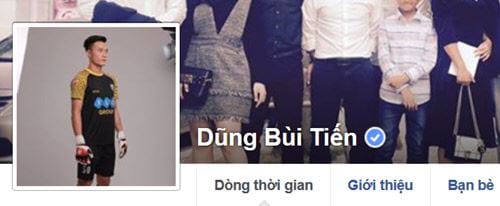
The old gray Page verification badge is not a current alternative. Do not follow legacy instructions that promise a gray badge or a transferable verification shortcut.
Prepare the account before applying
- Use the real name or registered business identity that the account represents.
- Add a clear profile photo and complete the relevant About information.
- Publish authentic, recent activity.
- Enable two-factor authentication and review login sessions.
- Remove impersonating or duplicate accounts you control when appropriate.
- Collect accurate identity or business documents requested by Meta.
- For a notable-badge application, identify independent news coverage rather than paid promotions or self-published pages.
Do not alter documents, buy articles, or create artificial search interest. Misleading evidence can lead to rejection or account action.
Apply for notable verification
Use the verification request available in Facebook's official Help Center or account settings. Select the Page or profile, provide the requested identification, choose the appropriate category and country or region, and submit links or information that demonstrate notability.
Review the request before sending. A rejected application does not mean a third-party agent can override Meta's decision. Follow the retry guidance shown by Facebook and improve only genuine gaps in the account or evidence.
Subscribe to Meta Verified
If Meta Verified is offered to the account, open the official subscription flow from Facebook settings, Accounts Center, or the verified-badge section displayed by the app. Confirm:
- which Facebook profile or Instagram profile is included;
- the name and photo requirements;
- the price, taxes, billing platform, and renewal terms;
- the identity document Meta requests;
- which changes are restricted while verification is active; and
- how cancellation affects the badge and benefits.
Complete payment only through the official Facebook, Meta, Apple, or Google billing surface presented by the app. Do not pay an individual by bank transfer, cryptocurrency, gift card, or direct message.
Common verification myths
- “Every legitimate account has a badge.” False. Most authentic accounts are not verified.
- “An agency can guarantee approval.” False. Only Meta controls the badge.
- “A badge can be transferred to another account.” Verification is tied to the approved identity and account; selling or transferring accounts can create serious risk.
- “More followers guarantee a checkmark.” Follower count is not a guarantee of notability or eligibility.
- “The badge makes posts rank first.” Verification is not a promise of search or feed placement.
- “Support will ask for a login code in chat.” Never share passwords or one-time codes with someone claiming to be an agent.
Avoid Facebook verification scams
Scammers often send messages claiming the Page will be deleted unless you “verify” through a link. Check the Page support inbox and account status directly instead of using the message link. Inspect the domain, and never upload identity documents to an unrelated site.
Warning signs include guaranteed approval, urgent payment demands, requests to add a stranger as Page admin, remote-access software, browser extensions, or instructions to reveal a two-factor code.
If verification is denied or unavailable
Confirm that the account type and country support the route you selected. For a notable badge, review authenticity, uniqueness, completeness, and notability requirements. For Meta Verified, check age, identification, account activity, profile consistency, and security requirements.
If the official interface reports a technical problem, save the exact error and use Facebook's support tools. TipsMake's guide to contacting Facebook support explains the available channels.
Protect the account after verification
Keep two-factor authentication enabled, limit Page access, remove unused connected apps, and monitor login alerts. A badge does not prevent account takeover. If a verified account is compromised, use official recovery immediately and avoid anyone who asks for payment to “restore the check.”
For a broader privacy review, see TipsMake's guide to information that should not be shared on social media.
Related Articles
 How to Verifying Facebook Account Identity3 minutes read
 How to Unlock Blocked Facebook: Unlock Blocked Facebook Accounts6 minutes read
 Whatsapp Account Verification Guide3 minutes read
 5 Note to Not Be Blocked Facebook Account3 minutes read
 How to Create a PayPal Account, Register, and Verify Your PayPal Account9 minutes read
 Why Is Facebook Account Hacked? This Is How to Prevent That!6 minutes read
Reader Comments 0
Sign in with email or Google to join the discussion.