Table of Contents
You can create more than one Gmail account and keep them signed in on the same browser or phone. Create each account through Google's normal sign-up flow, provide accurate recovery information, and complete any verification Google requests. Avoid tools or tricks that promise large numbers of accounts or bypass phone verification.
Choose the right setup first
- A second personal Gmail account is useful when you want a separate inbox for a project, shopping, or other personal activity.
- Gmail aliases help organize messages in one inbox but do not create separate Google Accounts.
- Google Workspace is the appropriate option when a business needs managed accounts and addresses on its own domain.
If Gmail is not required, compare TipsMake's list of free email services before creating several accounts with the same provider.
Create another Gmail account
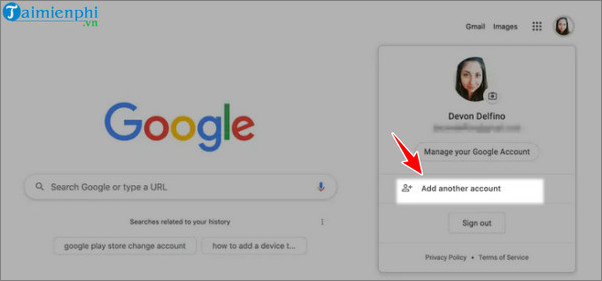
Step 1: Open Gmail or another Google service. Select the profile picture in the upper-right corner, then choose Add another account.
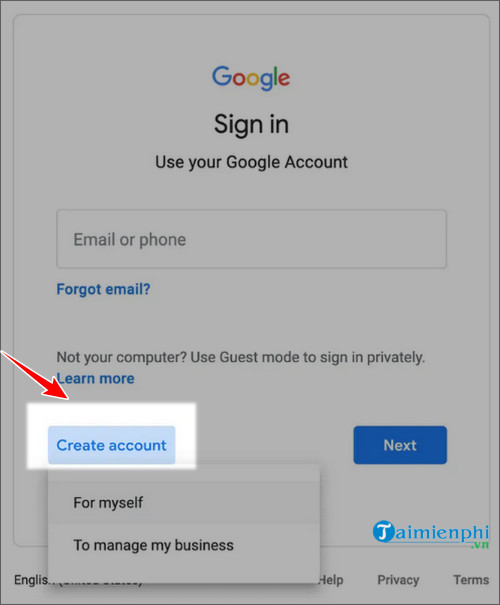
Step 2: On the sign-in page, select Create account.
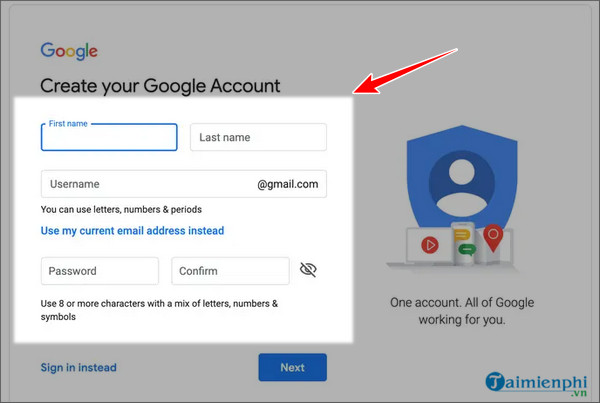
Step 3: Choose whether the account is for personal use, a child, or work, then enter the requested name and sign-in details. For a fuller walkthrough, see how to create a Gmail account.
Step 4: Add recovery details when prompted. Google may request phone verification depending on the account and sign-up context; follow the on-screen process rather than trying to circumvent it.
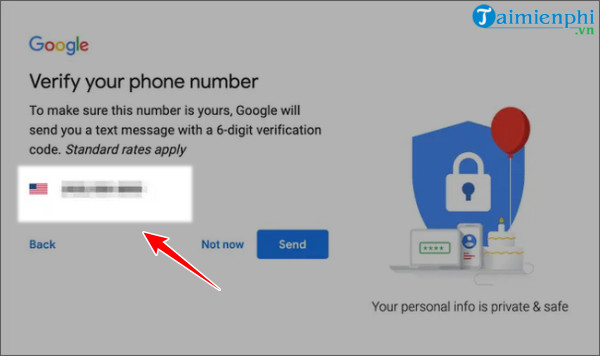
Step 5: Review Google's terms and privacy information, then finish account creation. Repeat the standard process only when you have a legitimate need for another separate account.
Switch between Gmail accounts
After signing in to more than one account, select the profile picture in Gmail and choose the inbox you want to open. Check the profile picture or email address before sending a message, editing a calendar event, or saving a file so that the work stays with the intended account.
Give each account a recovery email or phone number that you control, use a unique password, and keep recovery details current. On a shared computer, sign out of every account when you finish.
Understand Gmail aliases
Adding dots to the username portion of a Gmail address does not create a new account. Gmail generally delivers those variants to the same inbox. A plus tag such as name+shopping@gmail.com can also help label incoming mail, but it still uses the original account and password.
Aliases are useful for filters and organization. They are not suitable when you need a separate inbox, separate storage, or a separate Google identity.
Avoid unsafe bulk-account methods
Android emulators, automated sign-up tools, repeated phone-number changes, and instructions for skipping verification do not provide a dependable account-management strategy. They can leave accounts difficult to recover and may trigger additional security checks. For legitimate business use, managed Workspace accounts are easier to administer than a collection of unrelated personal accounts.
Related Articles
 Merge Multiple Accounts in One Gmail Mailbox8 minutes read
 Bulk Mail in Gmail: Complete Guide3 minutes read
 Instructions for Deleting, Changing, Adding Phone Numbers in Gmail5 minutes read
 Instructions for Adding Email Accounts to Gmail on iPhone, iPad5 minutes read
 More Than 90% of Gmail Users Still Don't Use the Two-factor Authentication Feature3 minutes read
 A Simple Way to Link Your Facebook Account to Gmail2 minutes read
Reader Comments 0
Sign in with email or Google to join the discussion.