Table of Contents
You can use multiple email accounts simultaneously without repeatedly signing out. The best method is usually the email provider's account switcher or separate browser profiles. Private windows and different browsers are useful for temporary access, while a desktop email client works well when you regularly manage accounts from several providers.
Choose the right method
| Situation | Recommended method | Main advantage |
|---|---|---|
| Several Gmail or Google Accounts | Google account switcher | Fast switching in one browser window |
| Work and personal accounts used every day | Separate browser profiles | Independent cookies, bookmarks, extensions, and history |
| One short or borrowed-device session | Private or guest window | Temporary session data |
| Accounts from different providers | Separate browsers or a mail client | Clear separation or a unified inbox |
Method 1: Use the email provider's account switcher
Gmail and many other services let you add several accounts to the same browser session. In Gmail, select the profile picture, choose Add another account, and sign in. Use the same menu to switch between accounts.
Each account opens its own mailbox, but links to other Google services may use the currently active or default Google Account. Before sending mail, changing settings, or opening Drive files, confirm the account avatar and address.
This method is convenient, but signing out may sign out all Google Accounts in the browser. For cleanup and remote controls, see how to log out of Gmail locally or remotely.
Method 2: Create separate browser profiles
Browser profiles are the clearest long-term solution for accounts that need different bookmarks, extensions, histories, passwords, and sign-in sessions.
- Open the browser's profile menu.
- Choose the option to add or create a profile.
- Name it by purpose, such as Work, Personal, or Client A.
- Open the email provider and sign in to the matching account.
- Give each profile a distinct color or icon so it is easy to recognize.
Do not enable browser synchronization on a shared computer unless you understand which history, passwords, and settings will be copied to that device. For managed work accounts, follow the organization's browser and data policies.
Method 3: Use a private or incognito window
A private window stores a separate set of session cookies, so it can hold a second login while the normal window remains signed in to the first account.
- Chrome, Edge, or Cốc Cốc: press Ctrl + Shift + N on Windows or use the browser menu.
- Firefox: press Ctrl + Shift + P on Windows or use the browser menu.
- Mac: the same commands generally use Command instead of Ctrl.
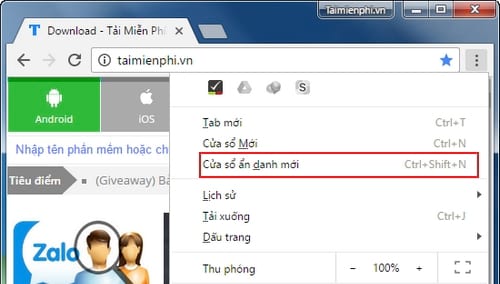
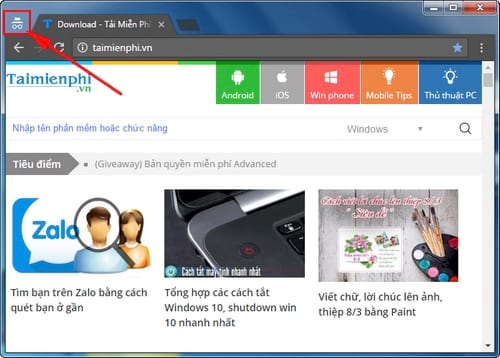
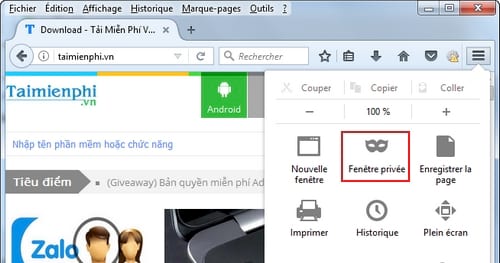
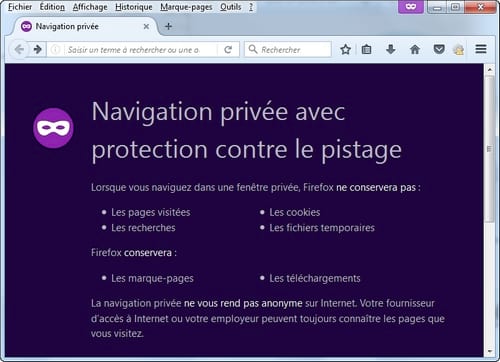
Private browsing is temporary, not anonymous. It does not protect against malware, device monitoring, network administrators, downloaded attachments, or screenshots. Sign out and close every private window when finished. For a borrowed device, follow these steps to sign in to Gmail safely on another device.
Method 4: Use different browsers
Chrome, Firefox, Edge, Safari, and other browsers maintain separate cookies and local profiles. You can keep one account open in each browser without mixing sessions.
This works well for two accounts, but it becomes cumbersome when every browser needs separate updates, extensions, privacy settings, and saved credentials. Browser profiles are usually easier to manage for more than two permanent identities.
Method 5: Add the accounts to a desktop email client
A desktop client can combine Gmail, Outlook, Exchange, IMAP, and other supported accounts while keeping mailboxes distinct. This is useful when you need unified search, calendars, notifications, or offline access.
Before adding a work or school account, check whether the organization requires a specific client, device management, encryption, or security policy. Use the provider's modern sign-in authorization rather than giving an unknown application your raw email password.
Prevent messages from being sent from the wrong account
- Use a different profile color, avatar, or browser theme for each account.
- Confirm the From address before sending important mail.
- Keep personal and work compose windows in separate browser profiles.
- Use distinct signatures that identify the account and organization.
- Do not forward work mail to a personal account unless policy allows it.
- Close unused sessions instead of leaving every mailbox signed in indefinitely.
Notifications and focus
Multiple inboxes can create repeated notifications. Enable browser or desktop alerts only for the accounts that need immediate attention. Use labels, rules, priority inboxes, or scheduled review periods for the rest.
When using Gmail in a browser profile, these Gmail keyboard shortcuts can make switching, searching, archiving, and composing faster.
Security checklist
- Use a unique password and two-step verification for every important account.
- Do not save passwords in a browser profile shared with another person.
- Review active device sessions regularly.
- Remove old accounts from mail clients and browser profiles you no longer use.
- Avoid private or confidential attachments on public computers.
- Lock the computer whenever you step away.
For daily use, browser profiles provide the best balance of separation and convenience. Use private windows for short sessions, and choose a desktop email client when several providers need to be managed in one place.
Related Articles
 Instructions for Pinning Emails in Outlook: What to Know5 minutes read
 Hacking Court Computer Systems to Spread Malicious Emails3 minutes read
 Phishing Emails Are Getting More Sophisticated, Can You Spot Them?6 minutes read
 How to Send Emails Using Gmail: Complete Guide6 minutes read
 minutes read
 Why Do Most Emails Fail to Achieve Success?8 minutes read
Reader Comments 0
Sign in with email or Google to join the discussion.