Table of Contents
There is no guaranteed instant way to open a strongly encrypted PDF without its password. If you own the document or have explicit authorization, start with password records, backups, and the document creator. Password-recovery software can test possible passwords, but success and time depend on how the password was created.
Confirm which password is involved
- Document-open password: required before the PDF can be viewed.
- Permissions password: the PDF opens, but printing, copying, editing, or security changes are restricted.
These passwords serve different purposes. Opening the document does not necessarily give permission to remove its restrictions.
Try the legitimate recovery routes first
- Search your password manager and secure notes for the filename, project, client, or date.
- Check the original email or delivery message for a separately communicated password hint.
- Ask the document creator for the password or a new authorized copy.
- Look for an unprotected original in approved backups, version history, document management, or the source application.
- Test only plausible variations of passwords you normally use for this document type; avoid repeated guesses against a work system that may log or limit attempts.
Do not upload a confidential PDF to a random “unlock” website. The service receives the encrypted file, and its privacy or retention practices may not meet your obligations.
Use password-recovery software only on an authorized file
A local recovery tool can test a password list or candidate patterns against your own PDF. It does not guarantee recovery, and a long, random password may be impractical to find.
The screenshots below show the legacy PDF Password Genius interface. Before installing any recovery utility, verify the publisher, scan the installer, read the current license, and confirm that its use is permitted by your organization and local law.
- Open the recovery tool and select the encrypted PDF.
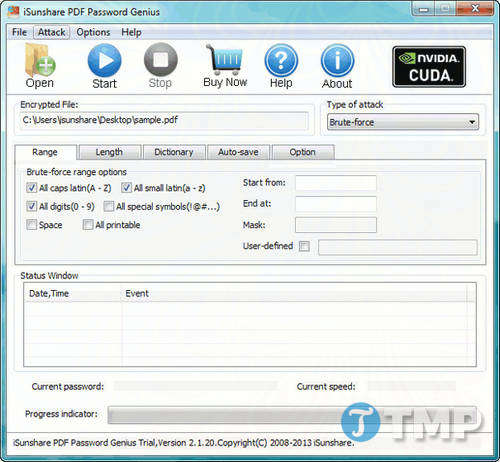
- Choose a recovery approach based on information you genuinely remember, such as a known prefix or likely character set, then start the authorized test.
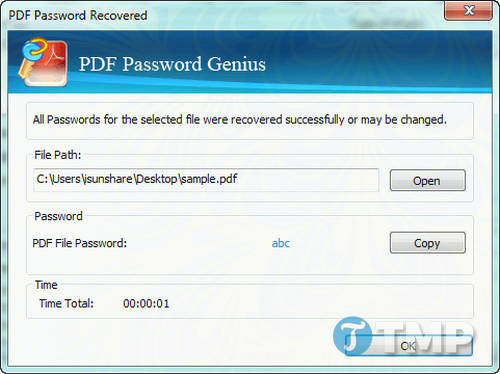
Save a recovered password in a password manager. Do not share it in email or chat, and stop if the file may belong to someone else.
Open the PDF after recovering the correct password
- Open the PDF in Adobe Acrobat and enter the recovered document-open password.
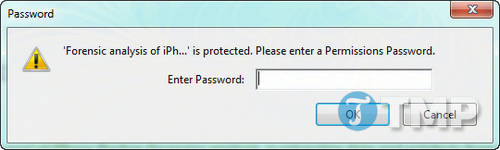
If you only need to read the document, you can stop here. Removing protection creates a less secure copy and should be done only when you are authorized to change the document's security.
Remove password security in Adobe Acrobat
Current Acrobat versions use All tools > Protect a PDF, followed by the security properties. Legacy versions may expose a lock icon or Remove Security command.
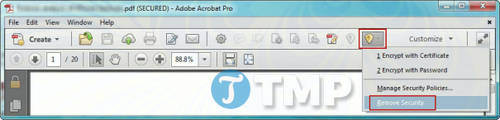
- Open the PDF with the correct password.
- Open the PDF security settings.
- Remove the document-open or permissions requirement as needed.
- Enter the permissions password if Acrobat requests it.
- Confirm the change.
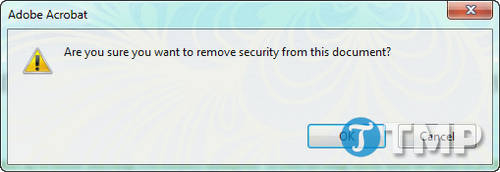
- Use Save As to create a separately named unprotected copy, preserving the protected original.
Adobe's current instructions for removing PDF passwords require the relevant password and permission to change the security settings.
What not to do
- Do not treat Google Drive, printing, or format conversion as a legitimate password bypass.
- Do not use cracking software on a PDF you do not own or administer.
- Do not weaken a work document's security without the owner's approval.
- Do not overwrite the only protected copy.
- Do not assume a recovered open password authorizes editing, copying, or redistribution.
If the password cannot be recovered
Ask for a new copy or return to the source document and export it again. Strong encryption is designed to resist recovery; the absence of a workaround is a security feature, not a software error.
TipsMake's PDF security and unlocking overview distinguishes opening and permissions restrictions. For ordinary reader problems that are not password-related, use the PDF-opening troubleshooting guide.
Prevent the same problem
- Store the password in a reputable password manager.
- Keep an approved unencrypted source file in protected storage when policy allows.
- Record who owns the password and how an authorized successor can recover it.
- Use a clear filename that distinguishes protected and unprotected copies.
- If you create password-protected PDFs regularly, test the recovery procedure before deleting source files. TipsMake's PDFelement security overview explains the difference between open and permissions passwords in one PDF editor.
Related Articles
 How to Recover a Forgotten Excel Password Using Passper6 minutes read
 Steps to Reset Forgotten Password on Windows 105 minutes read
 How to Retrieve Forgotten Windows 10 Password6 minutes read
 How to Open Password-Protected Excel Files: Complete Guide5 minutes read
 How to Access Your MacBook When You've Forgotten Your Password7 minutes read
 Forgot Your Saved Wi-Fi Password?6 minutes read
Reader Comments 0
Sign in with email or Google to join the discussion.