Table of Contents
The best code editor depends less on a popularity ranking and more on what you build. Visual Studio Code is a flexible cross-platform default; Cursor focuses on AI-assisted development; Sublime Text prioritizes fast text editing; WebStorm provides an integrated JavaScript and TypeScript IDE; and Notepad++ is a lightweight, open-source choice for Windows.
Quick comparison
| Tool | Platforms | Best fit | Main tradeoff |
|---|---|---|---|
| Visual Studio Code | Windows, macOS, Linux | General-purpose development with extensions | A large extension set can increase complexity and resource use |
| Cursor | Windows, macOS, Linux | AI-first, codebase-aware editing and agents | Cloud models, usage limits, and pricing require review |
| Sublime Text | Windows, macOS, Linux | Fast editing, navigation, and large text files | A license is required for continued use; advanced tooling needs packages |
| WebStorm | Windows, macOS, Linux | JavaScript and TypeScript projects needing an integrated IDE | Heavier than a minimal editor and subject to JetBrains licensing terms |
| Notepad++ | Windows | Quick edits, scripts, logs, and configuration files | Limited project-wide IDE features and no native macOS or Linux build |
Visual Studio Code
Visual Studio Code is Microsoft's free, cross-platform editor built from the open-source Code - OSS project. It includes editing support for HTML, CSS, JavaScript, and TypeScript, while extensions add language servers, debuggers, formatters, remote-development tools, containers, themes, and integrations for most mainstream stacks.
Git support, a terminal, debugging, tasks, profiles, and workspace settings make VS Code capable of handling projects far beyond plain text editing. Current releases also include an expanding agent interface, but access to particular AI models or usage levels can require a provider account, subscription, or credits.
Good choice for: Developers who switch languages, need remote or container workflows, or want to assemble a personalized toolset.
Watch for: Install extensions selectively. Every extension adds code and permissions to the editor, so verify the publisher, review requested capabilities, and remove tools you no longer use. If distribution and telemetry differences matter, compare VS Code with VSCodium.
Cursor
Cursor is an AI-focused development environment that combines a familiar code-editor interface with codebase search, inline suggestions, chat, multi-file edits, terminal tools, and agents that can plan, implement, and review changes. It is designed for workflows where the model needs context from more than the current file.
Good choice for: Developers who regularly use AI for code exploration, refactoring, debugging, test updates, or coordinated changes across a repository.
Watch for: Review the current plan, model charges, privacy controls, code-retention terms, and organizational policy before indexing a private repository. AI-generated changes still require a human review, tests, and a clean diff; an agent completing a task is not proof that the result is correct.
For other approaches to AI-assisted development, see these GitHub Copilot alternatives.
Sublime Text
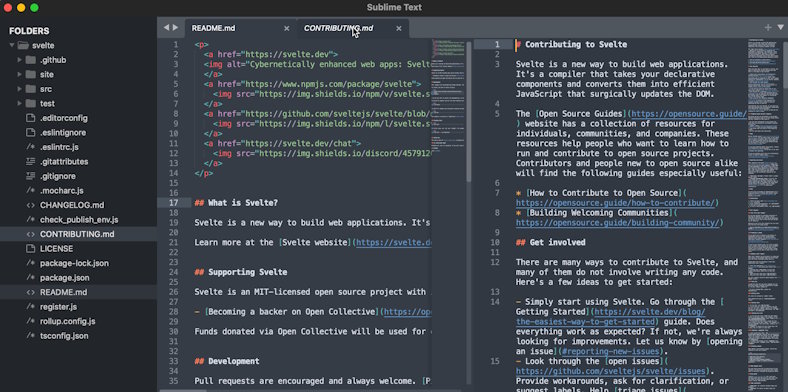
Sublime Text is a cross-platform editor known for quick startup, responsive navigation, multiple cursors, strong search, command-driven workflows, and a package ecosystem. Its focused interface is useful when you want a capable editor without turning every project into a full IDE workspace.
Good choice for: Fast edits, large text files, search-heavy work, and developers who prefer keyboard-oriented navigation.
Watch for: Sublime Text can be downloaded and evaluated without an enforced time limit, but its license states that continued use requires purchase. It does not display conventional advertising; occasional purchase reminders during evaluation should not be described as ads. Language-aware refactoring and debugging often depend on packages or external tools.
JetBrains WebStorm
WebStorm is a JavaScript and TypeScript IDE with project indexing, code analysis, navigation, refactoring, testing, debugging, version-control integration, framework support, and built-in database and SQL tools. Its main advantage is that these capabilities are designed to work together rather than being assembled from many unrelated extensions.
Good choice for: Large JavaScript or TypeScript codebases, framework-heavy web projects, and teams that want consistent inspections and refactoring tools.
Watch for: Indexing and a broad feature set use more memory and startup time than a small text editor. JetBrains offers different commercial and non-commercial terms, while AI Assistant and agent functionality may have separate access or usage requirements; check the current license that applies to your work.
Notepad++
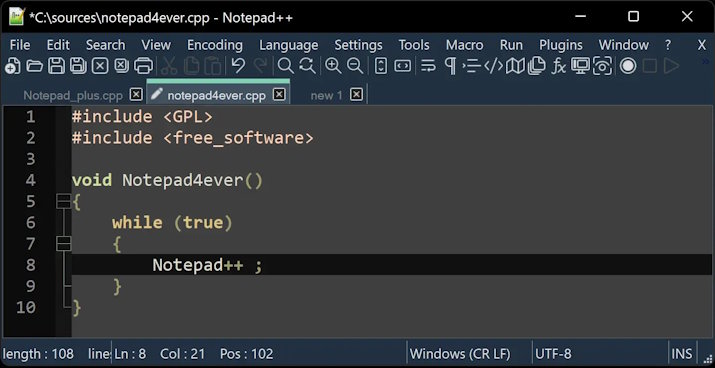
Notepad++ is a free, open-source Windows editor distributed under the GNU General Public License. It uses the Scintilla editing component and supports syntax highlighting, tabbed files, search and replace, macros, plugins, and many text-processing tasks while maintaining a small footprint.
Good choice for: Editing configuration files, inspecting logs, writing short scripts, making quick changes, and working on a Windows machine with limited resources.
Watch for: Notepad++ is not a full cross-platform IDE. Project-wide type analysis, refactoring, integrated testing, and rich debugging are not its main purpose. Download it from the project's official site rather than an unofficial app-store package.
How to choose
- Start with VS Code if you need a versatile editor and do not yet know which specialized features matter.
- Choose Cursor if codebase-aware AI is central to your daily workflow and its data and pricing terms fit your project.
- Choose Sublime Text if speed, text manipulation, and a low-distraction interface matter more than integrated IDE tooling.
- Choose WebStorm if you want deep JavaScript and TypeScript analysis, refactoring, testing, and database tools in one product.
- Choose Notepad++ for fast Windows text editing rather than a complete application-development environment.
Before settling on one tool, open the same small project in two candidates. Test search, rename/refactor, debugging, formatting, source control, extension or plugin setup, and startup on your own hardware. Editors can coexist, and many developers keep a full IDE for project work plus a lightweight editor for quick changes. Windows users can explore more options in this list of text editors for Windows, while newcomers can follow the Visual Studio Code installation guide.
Related Articles
 10 tips for Microsoft's cross-platform code editing tool - Visual Studio Code
 Plugins on well-known editing tools can give hackers priority
 Best AI Photo Editors for Different Editing Jobs
 Firehound app data exposure reports: what iPhone users should check
 6 best code editor apps for Mac
 10 best free HTML editing tools for Windows 2018
Reader Comments 0
Sign in with email or Google to join the discussion.