Table of Contents
This updated guide explains how to Log in to Multiple Facebook Accounts at the Same Time through clear steps, practical examples, and important checks that help prevent common errors.
Method 1: Use Many Different Browsers
This is the method many people use to log in to many different facebook accounts on their computer or phone. You can install browsers like Chrome, Coc Coc, FireFox, Opera, Edge on your computer so each Facebook account will log in on each different browser.

Method 2: Use an Incognito Window on the Browser
This can be said to be the most optimal way, you will not need to install many different types of browsers on your computer. What you need is just a single browser that you like then turn on incognito window mode or private mode to login to another facebook account. How many Facebook accounts you may need to log in can create an incognito window, which is convenient.
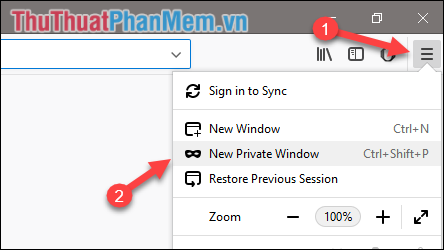
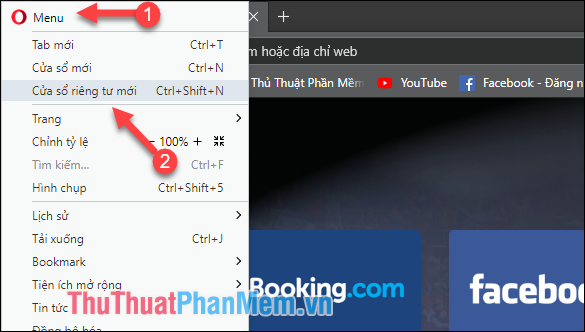
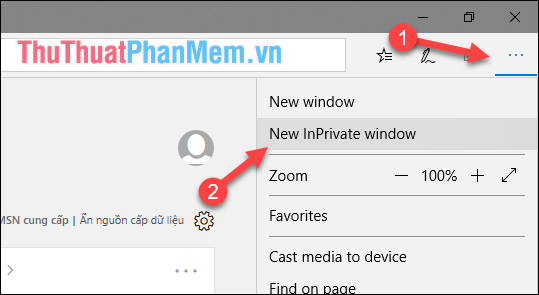
To open an incognito window, do the following:
Open an incognito window in Chrome browser:

Open an incognito window in Coc Coc browser:

Open an incognito window in FireFox browser:
Open an incognito window in the Opera browser:
Open an incognito window in the Edge browser:
FAQ
What is the easiest way to Log in to Multiple Facebook Accounts at the Same Time?
Start with the requirements in this guide, then follow each step in order. Check the result after every major change so problems are easier to identify.
Can beginners follow these instructions?
Yes. The process is organized into practical steps, and you can repeat any step before moving forward.
What should I check if the method does not work?
Confirm your software or device version, permissions, settings, file format, and internet connection when the task depends on online services.
Related Articles
 How to Login to Facebook Multiple Accounts at the Same Time6 minutes read
 How to Login to Multiple Accounts on Facebook Messenger5 minutes read
 How to Login Multiple Facebook Accounts at Once?3 minutes read
 How to Log in to Multiple WhatsApp Accounts: Complete Guide4 minutes read
 How to Login Multiple Accounts Gmail, Facebook, Zalo ... on4 minutes read
 How to Login Multiple Facebook Accounts Simultaneously4 minutes read
Reader Comments 0
Sign in with email or Google to join the discussion.