Table of Contents
Better Wi-Fi coverage can improve speed in rooms where the signal is weak, but it cannot make an internet plan faster than the service you buy. Before adding hardware, determine whether the bottleneck is the provider connection, the Wi-Fi link, or congestion from devices using the network.

Find the actual cause
- Fast near the router, slow in another room: coverage, obstacles, or interference is likely.
- Slow everywhere, including Ethernet: check the internet plan, provider status, modem, router WAN link, and active downloads.
- Only one device is slow: check that device's wireless adapter, driver, supported bands, and power settings.
- Speed falls when the household is busy: the internet link or router may be congested.
- Frequent drops at one boundary: the device may be roaming poorly between a router and extender.
Test next to the router and in each problem room using the same device. Record signal strength, download and upload speed, and latency. A Wi-Fi analyzer can help visualize nearby networks and channel use.
1. Restart and update the router
A normal restart can clear a temporary fault. Power-cycle the modem and router according to their manuals without pressing a factory Reset button. After the connection returns, check the manufacturer's support page for firmware intended for the exact model and hardware revision.
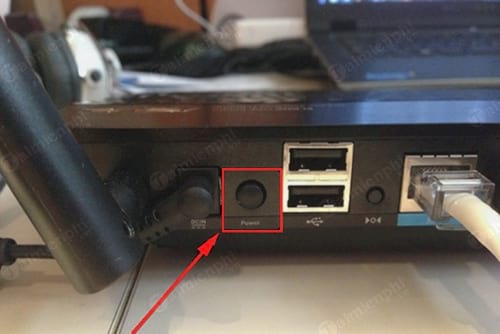
Routers run continuously by design and do not need scheduled long shutdowns simply because they are warm. Keep vents clear, avoid stacking the router on hot equipment, and investigate only if it becomes unusually hot, reboots, or smells damaged.
2. Improve router placement
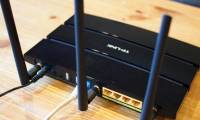
Place the main router or access point in an open, elevated position near the center of the area that needs coverage. Avoid a floor-level corner, closed cabinet, utility room, or position directly behind a television or large metal object.
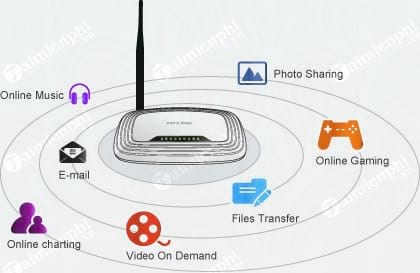
- Reduce the number of walls and floors between the router and important devices.
- Keep the router away from large appliances, mirrors with metal backing, aquariums, and dense building materials.
- Attach all supplied antennas and follow the model manual. With several adjustable antennas, using different orientations can help devices on the same and different floors.
- Do not hide the router solely for appearance if the enclosure blocks airflow or signal.
3. Choose the appropriate frequency band
2.4GHz generally travels farther and supports older equipment, but it has fewer non-overlapping channels and is often crowded. 5GHz usually provides more capacity with less interference at shorter range. 6GHz can offer clean spectrum for compatible devices but has more limited reach and requires matching router, client, operating-system, and regional support.
If the router uses one network name for all bands, band steering can select automatically. Separate names are useful during diagnosis when you need to prove which band a device is using.
4. Check channel selection
Nearby routers sharing or overlapping a channel can reduce performance. Automatic channel selection is a good starting point on modern equipment, but a congested environment may benefit from a manual choice after measurement.
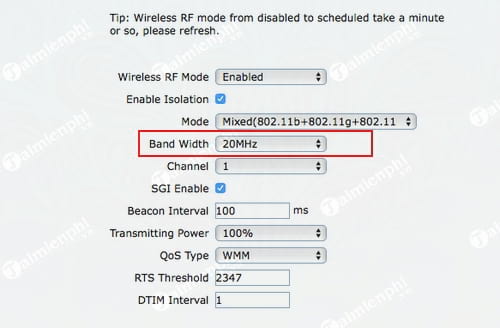
- On 2.4GHz, use a non-overlapping channel plan appropriate for your region; 1, 6, and 11 are the common choices where all three are permitted.
- On 5GHz and 6GHz, channel availability and radar-related behavior vary by country and router.
- A wider channel can raise peak throughput but may perform worse in a crowded area.
- Change one setting at a time and retest in the same locations.
5. Choose the right expansion method
Wired access point
An access point connected to the main router by Ethernet usually delivers the most consistent performance. Place it in or near the weak area and configure it according to the product's access-point or controller instructions. This is the best option when a cable can be run; TipsMake's Ethernet setup guide covers the underlying connection.
Mesh Wi-Fi system
A mesh kit coordinates multiple nodes and usually handles roaming more smoothly than unrelated extenders. For best results, use wired backhaul when available. With wireless backhaul, each node still needs a strong link to the main unit—do not place it inside the dead zone. TipsMake compares several mesh Wi-Fi systems and explains their tradeoffs.
Wi-Fi extender or repeater
An extender is inexpensive and convenient, but it must receive a usable signal before it can repeat one. Place it roughly between the router and the weak room, not at the far edge where the original signal has already failed. A single-radio repeater can reduce available throughput because it receives and retransmits traffic over the same link.
Powerline with Wi-Fi
Powerline adapters can carry network traffic over electrical wiring and create Wi-Fi in another room. Results depend heavily on the home's wiring, circuits, and electrical noise, so buy from a retailer with a practical return policy and test in the actual outlets.
6. Reduce congestion
Pause cloud backups, large downloads, and updates during calls or games. Connect stationary high-traffic devices such as TVs, consoles, and desktops by Ethernet when possible. If many devices compete for limited internet bandwidth, correctly configured QoS can prioritize real-time traffic, but inaccurate bandwidth values may make performance worse.
When to replace the router
Replacement is reasonable when the router no longer receives security updates, lacks an encryption mode suitable for current devices, cannot cover the space even from a good location, or repeatedly fails under normal load. Do not replace it solely because a speed test in a distant room is slow; first compare Ethernet and near-router Wi-Fi to identify the limiting link.
Related Articles
 How to Speed up Wi-Fi Network, Increase Wi-Fi Signal9 minutes read
 How Strong Is the Wireless Signal in Your Wi-Fi Network?3 minutes read
 Select the Location of the Router to Increase the Wi-Fi Wave5 minutes read
 Measure Your Internet Speed Online, No Software Required19 minutes read
 How to Increase Internet Speed: Step-by-Step Guide16 minutes read
 How to Fix ''input Signal Out of Range'' Error on Windows6 minutes read
Reader Comments 0
Sign in with email or Google to join the discussion.