Table of Contents
Apple Music and iTunes let you upload songs from your Mac or Windows PC to iCloud, keeping them synced across all your devices.
Apple Music and iTunes allow you to upload songs from your Mac or Windows computer to iCloud, keeping them synced across all your devices, including your iPhone and iPad. This also lets you quickly delete songs uploaded to iCloud without having to do too much work. Here's how to delete music uploaded to iCloud.
How to delete music uploaded to iCloud
Step 1:
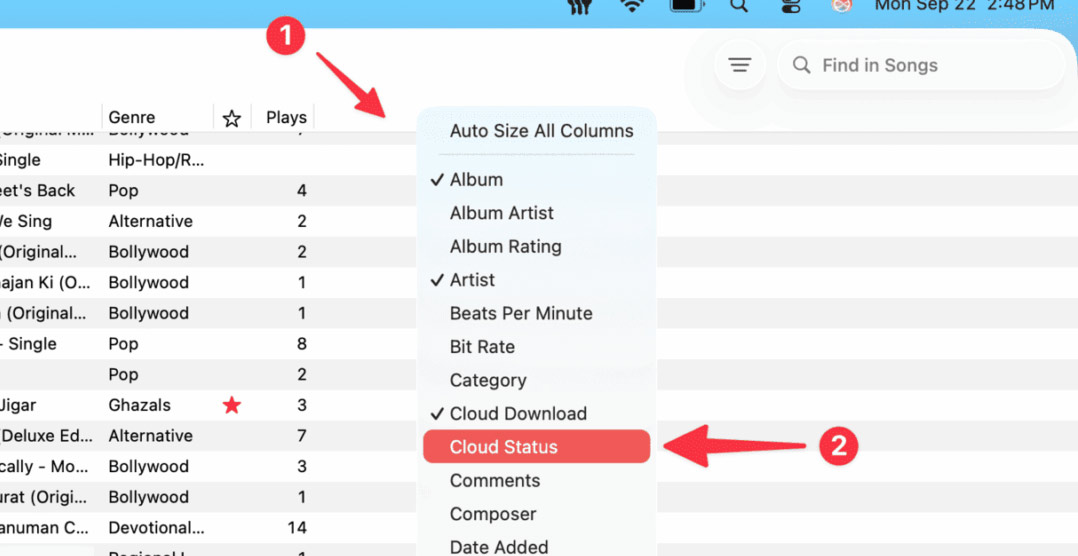
You open the Apple Music application on your computer. Next, you right-click on the top column and click on The Cloud Status option In the displayed list .
Step 2:
In the Cloud Status column, users look for songs that show the Uploaded notification to filter songs uploaded to iCloud.
Step 3:
Find The song You want to delete, Right-click on the song , select Delete, and then select Delete Uploaded Song .
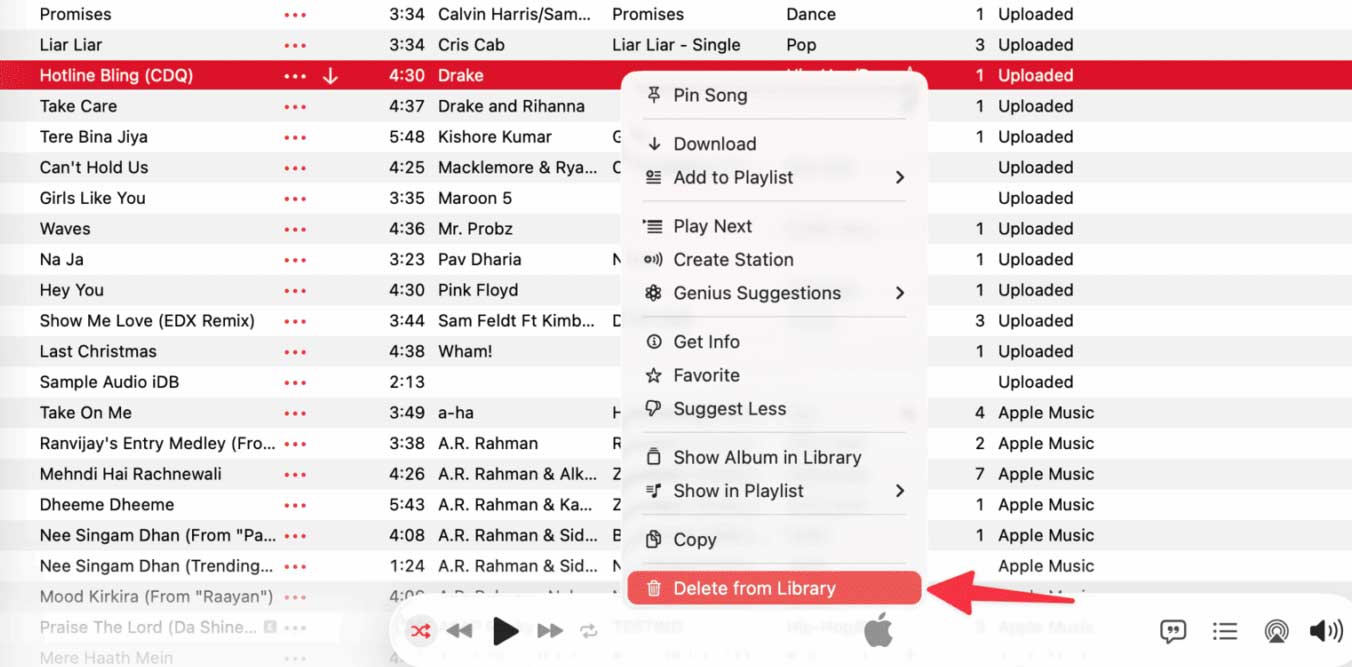
This song will be deleted from iCloud and then removed from the Apple Music app on all devices that have Sync Library turned on.
To delete multiple uploaded songs, hold down the Command key, then click on the songs you want to delete and delete them. Although you can't sort songs in the Music app on your iPhone or iPad by download list, if you know which uploaded songs you want to delete, you can just delete them on your iPhone.
FAQ
How do you delete music uploaded to iCloud: step-by-step guide?
In practical terms, apple Music and iTunes let you upload songs from your Mac or Windows PC to iCloud, keeping them synced across all your devices.
What should you check before getting started?
Review the requirements, compatible device or software version, and any warnings described in the guide before making changes.
What should you do if the steps do not work?
Repeat the steps in order, confirm that your app or system is up to date, and review the troubleshooting details provided above.
Related Articles
 How to Delete iCloud Backup on Iphone/mac4 minutes read
 Instructions on How to Delete Apps from ICloud on Any Device5 minutes read
 How to Turn Off iCloud Music Library: Clear Instructions4 minutes read
 How to Delete Old Messages in iCloud on iPhone4 minutes read
 How to Delete Photos Permanently on ICloud Fastest3 minutes read
 How to Delete Icloud Account on Iphone4 minutes read
Reader Comments 0
Sign in with email or Google to join the discussion.